00192662-01.pdf - 第181页
User Manual SIPLAC E F5/F5 HM 5 Single Functions Software version SR.407.xx 01/2001 US Edition 5.2 Single functions, Gantry 181 (5) Nozzle offset, Collec t&Place head (6) Nozzle configur ation, Col lect&Pl ace he…
5 Single Functions User Manual SIPLACE F5/F5 HM
5.2 Single functions, Gantry Software version SR.407.xx 01/2001 US Edition
180
NOTE
The revolver head functions can be executed with the machine cover open. To do this the key-
operated switch must be turned to position I. 5
5
5
5
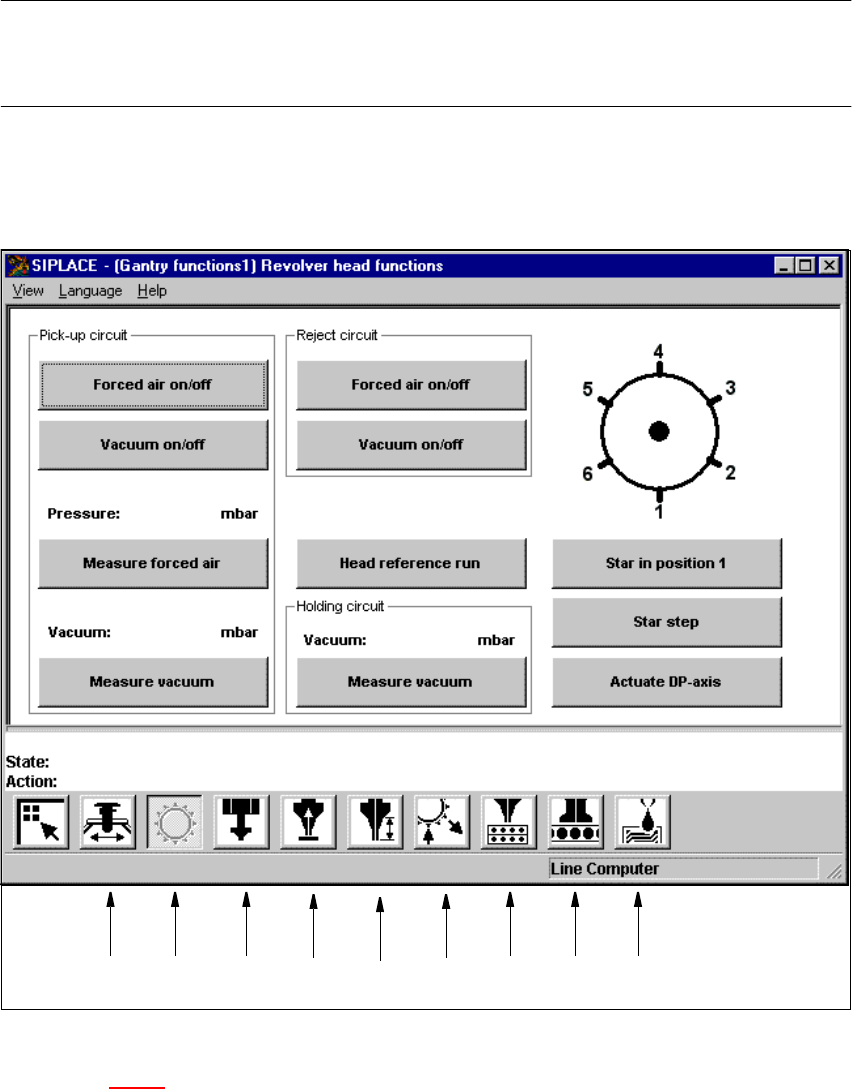
Fig. 5.2 - 1 "Revolver head functions" screen (6-nozzle Collect&Place head)
Key to Fig. 5.2 - 1
(1) Gantry functions
(2) Revolver head functions
(3) IC-head functions
(4) Vacuum test, Collect&Place head
12 34 56789
User Manual SIPLACE F5/F5 HM 5 Single Functions
Software version SR.407.xx 01/2001 US Edition 5.2 Single functions, Gantry
181
(5) Nozzle offset, Collect&Place head
(6) Nozzle configuration, Collect&Place head
(7) Nozzle changer configuration, Collect&Place head
(8) Nozzle changer configuration Pick&Place head
(9) Fluxer head functions
5
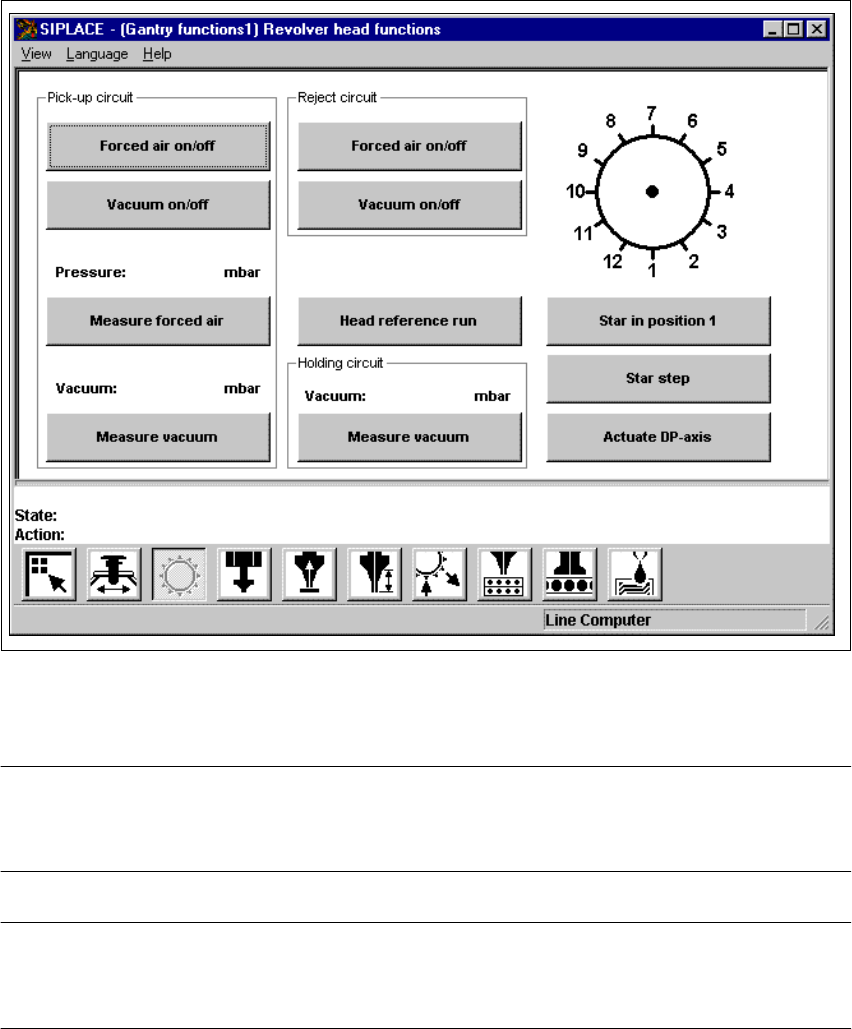
Fig. 5.2 - 2 "Revolver head functions" screen (12-nozzle Collect&Place head)
5
NOTE
Since the functions in the "Revolver head functions" screen are identical for the 6-nozzle and 12-
nozzle Collect&Place heads, they will not be described separately. 5
NOTE
The current position of the Collect&Place head segment is shown by the graphic above the "Star in
position 1" button. 5

5 Single Functions User Manual SIPLACE F5/F5 HM
5.2 Single functions, Gantry Software version SR.407.xx 01/2001 US Edition
182
5.2.1.1 Functions
In the "Revolver head functions" screen, the functions described below are available to help you
test the Collect&Place head. 5
– Vacuum test in the pick-up position
– Vacuum test in the reject position
– Vacuum test in the holding circuit
– Revolver head functions
The functions are triggered by clicking the appropriate button. 5
Pick-up circuit - Forced air on/off 5
When this function is activated, the forced air to the nozzle in the pick-up position is either
switched on or off.
Å In the "Pick-up circuit" area, click the Forced air on/off button.
This switches the forced air on or off.
Pick-up circuit - Vacuum on/off 5
When this function is activated, the vacuum at the nozzle in the pick-up position is either
switched on or off.
Å In the "Pick-up circuit" area, click the Vacuum on/off button.
This switches the vacuum on or off.
Pick-up circuit - Measure forced air 5
When this function is activated, forced air at the pick-up position is measured.
Å Switch on the forced air (using the "Forced air on/off" function in the "Pick-up circuit" area).
Å Click the Measure forced air button in the "Pick-up circuit" area.
The forced air is measured and the result displayed in [mbar] above the button.
NOTE
The value displayed after the measurement is taken does not correspond to the actual values at
the nozzle.
When calibrating the machine, you must use a manometer to establish the values (see Adjustment
instructions or the Service Manual). 5
Pick-up circuit - Measure vacuum 5
When this function is activated, vacuum at the pick-up position is measured.
Å Switch on the vacuum (using the "Vacuum on/off" function in the "Pick-up circuit" area).
Å Click the Measure Vacuum button in the "Pick-up circuit" area.
The vacuum is measured and the result displayed in [mbar] above the button.