00192662-01.pdf - 第185页
User Manual SIPLAC E F5/F5 HM 5 Single Functions Software version SR.407.xx 01/2001 US Edition 5.2 Single functions, Gantry 185 5.2.2.1 Functions In the "IC- head functions" scree n, the func tions de scribe d …
5 Single Functions User Manual SIPLACE F5/F5 HM
5.2 Single functions, Gantry Software version SR.407.xx 01/2001 US Edition
184
Actuate DP-axis 5
When this function is activated, the D-axis is rotated by 90
0
.
Å Click the Actuate DP-axis button.
The nozzle in the D-axis is rotated by 90
0
once.
5.2.2 "IC-head functions" screen
The IC-head functions can be used to control all functions relating to the Pick&Place head. 5
NOTE
The IC-head functions can be executed with the machine cover open. To do this the key-operated
switch must be turned to position I. 5
Å In the current screen for the single functions for Gantry, click the symbol .
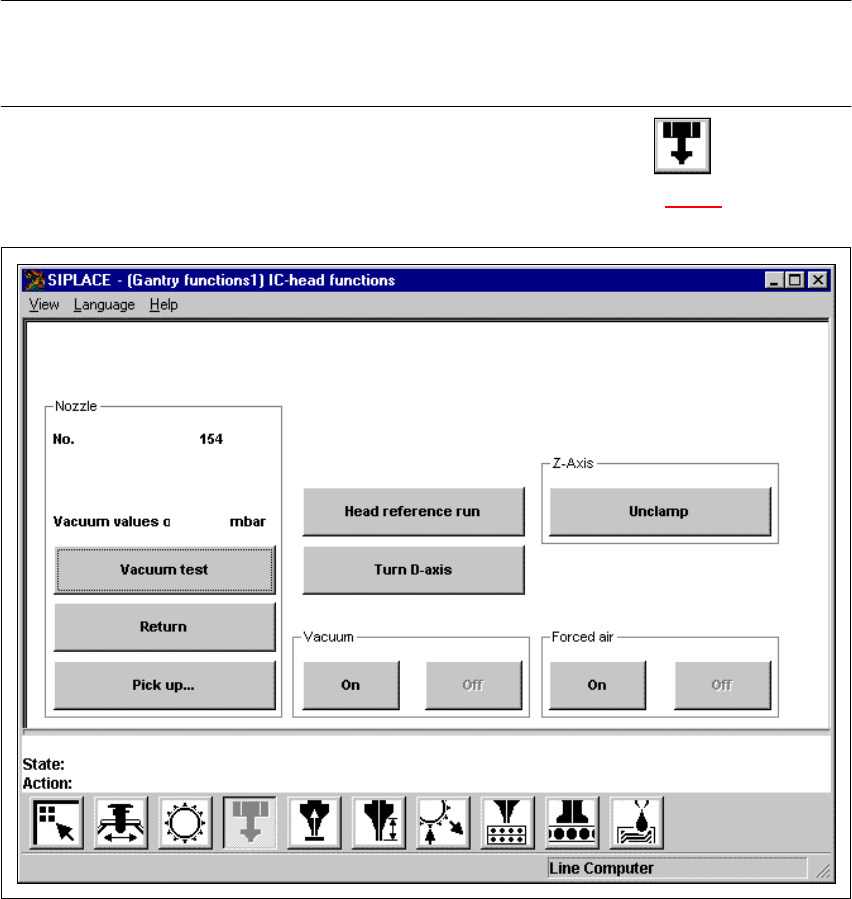
The user interface is switched to the "IC-head functions" screen (see Fig. 5.2 - 3
).
5
Fig. 5.2 - 3 "IC-head functions" screen
User Manual SIPLACE F5/F5 HM 5 Single Functions
Software version SR.407.xx 01/2001 US Edition 5.2 Single functions, Gantry
185
5.2.2.1 Functions
In the "IC-head functions" screen, the functions described below are available to help you test the
Collect&Place head. 5
– Vacuum test
– Return nozzle
– Pick up nozzle
– IC-head functions
The functions are triggered by clicking the appropriate button. 5
Vacuum/offset test 5
This function carries out a vacuum test and an offset test for the nozzle currently on the IC head.5
Å Click on the Vacuum test button.
The vacuum and the height of the current nozzle are tested.
The result of the vacuum test is displayed.
Return 5
This function returns the nozzle currently on the IC head to the nozzle changer. The number of the
current nozzle is displayed. 5
Å Click on the Return button.
The nozzle is returned to the nozzle changer.
Pick up... 5
This function picks up a specific nozzle from the nozzle changer. 5
Å Click the Pick up... button.
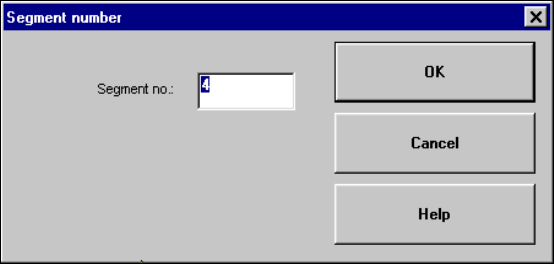
The dialog box shown below is displayed.
5

5 Single Functions User Manual SIPLACE F5/F5 HM
5.2 Single functions, Gantry Software version SR.407.xx 01/2001 US Edition
186
Å In the text box, enter the number of the required nozzle and confirm your entry with OK. The
corresponding nozzle is picked up from the nozzle changer.
NOTE
If a different nozzle is still on the IC head, this is first automatically returned to the nozzle changer.5
Head reference run 5
This function starts a reference run for the z and d axes, i.e. they both move to their reference
points. 5
Å Click on the Head reference run button.
The axes perform a reference run.
Turn D-axis 5
This function is used to test the d-axis. 5
Å Click on the Turn D-axis button.
The D-axis is turned once through 90
0
.
Unclamp 5
This function unclamps the z-axis. All other functions are locked while the z axis is unclamped. 5
Å Click the Unclamp button.
The z-axis is unclamped and a dialog box opens indicating this status.
Å Click on OK in the dialog box when the axis is to be clamped again.
Clamping is reactivated and the dialog box is closed. All functions are available again.
On/Off ("Vacuum" field) 5
This function allows the vacuum at the nozzle to be checked by switching it on and off. 5
Å Click on the On or Off button in the "Vacuum" field.
The vacuum is switched on or off.
On/Off ("Forced air" field) 5
This function allows the forced air at the nozzle to be checked by switching it on and off. 5
Å Click on the On or Off button in the "Forced air" field.
The forced air is switched on or off.
5