00192662-01.pdf - 第201页
User Manual SIPLAC E F5/F5 HM 5 Single Functions Software version SR.407.xx 01/2001 US Edition 5.2 Single functions, Gantry 201 5.2.7.1 General comments In the "Noz zle chan ger conf igura tion rev olver h ead"…
5 Single Functions User Manual SIPLACE F5/F5 HM
5.2 Single functions, Gantry Software version SR.407.xx 01/2001 US Edition
200
5.2.7 "Nozzle changer configuration revolver head" screen for 6-nozzle C&P head
5
Å In the current screen for the single function for Gantry, click the symbol .
NOTE
The nozzle changer must be installed and configured in the machine options. When calling
this scrren the nozzles on the placement head are returned to the nozzle changer. 5
The user interface is switched to the "Nozzle changer configuration revolver head" screen (see
Fig. 5.2 - 11
). 5
5
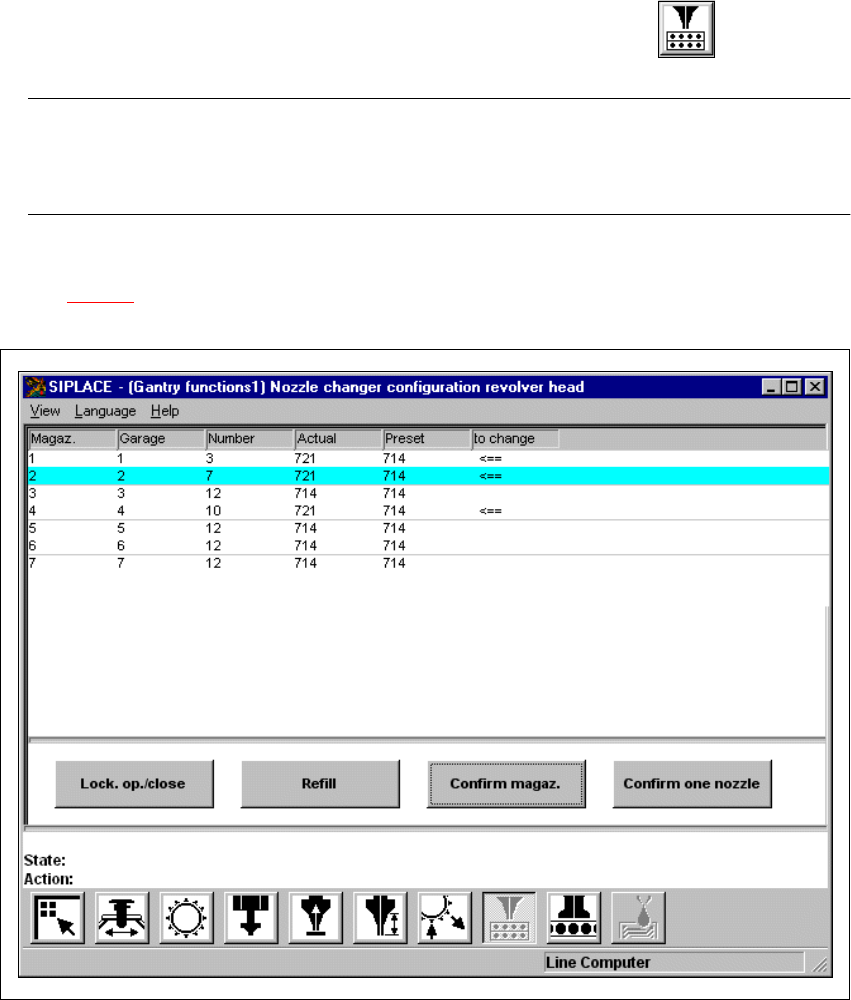
Fig. 5.2 - 11 "Nozzle changer configuration revolver head" screen (6--nozzle Collect&Place head)
User Manual SIPLACE F5/F5 HM 5 Single Functions
Software version SR.407.xx 01/2001 US Edition 5.2 Single functions, Gantry
201
5.2.7.1 General comments
In the "Nozzle changer configuration revolver head" screen there are functions which allow you to
adjust and confirm the nozzle configuration for the individual magazines in the nozzle changer.
Click on the appropriate button to carry out the required function.
The nozzle changer configuration is displayed in the table in the display.
5
Conditions for changing the set-up of the nozzle changer
Remember the following points when changing the set-up: 5
– The magazines may only be filled when all nozzles on the Collect&Place head have been re-
turned to their magazines.
– The magazines for type 7xx or 8xx nozzles are different.
– Only nozzles of type 7xx or 8xx can be set up in a single magazine. They must not be mixed.
– The maximum number of nozzles per magazine is 6.
– The maximum number of magazines on a nozzle changer is 5.
– The magazines must be filled outside the machine and must only ever be changed in their en-
tirety.
– To remove and load nozzles you must open the lock. Once you have finished, you must then
close the lock again.
Meaning of the entries in the table in the display
– Magazine
Number of the magazine
– Garage
Number of the nozzle holder
– Number
Number of nozzles in the magazine
– Actual
Type of nozzles currently in the magazine
– Preset
If the type of nozzle currently in the magazine is not the same as shown in this column, then it
is to be changed
– To change
An arrow ( <== ) in this column indicates that the nozzle type currently in the magazine
("Actual" column) must be changed for the nozzle type shown in the "Preset" column.
5 Single Functions User Manual SIPLACE F5/F5 HM
5.2 Single functions, Gantry Software version SR.407.xx 01/2001 US Edition
202
5.2.7.2 Functions
Lock. op./close 5
To be able to fill the magazine manually, you must use this function to open the lock (locking
plate) on the nozzle changer and close it afterwards.
Å Click the Lock. op./close button.
The magazine locking plate is opened.
Å Click the Lock. op./close button.
The magazine locking plate is closed again.
Refill 5
This function allows you to refill the magazine with new nozzles of the type already in use without
changing the current setup.
During placement it can become necessary to refill individual nozzles in the magazines. This in-
volves filling the individual nozzle holders with nozzles of the type already in use. 5
The nozzle types shown in the columns "Actual" and "Preset" of the table will agree.
The number of nozzles in the appropriate nozzle holder is shown in the "Number" column (0 =
not present / 1 = present). 5
Å From the table, choose the entry for the nozzle holder in which a nozzle is to be refilled. This
line is then highlighted in light blue.
Å Click the Lock. op./close button.
Å Fill the nozzle holder with the type of nozzle which was already set up there.
Å Click the Lock. op./close button again.
Å Click the Refill button.
The inventory level of the selected nozzle holder is updated (see "Number" column).