00192662-01.pdf - 第211页
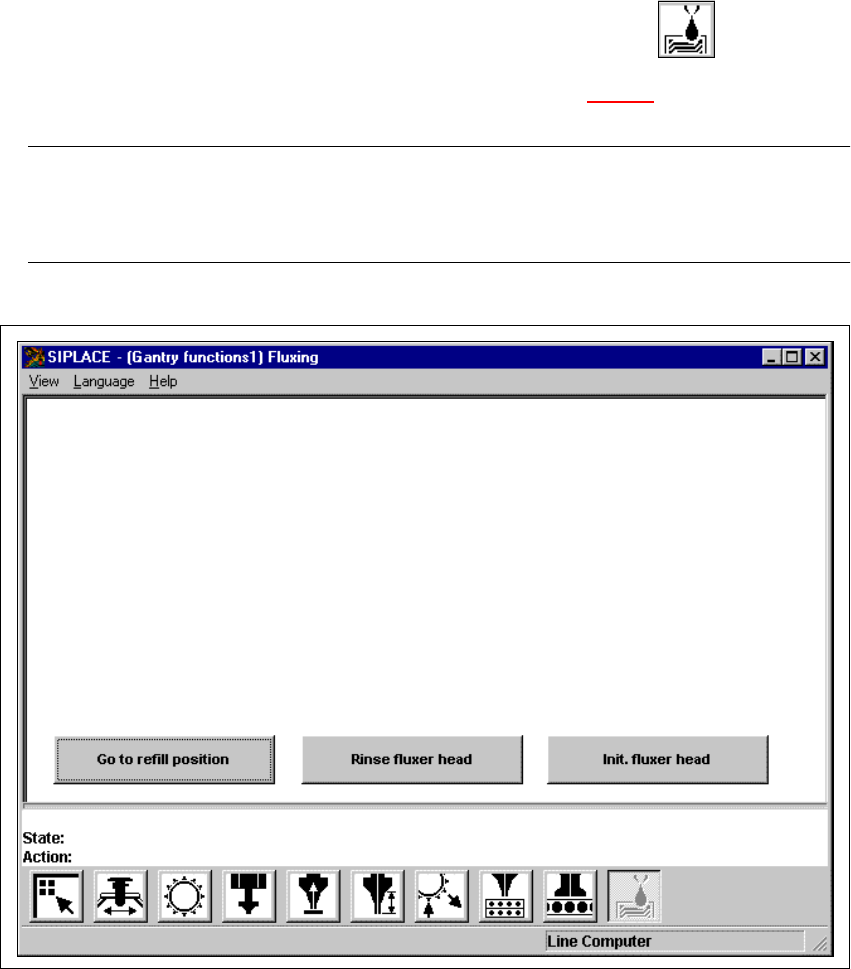
User Manual SIPLAC E F5/F5 HM 5 Single Functions Software version SR.407.xx 01/2001 US Edition 5.2 Single functions, Gantry 211 5.2.10 "Fluxing" screen 5 Å In the current screen for the s ingle fun ction for Ga…
5 Single Functions User Manual SIPLACE F5/F5 HM
5.2 Single functions, Gantry Software version SR.407.xx 01/2001 US Edition
210
5.2.9.2 Functions
Confirm 5
This function is used to confirm that an individual nozzle holder has been filled with a new nozzle
type.
When changing the set-up of a machine it may be necessary to change the type of nozzle in
some of the nozzle holders. To do this, the current nozzle configuration (Actual) and the nozzle
configuration for the new set-up (Preset) is shown in the table for each nozzle holder. When you
change the nozzle type from the "Actual" to "Preset" type, you must confirm this for each nozzle
holder separately.
Å In the table, click on the entry for the nozzle holder for which the nozzle is to be replaced. The
line is now highlighted in light blue.
Å Replace the nozzle currently in this nozzle holder with a nozzle of the type entered in the "Pre-
set" column.
Å Click the Confirm button.
The change of is now confirmed. The arrow ( <== ) no longer appears in the table against the
corresponding nozzle holder.
5
5
User Manual SIPLACE F5/F5 HM 5 Single Functions
Software version SR.407.xx 01/2001 US Edition 5.2 Single functions, Gantry
211
5.2.10 "Fluxing" screen
5
Å In the current screen for the single function for Gantry, click the symbol .
The user interface is switched to the "Fluxing" screen (see Fig. 5.2 - 14
). 5
NOTE
The "Fluxing" option must be installed and configured in the machine options before the func-
tions in this screen can be executed. 5
5
Fig. 5.2 - 14 "Fluxing" screen

5 Single Functions User Manual SIPLACE F5/F5 HM
5.2 Single functions, Gantry Software version SR.407.xx 01/2001 US Edition
212
5.2.10.1 General comments
The "Fluxing" screen provides the fluxing functions described below. Click on the appropriate but-
ton to carry out the required function. 5
Go to refill position 5
This function moves the fluxer head to the refill position. It is only possible to refill the flux storage
tank or replace the flux nozzle in this position. 5
Å Click on the Go to refill position button.
The fluxer head moves to the refill position.
5
Rinse fluxer head 5
This function allows you to rinse the piping system of the fluxer head as required in order to re-
move trapped air or flux residue. This can, for instance, be necessary after changing the flux stor-
age tank or when no flux has been applied for some time. 5
NOTE
The flux parameter "No. of rinse cycles" can be used to set how many rinse operations will be car-
ried out (see Chapter 11 Station extensions /Hardware). 5
Å Click on the Rinse fluxer head button.
First the flux nozzle is cleaned on the brush and then the piping system of the fluxer head is
rinsed.
Init. fluxer head 5
This function starts a reference run of the fluxer head. The valve and lifting axis are moved to the
home position. 5
Å Click on the Init. fluxer head button.
The reference run is carried out.
5
5