00192662-01.pdf - 第540页
11 Station extensions /Hardware User Manua l SIPLACE F5/F5 HM 11.10 PCB data transfer Software version SR.407.xx 01/2001 US Edition 540 1 1.10 PCB dat a transfer 1 1 .10.1 Functional description The ‘ PCB d ata transfer …

User Manual SIPLACE F5/F5 HM 11 Station extensions /Hardware
Software version SR.407.xx 01/2001 US Edition 11.9 Flux dispenser unit
539
Rinse fluxer head 11
The fluxer head can be rinsed to remove flux residues or air bubbles from the dispensing hose,
for example. This will prevent the dispensing hose and centering nozzle from hardening, or air
bubbles causing fluxing errors. 11
Å Click on the Rinse fluxer head button, and press the Start button. The fluxer head will move
over the rinsing tank, and dispense the syringe contents into the rinsing tank.
The rinsing tank is beside the component reject bin (see Fig. 11.9 - 10
).
Initialize fluxer head 11
It is possible to carry out a fluxer head reference run. 11
Å Click on the Init. fluxer head button, and press the Start button. The fluxer head will carry out
a reference run.
11 Station extensions /Hardware User Manual SIPLACE F5/F5 HM
11.10 PCB data transfer Software version SR.407.xx 01/2001 US Edition
540
11.10 PCB data transfer
11.10.1 Functional description
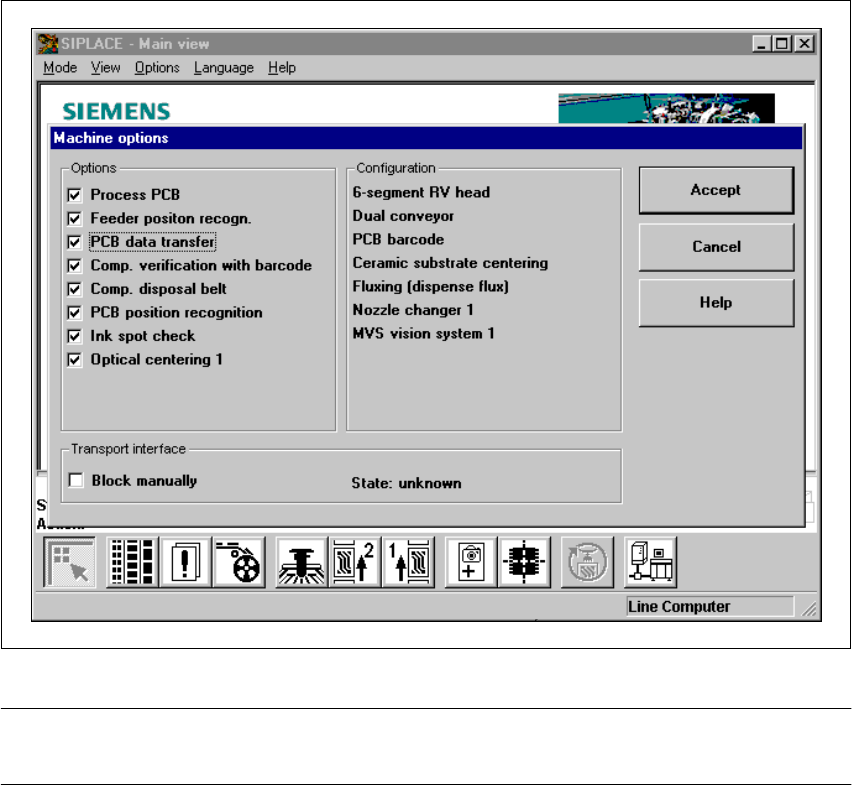
The ‘PCB data transfer’ option has been included in the ‘Machine options’ menu. The aim of this
function is to increase the line performance of your placement system by fully measuring a PCB
at the first placement machine, determining the associated fiducial, subpanel, ink spot, etc, data,
saving this data and then sending it to the next machine. At the next machine, it is then only nec-
essary to determine the data for two fiducial positions. These two fiducial positions are then used
to correct the position of each subsequent machine for the PCB to be placed. It is thus not neces-
sary to measure the entire PCB, together with its subpanels, ink dots, etc. 11
Fig. 11.10 - 1 Machine option: PCB data transfer
PLEASE NOTE: The PCB data transfer function can only be used if a PCB barcode reader is in-
stalled. 11
User Manual SIPLACE F5/F5 HM 11 Station extensions /Hardware
Software version SR.407.xx 01/2001 US Edition 11.10 PCB data transfer
541
11.10.2 Activating the PCB data transfer option
Å Click on the ‘Machine options’ button from the main view.
The ‘Machine options’ window will appear.
Å Select the ‘PCB data transfer’ option from the ‘Options’ box at the machine concerned.
Å Click on the ‘Accept’ button. The ‘PCB data transfer’ option is now active.