TRS GEM Manual for Intel Ver 1.1.pdf - 第17页
GEM Manual for DEK P rinters Capabilities Issue 1.1 March 20th, 2014 Page 17 of 152 Page 17 of 152 GEM Requirem ent ERASE_SESSION RENAME_PRODUCT ADJUST_PARAMETER CLEAN CLEAN _2 PASTE PP -SEL ECT CHANGE_SCREEN KNEAD_PASTE…

GEM Manual for DEK Printers Machine GEM Compliance
Issue 1.1 March 20th, 2014 Page 16 of 152 Page 16 of 152
GEM Requirement
Screen actuator error (ALID 28)
Paste cartridge paste error (ALID 29)
Screen changer drive error (ALID 30)
Lib bolt fault (ALID 31)
Screen couplings failed (ALID 32)
Camera X failed to position (ALID 33)
Camera Y failed to position (ALID 34)
ProFlow error (ALID 35)
CAN node down (ALID 36)
CAN bus down (ALID 37)
Dongle error (ALID 38)
Roll height monitor failed (ALID 39)
Servo following error (ALID 40)
Board stop stuck (ALID 51)
Board clamp stuck (ALID 52)
Board stuck in rails (ALID 53)
Upline transfer error (ALID 54)
Downline transfer error (ALID 55)
Rail lifted error (ALID 71)
Alignment out of range (ALID 72)
Stencil aperture blocked (ALID 73)
Stencil smeared (ALID 74)
Insufficient paste on pad (ALID 75)
Bridging detected (ALID 76)
Paste/pad alignment error (ALID 77)
Paste volume alarm (ALID 78)
Knead pressure error - front (ALID 79)
Knead pressure error - rear (ALID 80)
Print pressure error - front (ALID 81)
Print pressure error - rear (ALID 82)
Board fiducial 1 not found (ALID 83)
Board fiducial 2 not found (ALID 84)
Board fiducial 3 not found (ALID 85)
Screen fiducial 1 not found (ALID 86)
Screen fiducial 2 not found (ALID 87)
Screen fiducial 3 not found (ALID 88)
Select mark not found (ALID 89)
Bad vacuum tooling (ALID 90)
Verification item failed (ALID 92)
Product ID verification failed (ALID 93)
No cleaner paper (ALID 101)
No cleaner solvent (ALID 102)
Vortex cassette expired (ALID 103)
Paste cartridge empty (ALID 104)
Remote Commands
START
STOP
ERASE_LOG
ERASE_BATCH

GEM Manual for DEK Printers Capabilities
Issue 1.1 March 20th, 2014 Page 17 of 152 Page 17 of 152
GEM Requirement
ERASE_SESSION
RENAME_PRODUCT
ADJUST_PARAMETER
CLEAN
CLEAN_2
PASTE
PP-SELECT
CHANGE_SCREEN
KNEAD_PASTE
PAUSE
Capabilities
Establishing Communications 5.1
Data Collection 5.2
Alarm Management 5.3
Remote Control 5.4
Equipment Constants 5.5
Process Program Management 5.6
Material Movement 5.7
Equipment Terminal Services 5.8
Error Messages 5.9
Clock 5.10
Limits Monitoring 5.11
Spooling 5.12
Verification and Traceability 5.13
GEM Manual for DEK Printers Capabilities
Issue 1.1 March 20th, 2014 Page 18 of 152 Page 18 of 152
5.1 Establish Communications
This capability enables control of transitions between the normal communications and
inoperative communication conditions. The current state of the communication link is
continuously displayed at the equipment operator console as shown in appendix B. Appendix B
also shows the operator controls provided for switching between communications enabled and
disabled.
5.1.1 Communications State Model
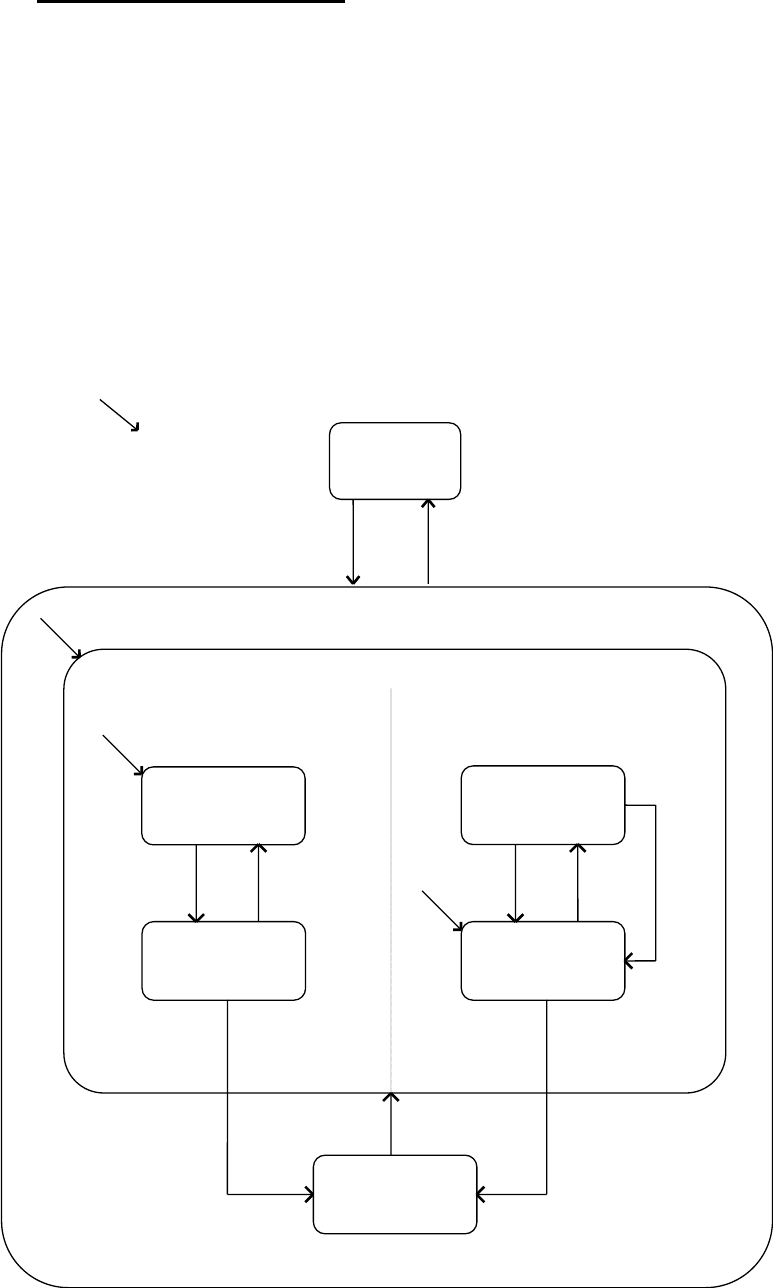
The following diagram illustrates the level of communication with the equipment with regard
to the host system.
State Diagram:
C
DISABLED
System
Initialisation.
COMMUNICATING
ENABLED
1
WAIT CRA
WAIT DELAY
WAIT TX.
COMPLETE
3
4
5
7
8
2
9
11
13
10
6
14
12
WAIT CR
FROM HOST
EQUIPMENT INITIATED CONNECT
HOST INITIATED CONNECT
NOT COMMUNICATING