CP43操作手册.pdf.pdf - 第37页
Part 1 Chapter 4 The Display 4.2.2 Display When Not In Automatic Operation (a) Information about all stations from one to seven is displayed. ST1.N 1 D 35 Er *** ST2.N 1 D 35 Er *** ST3.N 1 D 35 Er *** ST4.N 1 D 35 Er **…

Chapter 4 The DisplayPart 1
The relationships between the displays above are shown in the
Venn diagram below.
If the device check function is not used, the setting of parts can
only be cancelled or completed using the [PARTS SET]
CANCEL/COMPLETE switch.
Refer to Part 2, Chapter 4, Device Check, for details about the
device check function and the parts set cancel/complete
operation.
(c) Special operations procedures display here.
Stop after Current Board After finishing the board
currently being processed the
machine will stop.
Checking Device by HT Device check is currently being
carried out using a Handy
Terminal.
Calculating Placing Data Calculation of data necessary for
placing parts is currently being
carried out.
Vision Processor Executing Waiting for vision processing to
be completed.
(d) Information about optional functions display here.
In the case of Handy Terminal compatible operation, if the next
program has been specified then the name of this program will
display here.
If operating in the HELPS mode then the name of the
announcement or reservation program will display here.
1 – 23Version 5.0
FCP IV-3 Operation

Part 1 Chapter 4 The Display
4.2.2 Display When Not In Automatic Operation
(a) Information about all stations from one to seven is displayed.
ST1.N 1 D 35 Er ***
ST2.N 1 D 35 Er ***
ST3.N 1 D 35 Er ***
ST4.N 1 D 35 Er ***
ST5.N 1 D 35 Er 0
ST6.N 1 D 35 Er 0
ST7.N 1 D 35 Er 0
This is a display of the sequence and device numbers for every
station. “Er ***” means that vision processing has not yet been
completed. The “0” error code indicates that production has
finished under normal conditions. For further information on
error codes, refer to Part 6 of this manual.
Note: In Changeover mode and Device Change mode, when Device
Table 2 (81-160) is the original table, the device positions will
be displayed as 1-80. Note that when the next device is being
used, the machine will display the actual device number, (as
opposed to the device number which has been coded in the
program).
(b) The operation modes are displayed here in the same way they
are during automatic operation.
(c) Information about special operations is displayed here.
Seq. End Stop The machine has finished the board it was
processing when [S_STOP] was pressed.
(d) This display is the same as in the automatic operation display.
1 – 24Version 5.0
FCP IV-3 Operation
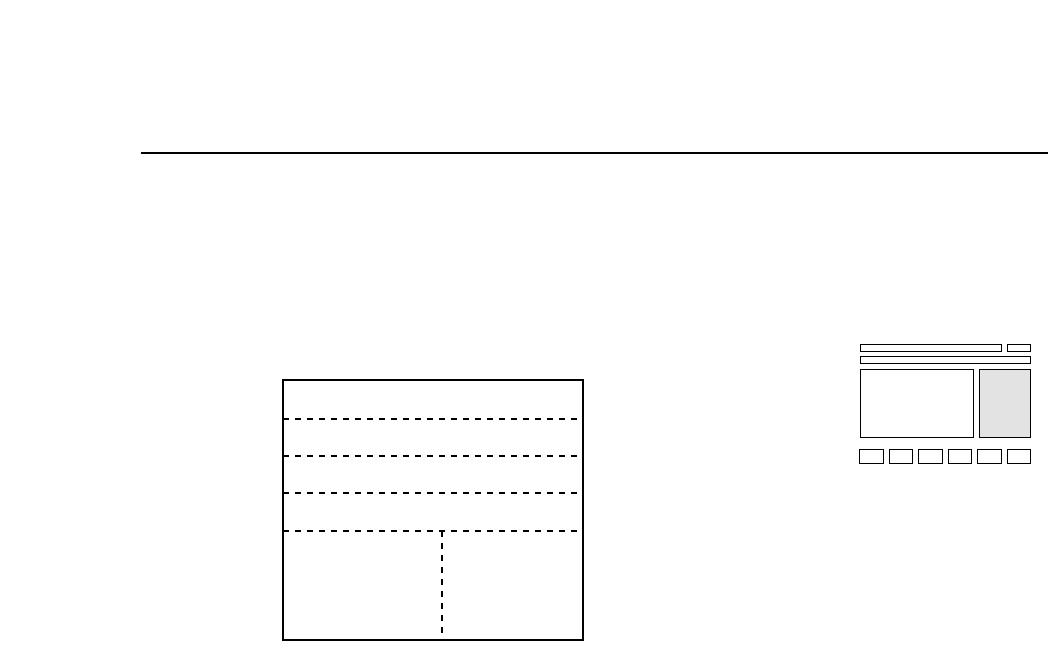
Chapter 4 The DisplayPart 1
4.3 Second Display Area
The second display area displays machine error status and messages to
the operator.
(a) Current Machine Status Display Area
This area displays the current status of the FCP IV-3.
Emergency Stop Under emergency conditions, this will be
displayed. When this happens, refer to (b),
Abnormal Operating Conditions Area.
Waiting for Reset SW The machine has stopped and is waiting for
the operator to restart it.
Press START Before the start of operation, the operator
must push the [START] button.
Machine Not Zero Set This item indicates that zero setting has not
yet been performed after the machine’s
power has been turned on. At this point the
[Position] command cannot be used.
Zero Set This item indicates that zero setting is being
carried out.
Ready The machine is operating and can receive
commands at this point.
Return Cam to Zero This displays if the cam axis is not at 0°.
Measuring Proper… The machine is now measuring Proper
data.
Emergency Stop
(a)
(c)
(d)
Waiting for Reset SW
Emergency Stop Pressed
D100 Resupply
Skip Nozzle
S CEIL
M ADL
L BG
Tape End
105 124
012
075
(b)
(e)
1 – 25Version 5.0
FCP IV-3 Operation