CP43操作手册.pdf.pdf - 第63页
Part 1 7.3 Necessary Data T o perform nozzle center measurement it is necessary to have the following data in the production pr ogram. Machine_data 38. S_nozzle_size 00.0~99.9 [mm] = 1.0 (example) This sets the nozzle di…

Part 1
7.2 Main Points
The nozzle center measurement is an operation designed to obtain a
compensation value for the nozzle center of each nozzle. As a result, if
this measurement is not carried out then the vision processing of parts
that are to be placed will not be exact. It is necessary to carry out nozzle
center measurement in the following case.
After camera Proper data has been remeasured
When the camera Proper data is remeasured the camera resolution
and other such values will change. Nozzle center measurement
requires that the camera obtain an image of the nozzle tip; thus, if the
camera resolution has changed then the nozzle center must be
remeasured as well.
Since nozzle center measurement valves are used for processing
Proper data at the MCS 30 computer, transmit Proper data from the
machine to the MCS 30 computer after nozzle center measurement has
been carried out.
Nozzle center measurement cannot be executed during production
(i.e. from the 1st placing sequence to the last sequence). This function
should be executed before or after production.
If the machine is rebooted after the power supply was turned off,
nozzle center measurement will not be executed because the machine
assumes that production is continuing. To restart nozzle center
measurement, finish the remaining production sequences, or perform
one of the following operations to cancel the condition in which
nozzle center measurement cannot be executed:
- Unload the board using the Unload PCB command.
- Replace the board using the Load PCB command.
- Change production programs (including Foreground transmit from
the MCS, program change, and production program change by
handy terminal).
- Specify a sequence during production.
- Change production mode.
- Execute a Proper data measurement command during operation.
- Execute a board check before center measurement, and if the
machine determines that there is no board on XY table, then center
measurement can be resumed.
1 – 49
FCP IV-3 Operation
Chapter 7 Nozzle Center Measurement
Version 5.0

Part 1
7.3 Necessary Data
To perform nozzle center measurement it is necessary to have the
following data in the production program.
Machine_data
38. S_nozzle_size 00.0~99.9 [mm] = 1.0 (example)
This sets the nozzle diameter of the nozzle affixed in the S holder.
39. M_nozzle_size 00.0~99.9 [mm] = 1.3 (example)
This sets the nozzle diameter of the nozzle in the M holder.
40. L_nozzle_size 00.0~99.9 [mm] = 2.5 (example)
This sets the nozzle diameter of the nozzle in the L holder.
These data are used during nozzle check.
To perform nozzle center measurement the nozzle sizes of the nozzles in
the S, M, and L holders must be the same as that specified in the data of
the present production program.
If the size of the nozzle seen by the cameras does not match that specified
in the production program, nozzle check result will be NG.
1 – 50
FCP IV-3 Operation
Chapter 7 Nozzle Center Measurement
Version 5.0
Part 1
7.4 Procedure
Measurement is automatically carried out by following the command key
operation below.
[SET] → [MANUAL] → [NOZZLE] → [CENTER]
Note: For information concerning the displays of this command key operation
refer to Part 3 Chapter 3, "Descriptions of Commands".
7.5 Setting the Maximum Nozzle Bend Tolerance
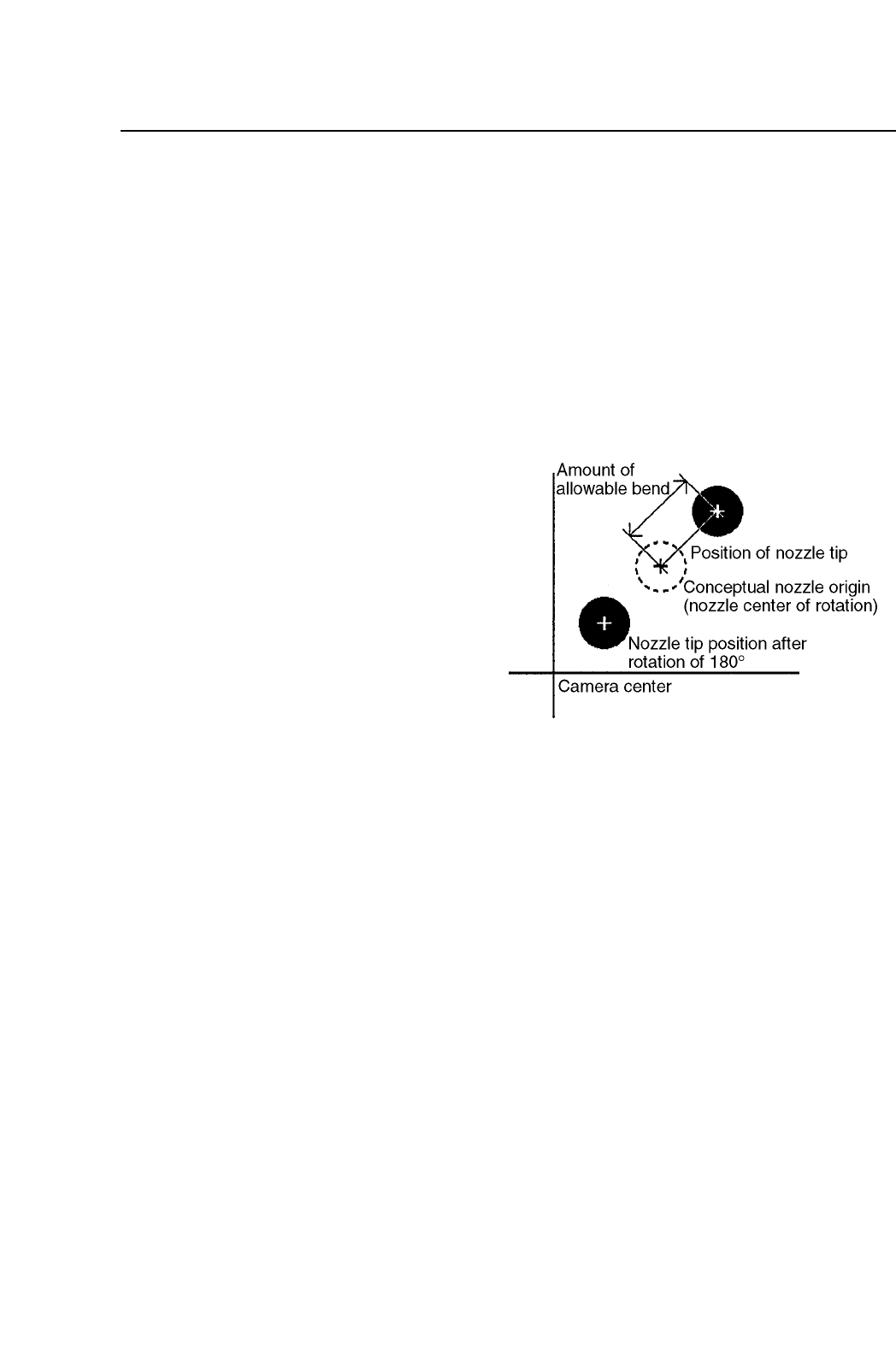
When placing the smallest
parts, the amount of nozzle
bend has a major influence
on picking accuracy and
the picking rate. On the
FCP IV-3 the nozzle bend
tolerance value can be set.
If the results of nozzle
center measurement yields
a value greater than the
bend tolerance value, this
allows that particular
nozzle to be clearly distinguished as "NG".
The nozzle bend amount is defined in the diagram to the right.
The 2 methods for setting the nozzle bend tolerance are explained below.
(1) Making the setting on the machine
To make the nozzle bend tolerance setting on the machine, press the
following command keys;
[SET] → [MANUAL] → [NOZZLE] → [CENTER] → [TOLERANCE]
Note: For information concerning the displays of this command key
operation refer to Part 3 Chapter 3, "Descriptions of Commands".
1 – 51
FCP IV-3 Operation
Chapter 7 Nozzle Center Measurement
Version 5.0