CP43操作手册.pdf.pdf - 第64页
Part 1 7.4 Procedure Measurement is automatically carried out by following the command key operation below . [SET] → [MANUAL] → [NOZZLE] → [CENTER] Note: For information concerning the displays of this command key operat…

Part 1
7.3 Necessary Data
To perform nozzle center measurement it is necessary to have the
following data in the production program.
Machine_data
38. S_nozzle_size 00.0~99.9 [mm] = 1.0 (example)
This sets the nozzle diameter of the nozzle affixed in the S holder.
39. M_nozzle_size 00.0~99.9 [mm] = 1.3 (example)
This sets the nozzle diameter of the nozzle in the M holder.
40. L_nozzle_size 00.0~99.9 [mm] = 2.5 (example)
This sets the nozzle diameter of the nozzle in the L holder.
These data are used during nozzle check.
To perform nozzle center measurement the nozzle sizes of the nozzles in
the S, M, and L holders must be the same as that specified in the data of
the present production program.
If the size of the nozzle seen by the cameras does not match that specified
in the production program, nozzle check result will be NG.
1 – 50
FCP IV-3 Operation
Chapter 7 Nozzle Center Measurement
Version 5.0
Part 1
7.4 Procedure
Measurement is automatically carried out by following the command key
operation below.
[SET] → [MANUAL] → [NOZZLE] → [CENTER]
Note: For information concerning the displays of this command key operation
refer to Part 3 Chapter 3, "Descriptions of Commands".
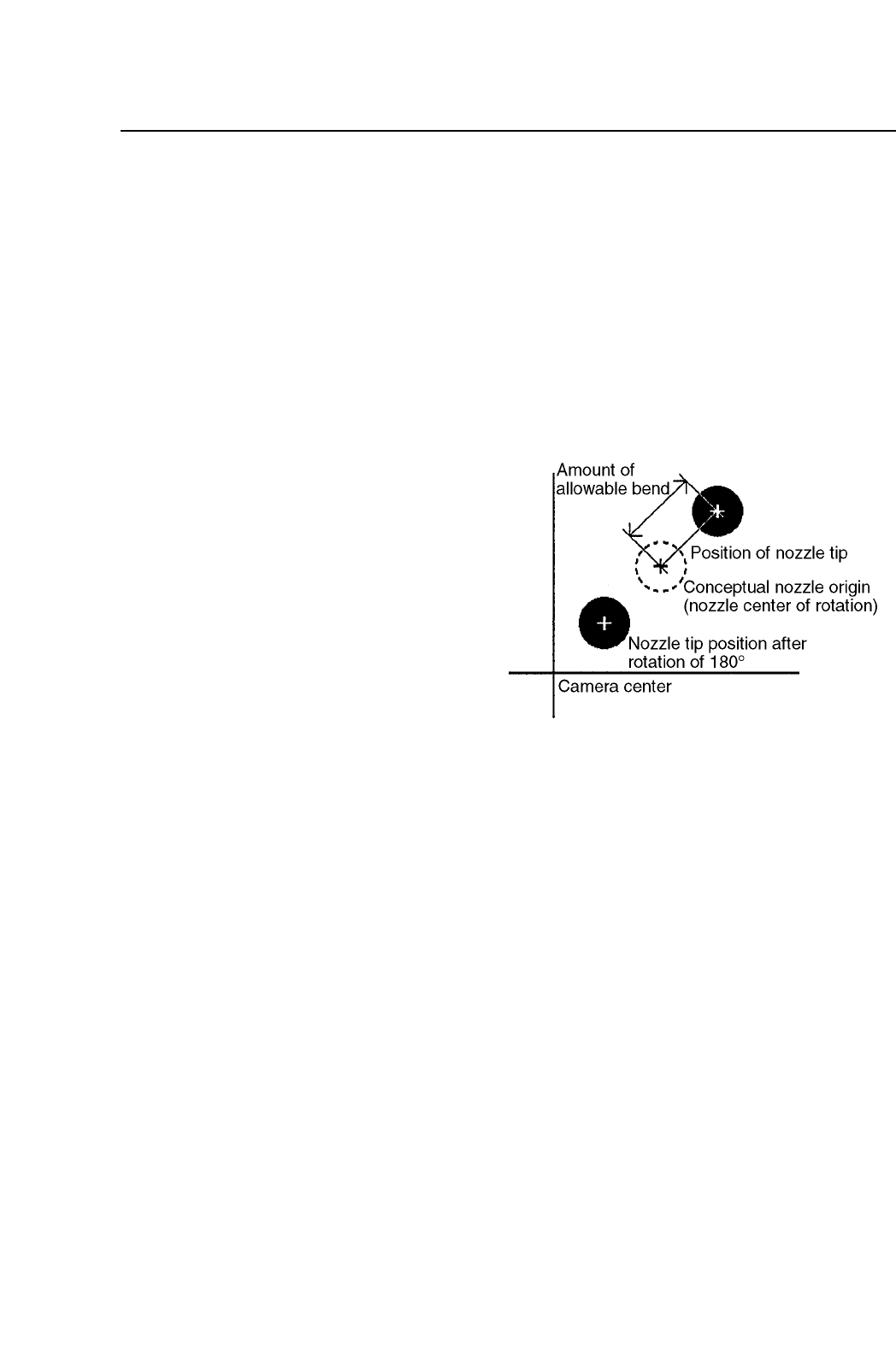
7.5 Setting the Maximum Nozzle Bend Tolerance
When placing the smallest
parts, the amount of nozzle
bend has a major influence
on picking accuracy and
the picking rate. On the
FCP IV-3 the nozzle bend
tolerance value can be set.
If the results of nozzle
center measurement yields
a value greater than the
bend tolerance value, this
allows that particular
nozzle to be clearly distinguished as "NG".
The nozzle bend amount is defined in the diagram to the right.
The 2 methods for setting the nozzle bend tolerance are explained below.
(1) Making the setting on the machine
To make the nozzle bend tolerance setting on the machine, press the
following command keys;
[SET] → [MANUAL] → [NOZZLE] → [CENTER] → [TOLERANCE]
Note: For information concerning the displays of this command key
operation refer to Part 3 Chapter 3, "Descriptions of Commands".
1 – 51
FCP IV-3 Operation
Chapter 7 Nozzle Center Measurement
Version 5.0

Part 1
(2) Making the setting on the MCS 30 computer
Values can be set in the production program with the MCS 30 Editor.
Initially the values are set at 0.200 mm.
Machine_data
45. S_bend_limit 0.000~2.000 [mm] = 0.200
This sets the bend tolerance for the nozzle affixed in the S holder.
46. M_bend_limit 0.000~2.000 [mm] = 0.200
This sets the bend tolerance for the nozzle in the M holder.
47. L_bend_limit 0.000~2.000 [mm] = 0.200
This sets the bend tolerance for the nozzle in the L holder.
1 – 52
FCP IV-3 Operation
Chapter 7 Nozzle Center Measurement
Version 5.0