CP43操作手册.pdf.pdf - 第66页
Part 1 7.6 Setting the Nozzle Background Disk Diameter On the FCP IV -3 the background disk diameter can be set which allows a wider possible range of options related to what type of nozzle can be affixed in each holder …

Part 1
(2) Making the setting on the MCS 30 computer
Values can be set in the production program with the MCS 30 Editor.
Initially the values are set at 0.200 mm.
Machine_data
45. S_bend_limit 0.000~2.000 [mm] = 0.200
This sets the bend tolerance for the nozzle affixed in the S holder.
46. M_bend_limit 0.000~2.000 [mm] = 0.200
This sets the bend tolerance for the nozzle in the M holder.
47. L_bend_limit 0.000~2.000 [mm] = 0.200
This sets the bend tolerance for the nozzle in the L holder.
1 – 52
FCP IV-3 Operation
Chapter 7 Nozzle Center Measurement
Version 5.0
Part 1
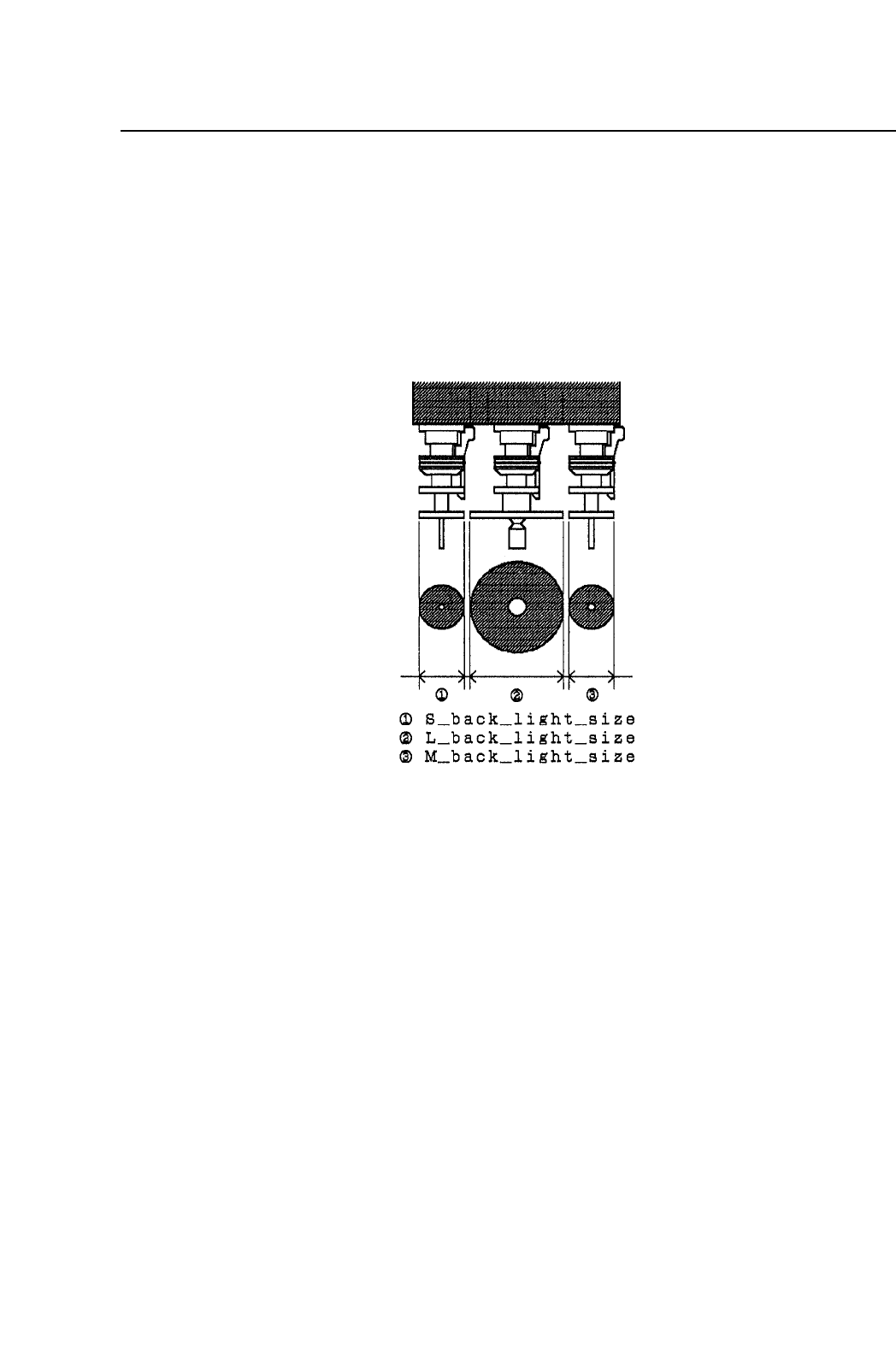
7.6 Setting the Nozzle Background Disk Diameter
On the FCP IV-3 the background disk diameter can be set which allows a
wider possible range of options related to what type of nozzle can be
affixed in each holder.
The background disk diameter for each nozzle is set in Machine_data in
the program.
Machine_data
42. S_back_light_size 0~50 [mm] = 12
This sets the background disk size (diameter) of the nozzle affixed in
the S holder. Initially this value is set at 12 mm.
43. M_back_light_size 0~50 [mm] = 12
This sets the background disk size (diameter) of the nozzle affixed in
the M holder. Initially this value is set at 12 mm.
44. L_back_light_size 0~50 [mm] = 25
This sets the background disk size (diameter) of the nozzle affixed in
the L holder. Initially this value is set at 25 mm.
1 – 53
FCP IV-3 Operation
Chapter 7 Nozzle Center Measurement
Version 5.0

Part 1
7.7 Skipping a Faulty Nozzle
A nozzle determined as faulty by nozzle center measurement (due to
measurement error, nozzle bent, abnormal nozzle diameter, etc.) should
basically be replaced with a normal nozzle. However it is possible to skip
a faulty nozzle if it cannot be replaced with a normal one because of no
spare nozzles or for other reasons.
To use this function, specify the proper data as follows:
12:Machine Status B 0000 0000 0000 0001
A faulty nozzle skipped with this function will display in red in the skip
nozzle display area. To cancel this function, execute either of the
following methods:
• Cancelling by nozzle center measurement
Execute the nozzle center measurement. If measurement result is OK,
the nozzle skip function will be cancelled.
• Cancelling by nozzle skip editor
Nozzle skip function can also be cancelled using the nozzle skip
editor. The faulty nozzle must be replaced, otherwise, a nozzle pick-
up or vision processing error will occur if the skip function is
cancelled.
1 – 54
FCP IV-3 Operation
Chapter 7 Nozzle Center Measurement
Version 5.0