CP43操作手册.pdf.pdf - 第90页
Chapter 1 Automatic Operation Part 2 1.17 Pass Mode If the board loaded fr om the previous stage does not need parts placed, the machine can be set to let the board pass thr ough. The two ways of carrying out Pass mode a…

Chapter 1 Automatic OperationPart 2
1.15 Tape End Display
When the supply of a part is about to run out the device number will be
displayed on the monitor. Also, the signal tower lamp can be set to flash
(the color depends on what is entered in Proper data).
When a tape end is detected, the following actions will clear the device.
Program change: In joint mode and device change mode all
devices must be cleared. In changeover
mode the devices on the original table must
be cleared.
Parts Set switch: When parts run out during production in
device change mode, once the table has been
loaded and the PARTS SET switch is set to
[COMPLETE], then devices on that table will
be cleared.
Tape End Detection button: After the tape end has been reached and the
tape end sensor has been activated the
device will be cleared.
Power On: After the power has been turned on all the
tape end displays will be cleared.
1.16 Large Parts Pickup Check
Station 2 checks whether or not parts have been picked from the feeder.
When parts have not been picked, the machine will instantly stop, thereby
minimizing the number of expensive parts which are destroyed by the
tape cutter. This function is set in Part data, allowing it to be selected for
each part type. If a part could not be picked and recovery is set to "auto
recover" the machine will attempt the recovery process as soon as an error
which needs a recovery occurs.
How to set Part data:
Carrying_data
14. Pickup_check : This data item chooses whether or not a large part
pickup check will be carried out.
Note: The large parts pickup check function is only concerned with parts whose
thickness exceeds 1 mm. The check function is not carried out for parts
with a thickness (registered in Part data) of less than 1 mm.
2 – 21Version 5.0
FCP IV-3 Operation
Chapter 1 Automatic OperationPart 2
1.17 Pass Mode
If the board loaded from the previous stage does not need parts placed,
the machine can be set to let the board pass through. The two ways of
carrying out Pass mode are described below.
• Set Production_mode in the program to Pass.
• Press the [SET], [STATUS] and [PASS] command function keys, in that
order.
If Pass Mode was set in Production_mode in the program then the
message “Pass” will display in yellow on the screen. If Pass mode was set
using the command keys then the message "Pass" will display in cyan. If
“Pass” mode was set in the program it can only be cancelled using the
command function keys.
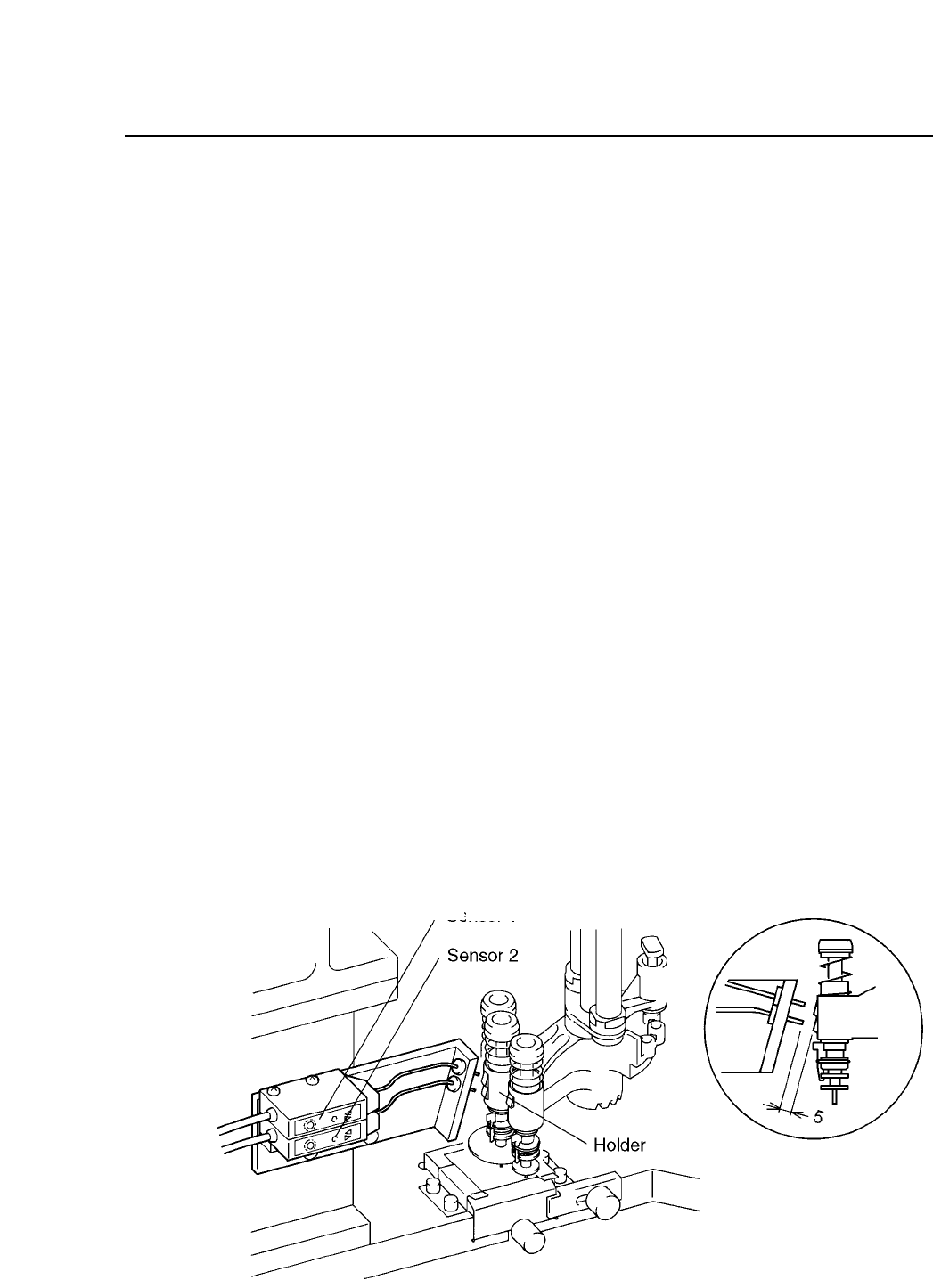
1.18 Nozzle Type and Nozzle Holder Check
At Station 10 a sensor will check to see which nozzle is being used in
order to determine whether or not nozzle change is necessary for the next
part to be picked. At Station 12, another nozzle change check sensor will
check to see if the appropriate change has been made.
2 – 22Version 2.0
FCP IV-3 Operation
Nozzle
Sensor 1
Sensor 2
S
Green unlit Green lit
L
Green lit Green lit
M
Green lit Green unlit

Chapter 1 Automatic OperationPart 2
1.19 Backlight and Frontlight
Vision processing is carried out at Station 4. This process uses a backlight,
but an optional frontlight is also available. See the Maintenance Manual
for details.
Details on setting the light type in Proper and Part data follow:
[Proper]
126. Front Light : This determines whether or not a front light is
being used.
Non : Not in use
Use : In use
When using a standard machine always set this to Non.
[Part data]
Vision_data
13. Lighting : This item selects which surface will be lit by image
processing.
Back_Light Back light in use (standard setting)
Front_Light Front light in use
When using the Front_Light setting, be sure to also
set Proper data item 126 to Use.
2 – 23Version 2.0
FCP IV-3 Operation