CP43操作手册.pdf.pdf - 第97页
Chapter 3 Block Skip Part 2 3.3 Block Skip Specifications The specifications of the block skip function for the FCP IV -3 are as follows: • Block Number Restrictions Block numbers can be set from 0 to 255. • Managing the…
Chapter 3 Block SkipPart 2
3.2.2 Setting Automatic Block Skip Marks
In this case, the camera will read the block skip marks on the board
and automatically skip the appropriate blocks.
(1) Mark the board with very large bright (or dark) block skip
marks. Whether the mark is inside or outside each block makes
no difference. Only the number of the block is important.
(2) Enter the mark type, mark color (B/W) and CCD level in the
[Program] Mark_data via the MCS/2H editor, and enter the
mark sizes (Size X, Size Y) and reading threshold level (CCD).
(3) Enter every block number into sequence data (N_data) block
number (B).
(4) Enter the letter B into sequence data (N_data) device type (W).
(5) Enter the Mark_data Mark No. as the device number in
sequence data (N_data).
(6) Finally, enter the XY coordinates for each block skip mark into
sequence data (N_data).
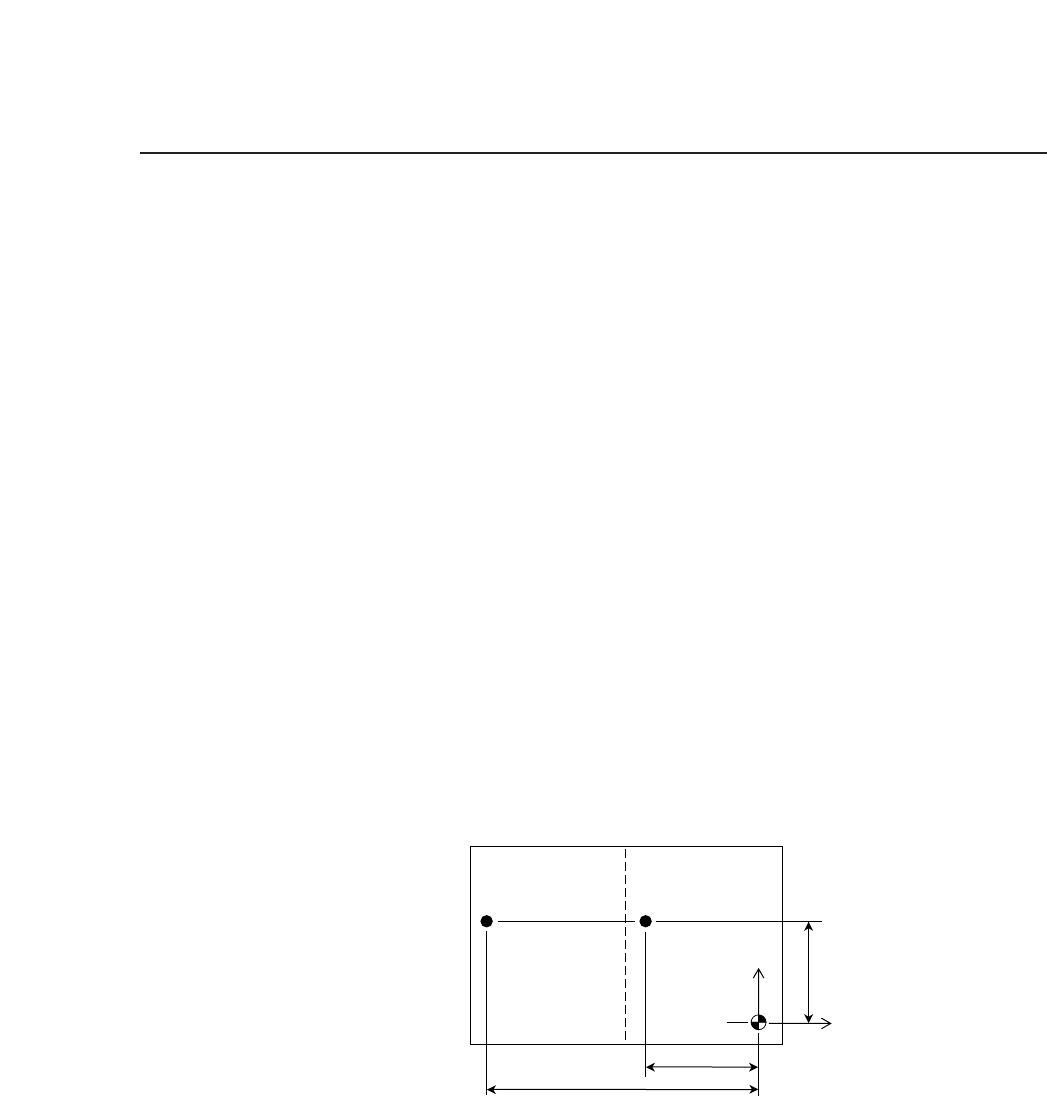
The example below shows the entries for two block skip marks.
Program Data
Mark_data Type Ptn B/W CCD L/S Scan Size_a Size_b Size_c Size x Size_y
001 B 00 B 150 0200 100 000 0050 0100 0100
N_Data B W D X Y Q
001 1 B 001 -500 800 0.00 : Block skip mark 1
002 2 B 001 -1500 800 0.00 : Block skip mark 2
When B is entered in the W column, the machine will automatically
read the block skip marks and skip the boards that are marked
appropriately. Mark sizes (Size X, Size Y) and reading threshold
levels (CCD) can also be set at the machine. See Part 3, Section 3 of
this manual for further details.
Block 2
Block skip
mark 2
Block skip
mark 1
Block 1
Y
X
-1500
-500
800
2 – 28Version 2.0
FCP IV-3 Operation

Chapter 3 Block SkipPart 2
3.3 Block Skip Specifications
The specifications of the block skip function for the FCP IV-3 are as
follows:
• Block Number Restrictions
Block numbers can be set from 0 to 255.
• Managing the Skip Sequence in the Program
When a skip sequence is set in the program using the MCS/2H Editor,
there is no distinction made between a block and device sequence.
Moreover, the skip sequence cannot be cancelled at the FCP IV-3.
• Marks Permissible On One Board
Including fiducial marks, a maximum of 255 marks are permissible.
• Block Skip Mark Restrictions
Size: Set in MCS/2H.
Mark color: The mark should contrast with the board color so that the
camera can read it easily.
Location: Same as fiducial marks.
• Conditions Under Which Block Skip Marks Are Read
When the letter "B" has been entered into the sequence data device
type (W) column, the machine looks for block skip marks.
• Conditions Under Which Block Skip Is Carried Out
An area of a certain size (Size_X, Size_Y) centered around the
coordinate location is inspected. If all this area matches the color
specified for the block skip mark, the corresponding block is skipped.
2 – 29Version 2.0
FCP IV-3 Operation

Chapter 3 Block SkipPart 2
3.4 Points to Remember When Using Block Skip
It is possible for a block skip mark sequence to reference a fiducial mark,
but the fiducial mark sequence must be placed before the block skip mark
sequence.
A block skip that is set using the machine command keys is valid until
cleared by the operator if the program being run does not have block skip
mark sequences. For programs which do have block skip mark
sequences, the block skip flags set at the machine are cleared before each
new board is produced.
If a board which uses block skip marks, is cleared off in the middle of
production and a new board is then added by hand, production on the
new board will continue using the original block skip information of the
previous board. On the other hand, if a new board is loaded into the
machine using the [LOADER] or [AUTO] function then block skip marks
will be read again and the block skip function will be carried out using
this new information.
2 – 30Version 2.0
FCP IV-3 Operation