DEUKYX-193-4110_G5S2_VOL4.pdf - 第258页
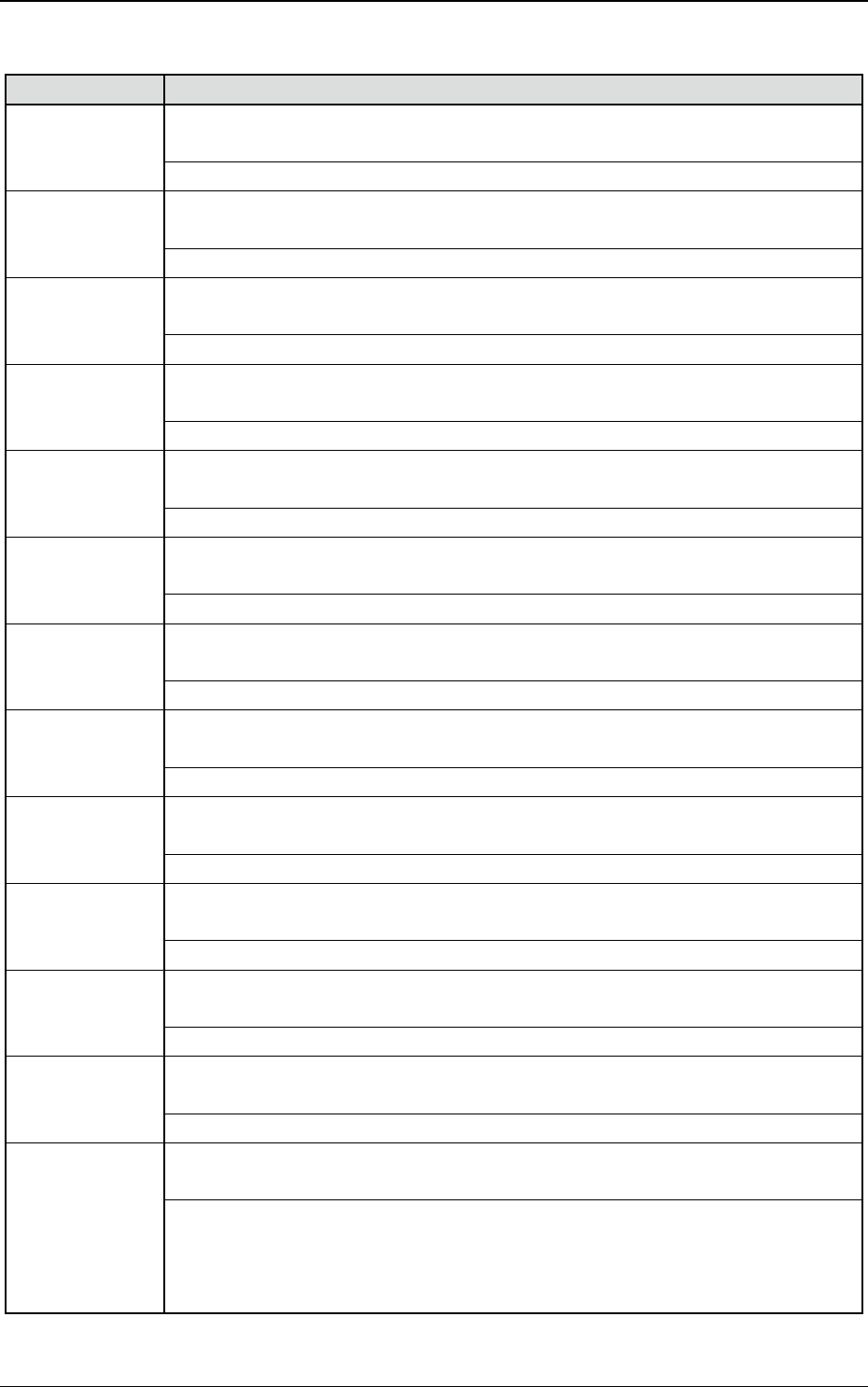
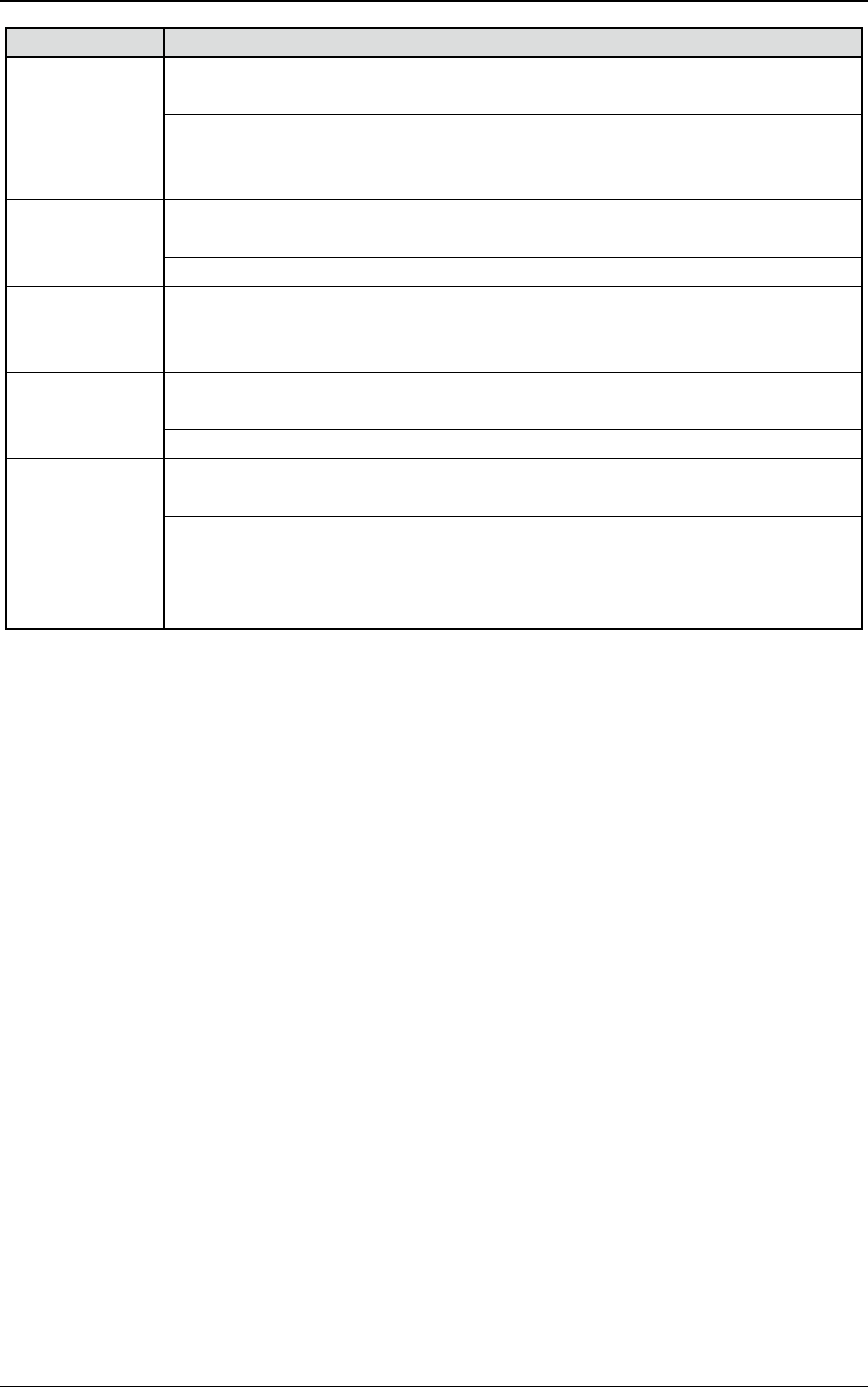
DEUKYX 3-80 193-41 10 3.7 PEC-Erkennung Error ID Fehlername, Beschreibung, Ursache und Wiederherstellung 46010e P .E.C. Inspection Failed in Land recog Führen Sie die folgenden Schritte aus: 1. Prüfen Sie die Marke auf d…
DEUKYX
3-79193-4110
3.7 PEC-Erkennung
3.7 PEC-Erkennung
Error ID Fehlername, Beschreibung, Ursache und Wiederherstellung
460101 P.E.C. Inspection
P.E.C. Mark #1 (Global)
-----
460102 P.E.C. Inspection
P.E.C. Mark #2 (Global)
-----
460103 P.E.C. Inspection
P.E.C. Mark #3 (Global)
-----
460104 P.E.C. Inspection
P.E.C. Mark #1 (Image)
-----
460105 P.E.C. Inspection
P.E.C. Mark #2 (Image)
-----
460106 P.E.C. Inspection
P.E.C. Mark #3 (Image)
-----
460107 P.E.C. Inspection
P.E.C. Mark #1 (Local)
-----
460108 P.E.C. Inspection
P.E.C. Mark #2 (Local)
-----
460109 P.E.C. Inspection
P.E.C. Mark #3 (Local)
-----
46010a P.E.C. Inspection
Land P.E.C. Mark #1
-----
46010b P.E.C. Inspection
Land P.E.C. Mark #2
-----
46010c P.E.C. Inspection
Land P.E.C. Mark #3
-----
46010d P.E.C. Inspection
Failed in P.E.C. Recognition
Führen Sie die folgenden Schritte aus:
1. Prüfen Sie die LP-Positionierung.
2. Prüfen Sie, ob die Markenposition für die LP-Erkennung korrekt ist.
3. Prüfen Sie, ob die Ausrichtung der LP stimmt.
DEUKYX
3-80193-4110
3.7 PEC-Erkennung
Error ID Fehlername, Beschreibung, Ursache und Wiederherstellung
46010e P.E.C. Inspection
Failed in Land recog
Führen Sie die folgenden Schritte aus:
1. Prüfen Sie die Marke auf der LP.
2. Prüfen Sie die LP-Positionierung.
46010f P.E.C. Inspection
P.E.C. Mark #1 (Unit)
----
460110 P.E.C. Inspection
P.E.C. Mark #2 (Unit)
----
460111 P.E.C. Inspection
P.E.C. Mark #3 (Unit)
----
460201 2D bar code Error
Failed in reading 2D bar code
Führen Sie die folgenden Schritte aus:
1. Prüfen Sie die LP-Positionierung.
2. Legen Sie die Position des 2D-Barcodes fest.
3. Prüfen Sie, ob der 2D-Barcode verschmutzt ist.
DEUKYX
3-81193-4110
3.8 Automatische Einstellung
3.8 Automatische Einstellung
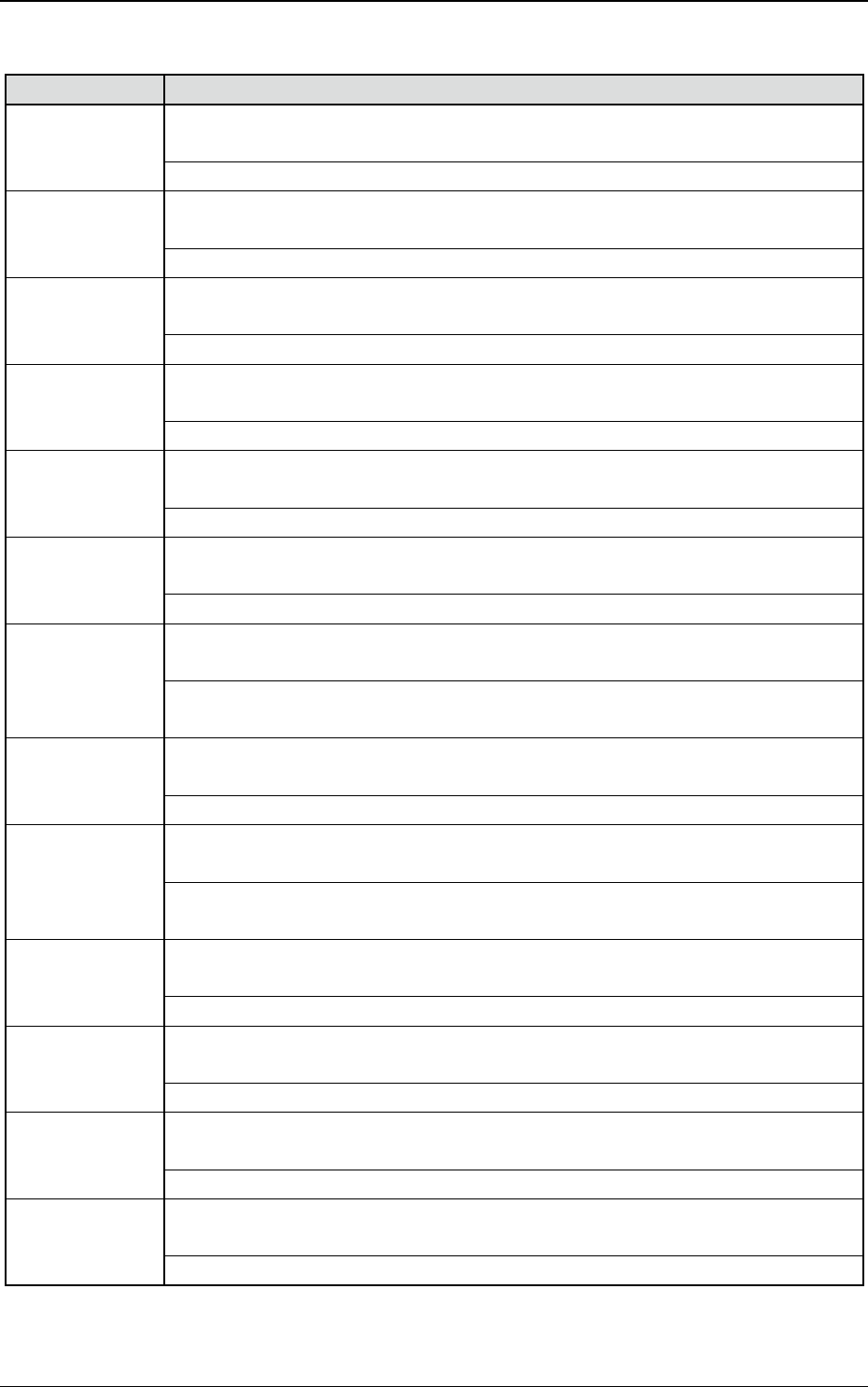
Error ID Fehlername, Beschreibung, Ursache und Wiederherstellung
490603 Conveyor Width Automatic Adjustment
PCB exists on the L conveyor.
-----
490604 Conveyor Width Automatic Adjustment
PCB exists on the R conveyor.
-----
490617 Conveyor Width Automatic Adjustment
Software limit
-----
490690 Conveyor Width Automatic Adjustment
Auto Setup Error(Others).
-----
490701 Nozzle set up
Nozzle Stocker is not set.
Prüfen Sie, ob die Stationsbasis korrekt eingerichtet ist.
490702 Nozzle set up
Motor Error Detection.
-----
490703 Nozzle set up
Nozzle Stocker Shutter open/close failed.
Es gibt „no oat going up“ auf einen Aufnehmer oder prüfen Sie, ob beim Öffnen
und Schließen eine Verbindung besteht.
490704 Nozzle set up
The up/down movement of Nozzle Stocker failed.
Prüfen Sie, ob oberer/unterer Zylinder in Ordnung ist.
490705 Nozzle set up
Nozzle placing was not found in the stocker.
Prüfen Sie, ob es Unterschiede zwischen der aktuellen Anordnung in der Station
und den Stationsdaten gibt.
490707 Nozzle set up
There is no free space for nozzle storing. Please conrm the arrangement data.
Prüfen Sie die Stationsdaten.
490708 Nozzle set up
There are neither a free space nor a nozzle for nozzle exchange.
Richten Sie die Aufnehmerstation entsprechend ein.
490709 Nozzle set up
Nozzle exchange abnormal data was found.
Prüfen Sie die Aufnehmer- und Stationsdaten.
49070a Nozzle set up
Nozzle stocker position teaching failed.
Techen Sie im Instruction-Bildschirm die Aufnehmerstationspositionen neu.