00196624-04_Service Manual WPC5_6_EN_01-2019.pdf - 第51页
Service Ma nual W PC5 / WPC6 3.6.3.5 Repla ce the Se rvo Am plifie r for t he Li fting Axis and Feed A xis Spare Parts • Servo amplif ier TBS 200/3Z1 [03048005 -xx] f or feed axis • Servo amplif ier TBS 200/10X1 [003 442…
Service Manual WPC5 / WPC6
3.6.3.4 Replace the Axis card
Spare Part
• Axis KSP A364 analog [03041865-xx]
Removal / Installation
➢ Wear the ESD wristband.
➢ Loosen the 2 screws fastening the front plate of the axis card.
➢ Carefully pull the axis card (see "3.6.3 Control Unit" [➙ 3-47]) out of the control unit.
➢ Carefully insert the new axis card.
➢ Make sure that the axis card engages properly.
➢
Tighten the 2 screws fastening the front plate of the axis card.
Settings
➢ Perform a firmware download for the axis card..
➢ For more information, refer to the Online Help for the station software.

Service Manual WPC5 / WPC6
3.6.3.5 Replace the Servo Amplifier for the Lifting Axis and Feed Axis
Spare Parts
• Servo amplifier TBS 200/3Z1 [03048005-xx] for feed axis
• Servo amplifier TBS 200/10X1 [00344204-xx] für lifting axis
Removal / Installation
➢ Wear the ESD wristband.
➢ Loosen the 4 screws fastening the plexiglass cover and remove this.
➢ Press down the lock under the board of the relevant servo amplifier (see "3.6.3 Control Unit"
[➙ 3-47]).
➢ Carefully pull the servo amplifier out of the control unit.
➢ Make sure that the servo amplifier matches the relevant axis. Compare the part numbers of
the "old" servo amplifier with those of the new one.
➢ Carefully insert the new servo amplifier.
➢ Make sure that the servo amplifier engages properly.
➢ Refit the plexiglass cover and screw into place.
Settings
• No settings are required.
Service Manual WPC5 / WPC6
3.6.3.6 Replace the Servo Amplifier for the Non-Stop Module
Spare Part
• Servo amplifier TBS 200/3Z1 [03048005-xx] for Non-Stop-Module
Removal / Installation
➢ Move the tower into the refill position and switch the WPC off.
➢ Wear the ESD wristband.
➢ Remove the second side cover from the control unit side.
➢ Loosen the 4 screws fastening the plexiglass cover and remove this.
Settings
• No settings are required.
See also...
3.6.3
Control Unit [➙ 3-47]
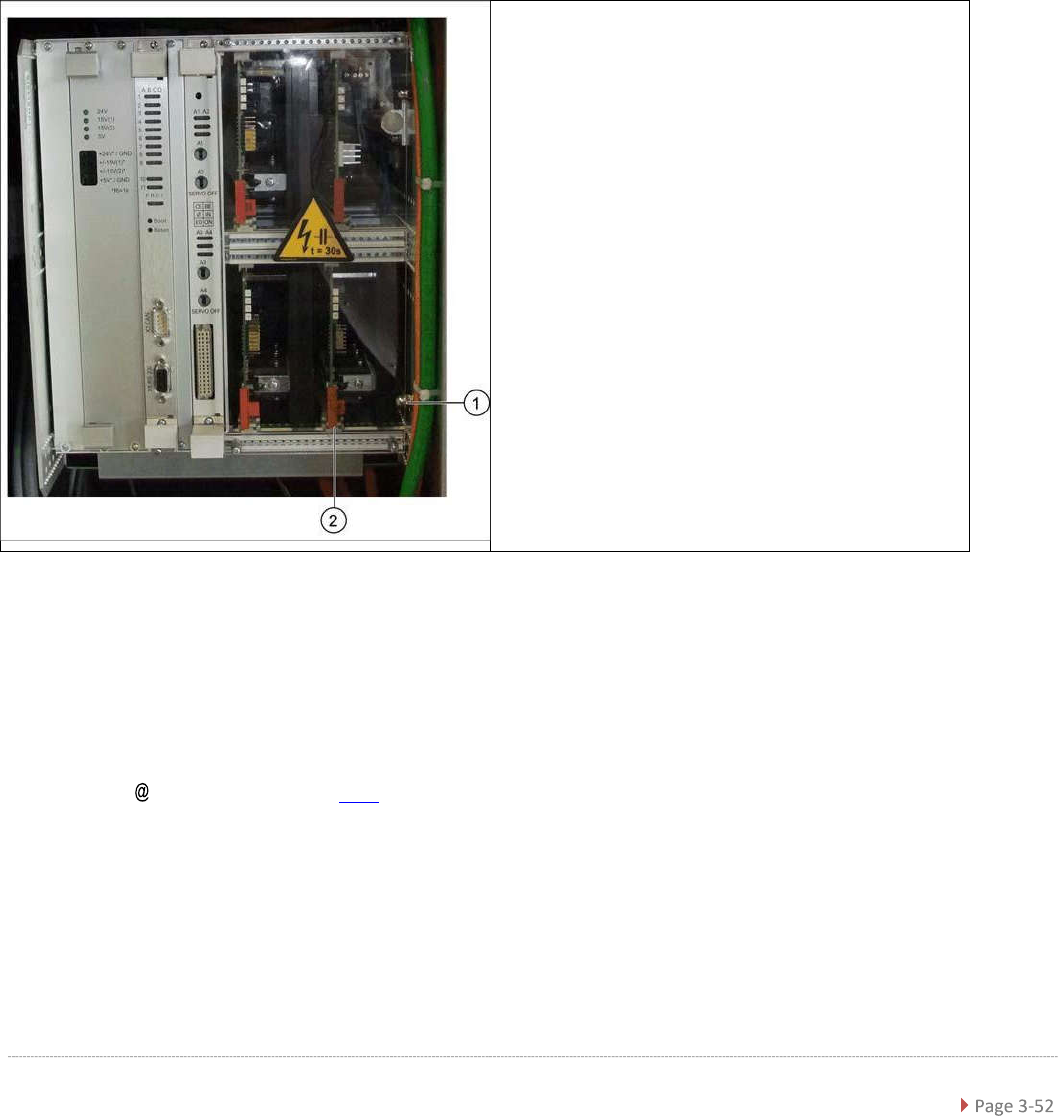
➢ Loosen and remove the lower cap nut on the
slot unit (1).
➢ Loosen the counternut and pull the screw out
towards the back until you can remove the
servo amplifier.
➢ Press the lock under the board of the servo
amplifier (2).
➢ Carefully pull the servo amplifier out of the
control unit.
➢ Carefully insert the new servo amplifier.
➢ Make sure that the servo amplifier engages
properly.
➢ Tighten the cap nut and counternut.
➢ Refit the plexiglass cover and screw into place.