TM-300_0wners_Manual.pdf - 第17页
TM-300 Ope ration Ins truct ion s 61170613. fm Page 11 of 27 Decs ription - Op erating Cont r ols Fi gu r e 2. 3 (Fro nt Pa nel) Power S witch ( Ref. A) The ma in p owe r swit ch for th e TM -300 Con- troll er prov ides …

TM-300 Operation Instructions 61170613.fm Page 10 of 27
Description - Mechanical Assembly
Cover Tape Guide #3 (Ref. R)
Adjustable guide for precisely positioning the
cover tape over the carrier tape prior
to sealing.
Heat Sealer Assembly (Ref. S)
Controls the heat shoes with three variables:
time, temperature, and pressure. The assem-
bly is interchangeable for different tape widths.
Count Sensor (Ref. T)
Optical sensor which provides count pulses for
the counter module.
Drive Motor (Ref. U)
AC motor which powers the drive sprocket.
Idler Arm (Ref. V)
Holds the sealed tape against the drive
sprocket.
Seal Assembly / Motor Upright Plate
(Ref. W)
Supports the air pressure gauges, seal
assembly, and drive motors.
Follower Track Support Arm (Ref. X)
Supports the follower track, carrier tape guide
#3, and take-up reel drive arm.
TM-300 Operation Instructions 61170613.fm Page 11 of 27
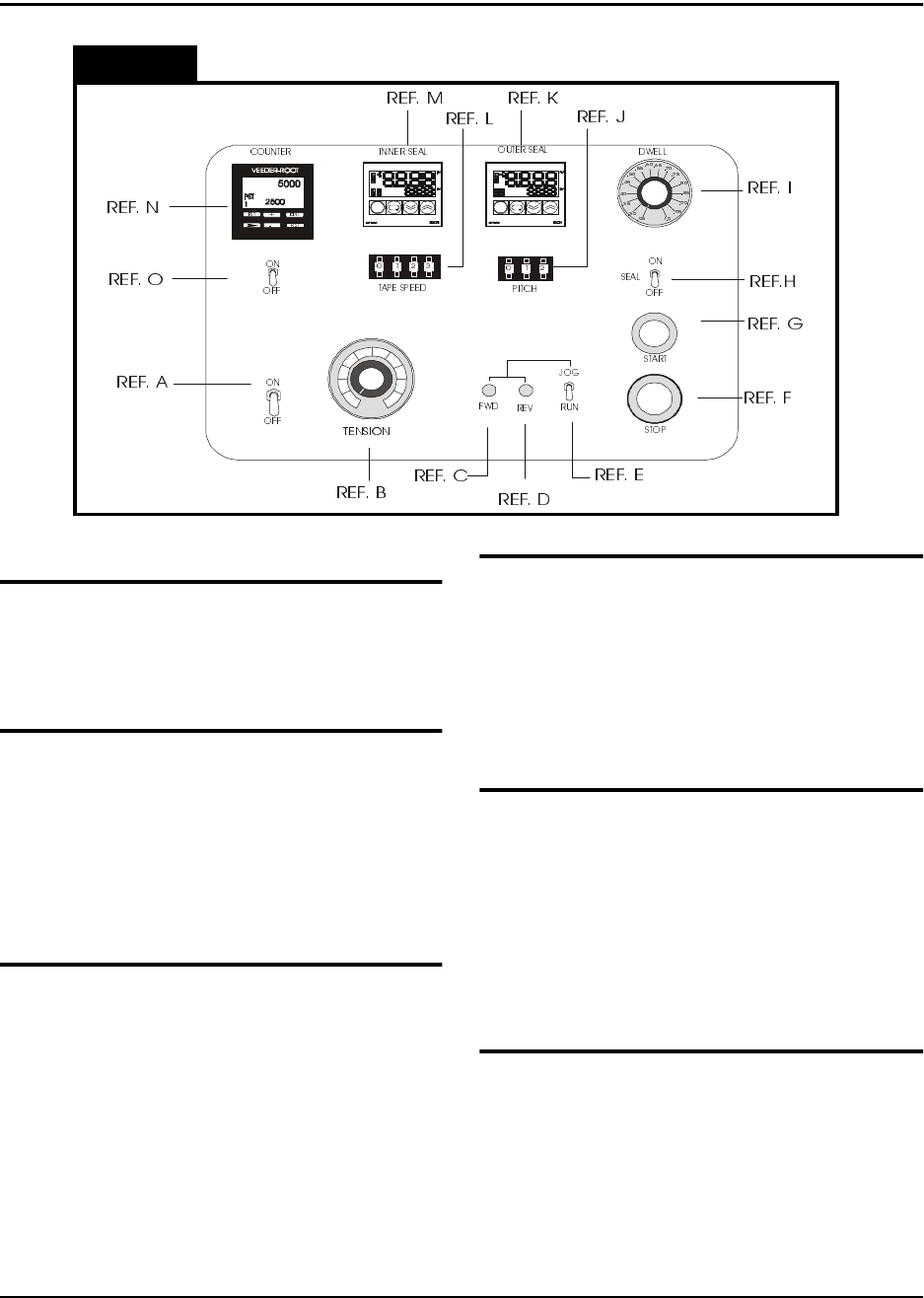
Decsription - Operating Controls
Figure 2.3
(Front Panel)
Power Switch (Ref. A)
The main power switch for the TM-300 Con-
troller provides power to the counter, take-up
motor, sealer and drive motor.
Tension Adjust (Take-up Motor) (Ref. B)
Adjusts the torque applied to the filled tape as
it is wrapped onto the take-up reel. Apply only
as much tension as needed to wrap the tape
onto the reel. Adjustments may need to be
made due to differing sizes and weights of
taped components.
FWD Button (Ref. C)
This button is used to advance the drive
sprocket by small increments for the purpose
of tape positioning. The JOG/RUN switch
must be set to JOG to use this feature.
REV Button (Ref. D)
This button performs the same function as the
FWD button, but in the reverse direction.
Extreme care must be taken if reverse posi-
tioning is to be performed since both the car-
rier and cover tape can jam when moving back
into the loading track.
JOG/RUN Switch (Ref. E)
When this switch is set to JOG, the TM-300
Controller is in the Tape Adjust mode, where
forward and backward positioning of the tape
is allowed.
When this switch is set to RUN, the TM-300
Controller is operating in normal taping mode.
Stop Button (Ref. F)
Pressing this button causes the motor to
immediately stop its motion and halts the pro-
gram at the current line number. Pressing the
START button allows the program to finish the
interrupted move.

TM-300 Operation Instructions 61170613.fm Page 12 of 27
Description - Operating Controls (cont.)
Start Button (Ref. G)
This button starts execution from the current
program line number. Pressing the START
button after a RESET will start execution at
the first program line. Pressing the START
button after an Emergency Stop (
E-Stop
) will
start the program at the line where the E-Stop
was detected.
Seal (Ref. H)
When set to ON, the seal is enabled.
When set to OFF, the seal is disabled.
Dwell (Ref. I)
The dwell knob is used to set the amount of
time the heat seal shoes remain on the cover
tape. There are 16 Dwell settings ranging
from 0.25 to 1.00 seconds in 0.05 second
intervals.
Temperature Controls (Ref. K and M)
The temperature controls set the temperature
of the heat shoes to a level that will cause the
heat sensitive adhesive on the cover tape to
melt. There are two separate controls:
Inner Seal (Ref. M)
This is the seal head closest to the
sprocket side of the carrier tape.
Outer Seal (Ref. K)
This is the seal head closest to the out-
side edge of the carrier tape as viewed
facing the machine.
Pitch (Ref. J)
The PITCH control is used to set software
parameters which control the drive sprocket
motor and the counter. For the TM-300 Con-
troller, PITCH refers to the distance (mm)
between pocket centers in the carrier tape.
The current factory default settings allow the
following PITCH settings:
4mm, 8mm, 12mm, 16mm, 20mm,
24mm, and 32mm.
Tape Speed (Ref. L)
This set of 4 Thumbwheel switches is used to
determine tape velocity. Speeds are entered
in pps (pulses per second) units. A new
speed may be selected whenever motion is
not in progress.
(Note: Acceleration/deceleration, and ramp-
ing profiles can be changed via software by
downloading programs with these parameters
varied).
Counter (Ref. N)
The counter keeps an accurate count of the
number of parts taped. The counter will auto-
matically keep an accurate parts count for any
tape pitch (pocket width). For counter opera-
tion, refer to the SETTING COUNTER section
of this manual.
Count (Ref. O)
In the ON position, the counter is enabled.
In the OFF position, the counter is disabled.
To set the target temperature, simply use the
Increment and Decrement keys to adjust the
set point display (Ref. C).