TM-300_0wners_Manual.pdf - 第20页
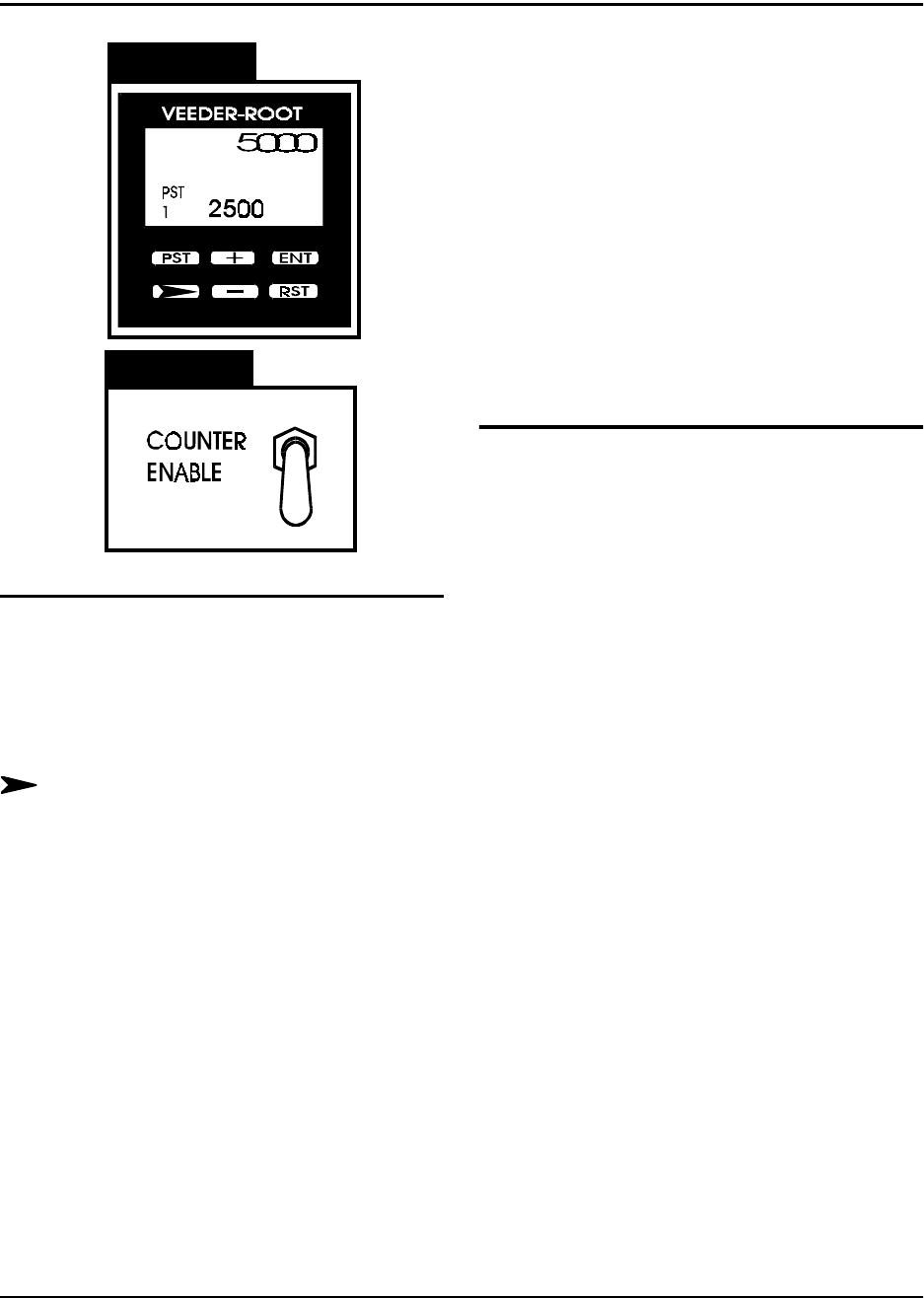
TM-300 Ope ration Ins truct ion s 61170613. fm Page 14 of 27 Coun ter Controls F i gur e 2. 5 Figur e 2. 6 Counter Module (Figu re 2.5 ) PST - Pr eset Sel ect This key can be used t o sel ec t d ata to be dis- play ed w …
TM-300 Operation Instructions 61170613.fm Page 13 of 27
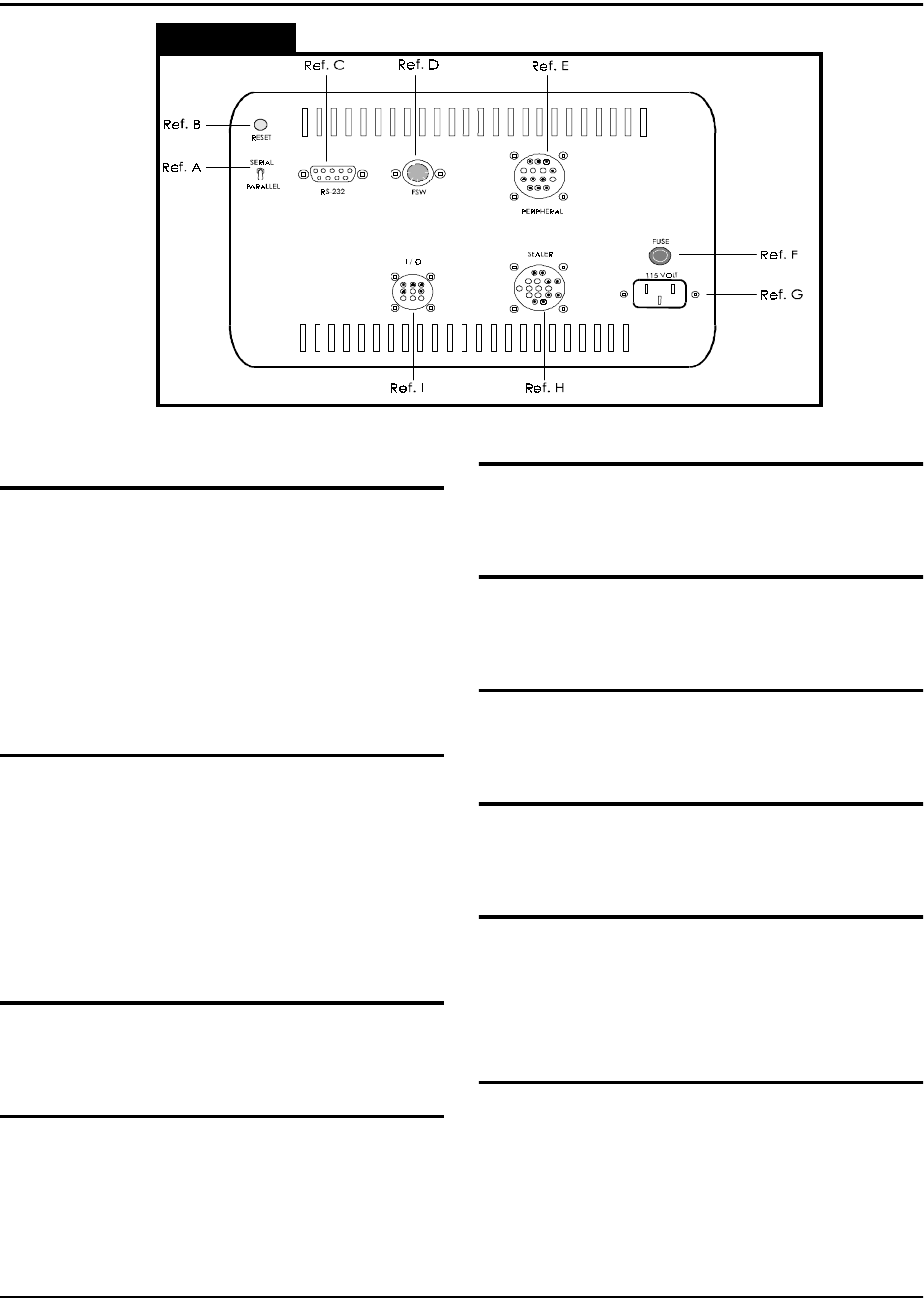
Description - Operating Controls (cont.)
Figure 2.4
(Rear Panel)
Serial/Parallel Switch (Ref. A)
When this switch is set to SERIAL, new soft-
ware programs can be downloaded from a
personal computer (PC) to the TM-300 Con-
troller. For reliable operation, this switch
should be set to PARALLEL when operating in
normal RUN or STEP/JOG mode. When
downloading software, this switch must be set
to the SERIAL position.
Reset (Ref. B)
Pressing this button will stop current program
execution and reset the program line pointer
to the first line of the current program.
NOTE
:
The START button must be pressed to
restart program execution after Reset is acti-
vated.
RS-232 Conector (Ref. C)
This port allows communication between an
IBM compatible PC and the TM-300.
FSW (Ref. D)
This connector connects the footswitch to the
TM-300 controller.
Peripheral (Ref. E)
This connector provides connections from the
TM-300 Controller to motors on the machine.
Fuse (Ref. F)
The TM-300 uses a 1.5 Amp, 250 Volt, type
3AG fuse.
115VAC (AC Power Input) (Ref. G)
This is a 115VAC, 50-60 HZ input for AC
power.
Sealer (Ref. H)
Connects the heat seal assembly to the tem-
perature controllers.
I/O (Input/Output) (Ref. I)
This connector is reserved for future use. It
provides TWO logic level Inputs, one Motion
Busy Output, and a circuit Common, for future
hardware/software flexibility.
Air Regulator (Not Shown)
Connects the TM-300 to the air supply and
regulates the air pressure.
TM-300 Operation Instructions 61170613.fm Page 14 of 27
Counter Controls
Figure 2.5
Figure 2.6
Counter Module (Figure 2.5)
PST-Preset Select
This key can be used to select data to be dis-
played when the PGM input is active, although
for normal operation of the TM-300 this key is
not used.
Next Digit
This key selects one digit of data to be
changed. The first keypress will select the
left-most digit; additional presses will select
digits further to the right. The chosen digit will
flash twice per second. That digit may then be
changed with the + and - keys
+/- Increment/Decrement
The (+) key will change the selected (flashing)
digit of Preset or Program Data by adding 1 to
it. Rollover occurs from 9 back to 0. The (-)
key similarily subtracts 1, and will roll under
from 0 to 9. Holding either key down will
cause the digit to change repeatedly about
twice per second.
RST (Reset)
The counter is reset to 0 when this key is
pressed.
ENT (Enter)
This key transfers edited Preset or Program
Data to nonvolatile memory. The newly
selected value is not used until the ENTER
key is pressed. During normal operation a ten
second timer is in effect. If a Preset has been
changed but not entered, the Preset Data will
revert back to its old value after ten seconds of
inactivity.
Count Enable Switch (Figure 2.6)
The Count Enable Switch has two positions:
up and down.
Up
In this position, the counter will be in its normal
operating mode. The count value will incre-
ment as the tape moves through the TM-300,
dependent on the setting of the Prescale value
(Pitch Setting).
Down
In this position, the counter will be disabled.
The TM-300 will function normally but the
count value will not increase.
TM-300 Operation Instructions 61170613.fm Page 15 of 27
Setting the Counter
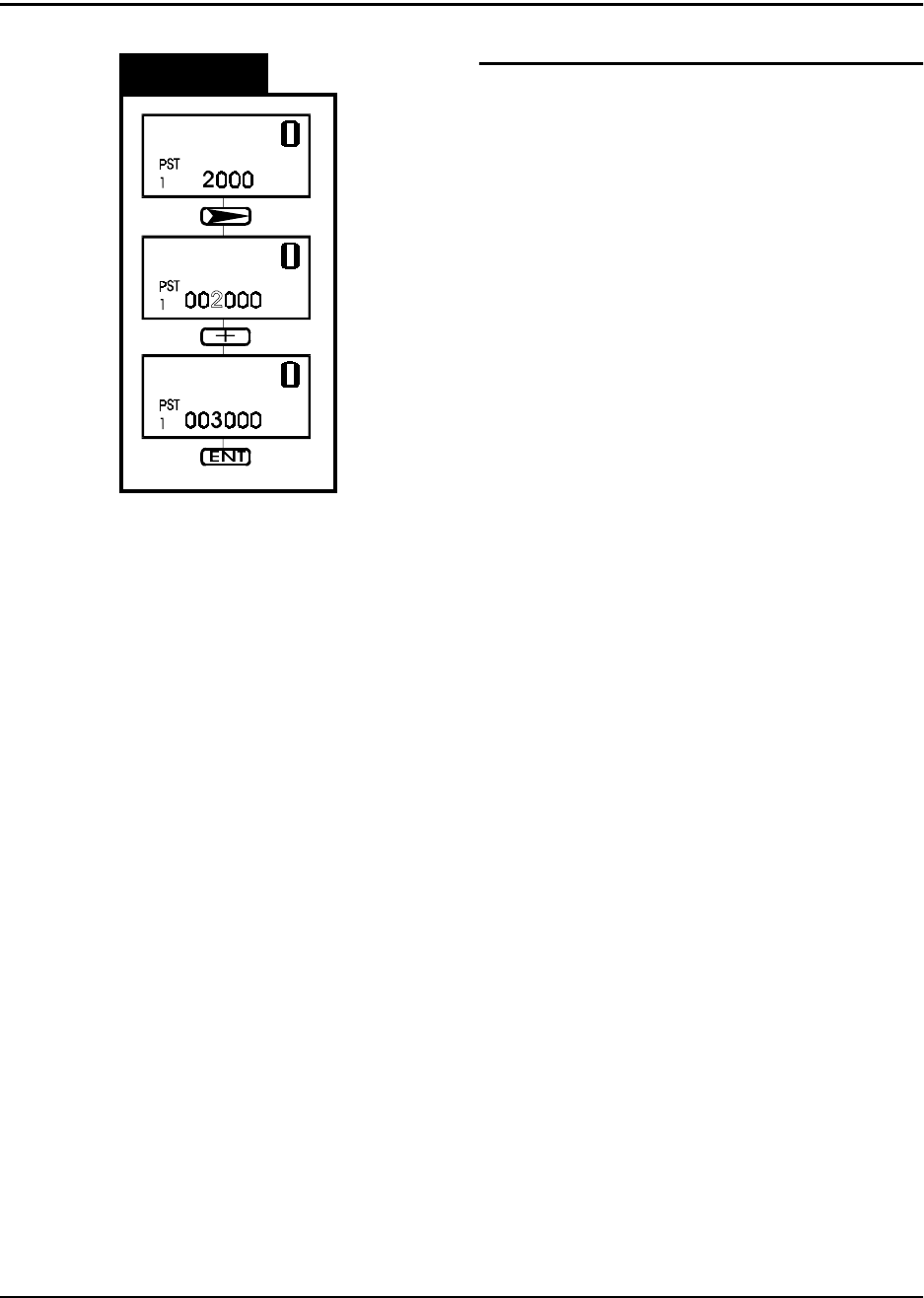
Figure 2.7
Changing the End Count Value
The Preset Data value is the end count, or tar-
get value, for the current job. The machine
will cease operation when the counter module
reaches this value. To continue tape move-
ment, press the RESET button on the counter
module.
This diagram shows the sequence for entering
new values in the Preset Data. This proce-
dure can be done with the Count Enable
Switch in either the UP or Down position.
Use the NEXT DIGIT key to select one digit to
change. The selected digit begins to flash.
Change the selected digit with the + and -
keys.
When all of the digits have been correctly set,
press the ENTER key to store the new value
in memory.