TM-300_0wners_Manual.pdf - 第21页
TM-300 Ope ration Ins truct ion s 61170613. fm Page 15 of 27 Setting the Counter F i gur e 2. 7 Changin g the E n d Count Value Th e Pres et D ata valu e is th e end cou nt, or ta r- get valu e, for the cur rent job. Th …
TM-300 Operation Instructions 61170613.fm Page 14 of 27
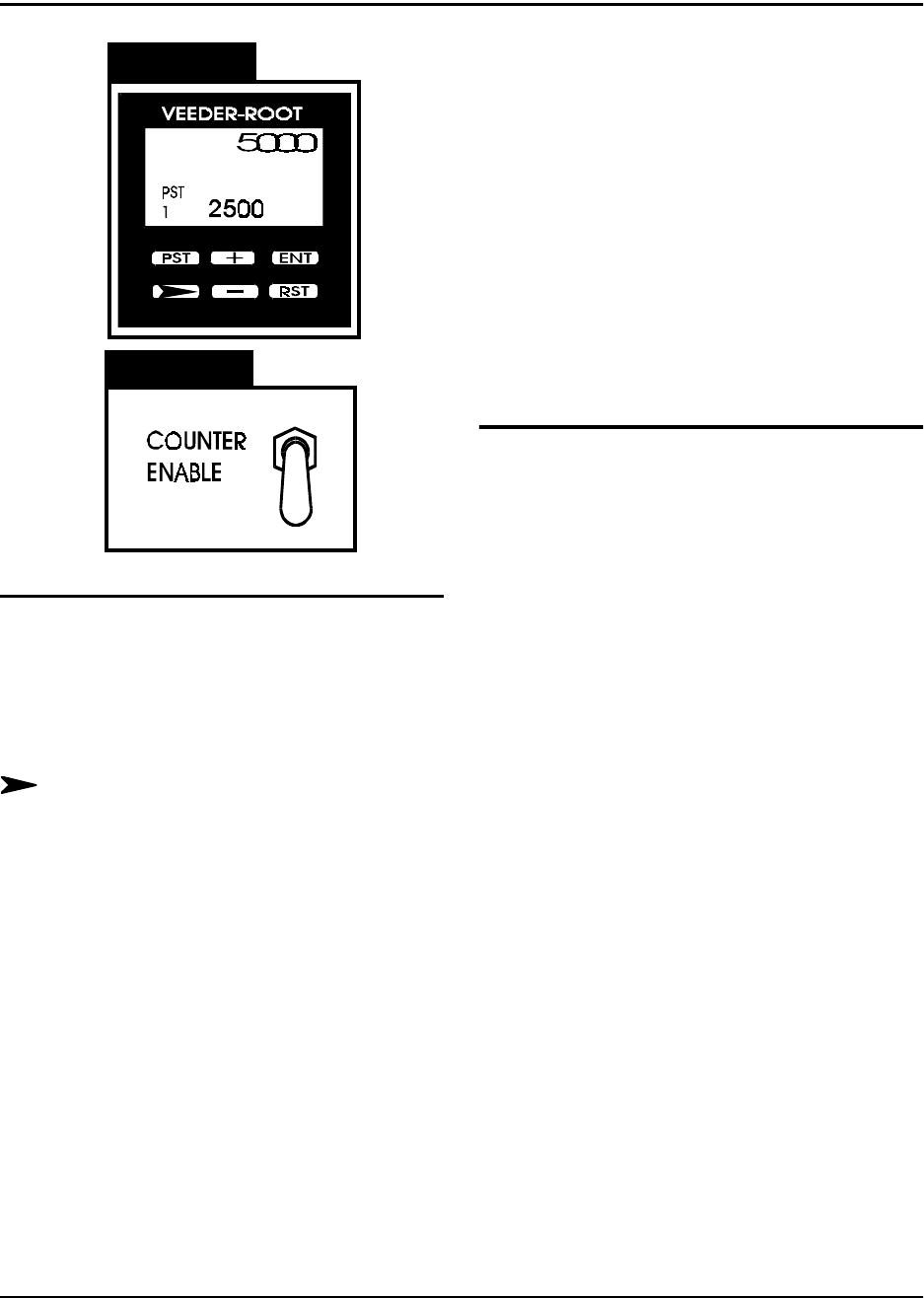
Counter Controls
Figure 2.5
Figure 2.6
Counter Module (Figure 2.5)
PST-Preset Select
This key can be used to select data to be dis-
played when the PGM input is active, although
for normal operation of the TM-300 this key is
not used.
Next Digit
This key selects one digit of data to be
changed. The first keypress will select the
left-most digit; additional presses will select
digits further to the right. The chosen digit will
flash twice per second. That digit may then be
changed with the + and - keys
+/- Increment/Decrement
The (+) key will change the selected (flashing)
digit of Preset or Program Data by adding 1 to
it. Rollover occurs from 9 back to 0. The (-)
key similarily subtracts 1, and will roll under
from 0 to 9. Holding either key down will
cause the digit to change repeatedly about
twice per second.
RST (Reset)
The counter is reset to 0 when this key is
pressed.
ENT (Enter)
This key transfers edited Preset or Program
Data to nonvolatile memory. The newly
selected value is not used until the ENTER
key is pressed. During normal operation a ten
second timer is in effect. If a Preset has been
changed but not entered, the Preset Data will
revert back to its old value after ten seconds of
inactivity.
Count Enable Switch (Figure 2.6)
The Count Enable Switch has two positions:
up and down.
Up
In this position, the counter will be in its normal
operating mode. The count value will incre-
ment as the tape moves through the TM-300,
dependent on the setting of the Prescale value
(Pitch Setting).
Down
In this position, the counter will be disabled.
The TM-300 will function normally but the
count value will not increase.
TM-300 Operation Instructions 61170613.fm Page 15 of 27
Setting the Counter
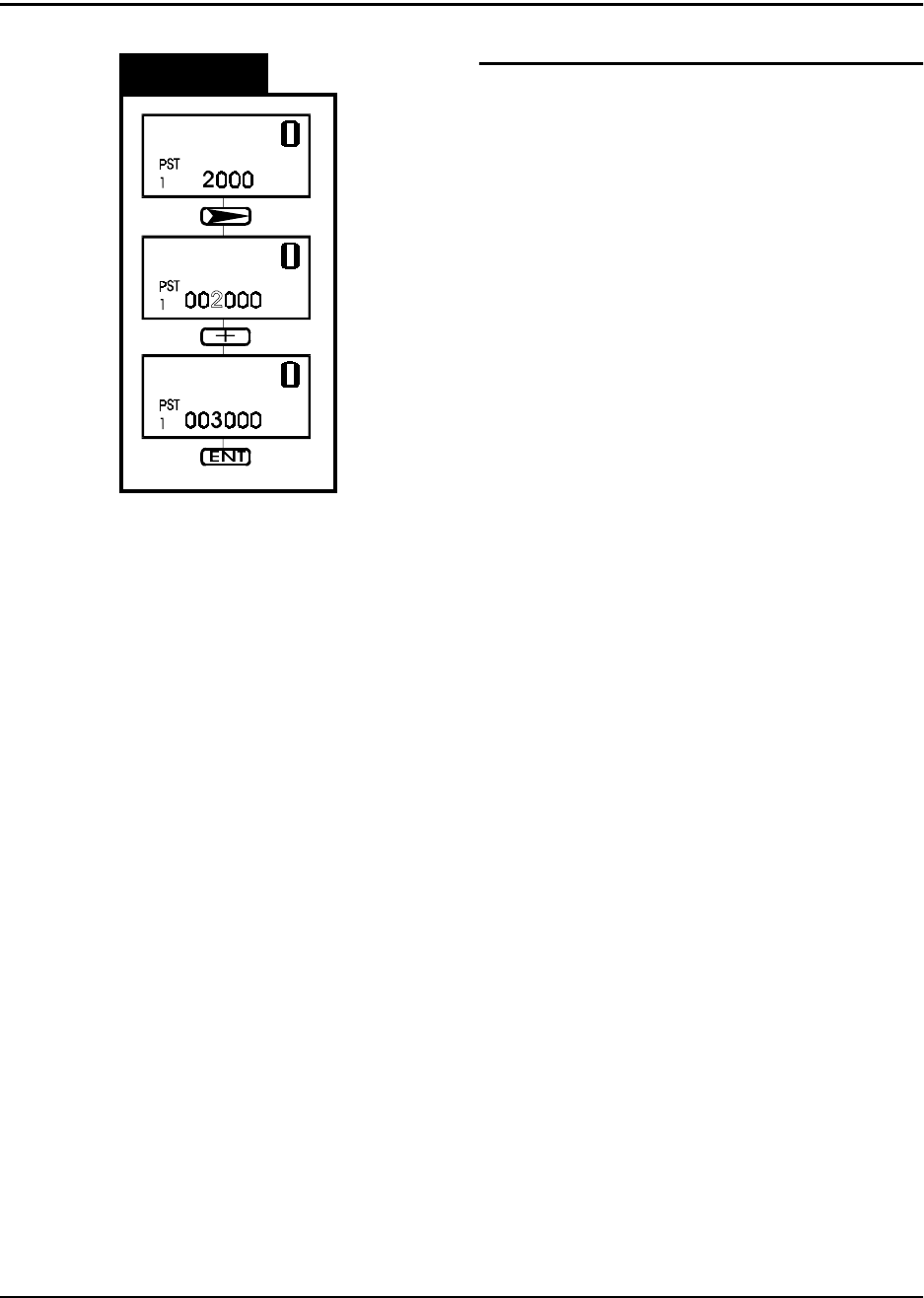
Figure 2.7
Changing the End Count Value
The Preset Data value is the end count, or tar-
get value, for the current job. The machine
will cease operation when the counter module
reaches this value. To continue tape move-
ment, press the RESET button on the counter
module.
This diagram shows the sequence for entering
new values in the Preset Data. This proce-
dure can be done with the Count Enable
Switch in either the UP or Down position.
Use the NEXT DIGIT key to select one digit to
change. The selected digit begins to flash.
Change the selected digit with the + and -
keys.
When all of the digits have been correctly set,
press the ENTER key to store the new value
in memory.
TM-300 Operation Instructions 61170613.fm Page 16 of 27
Startup Procedure
Turn the TM-300 Controller POWER switch to
ON. Press the START button to begin pro-
gram execution.
Run Mode
The Run Mode is the normal mode of opera-
tion for taping parts. In this mode the internal
software constantly monitors the PITCH,
TAPE SPEED, DWELL, and Emergency
STOP controls.
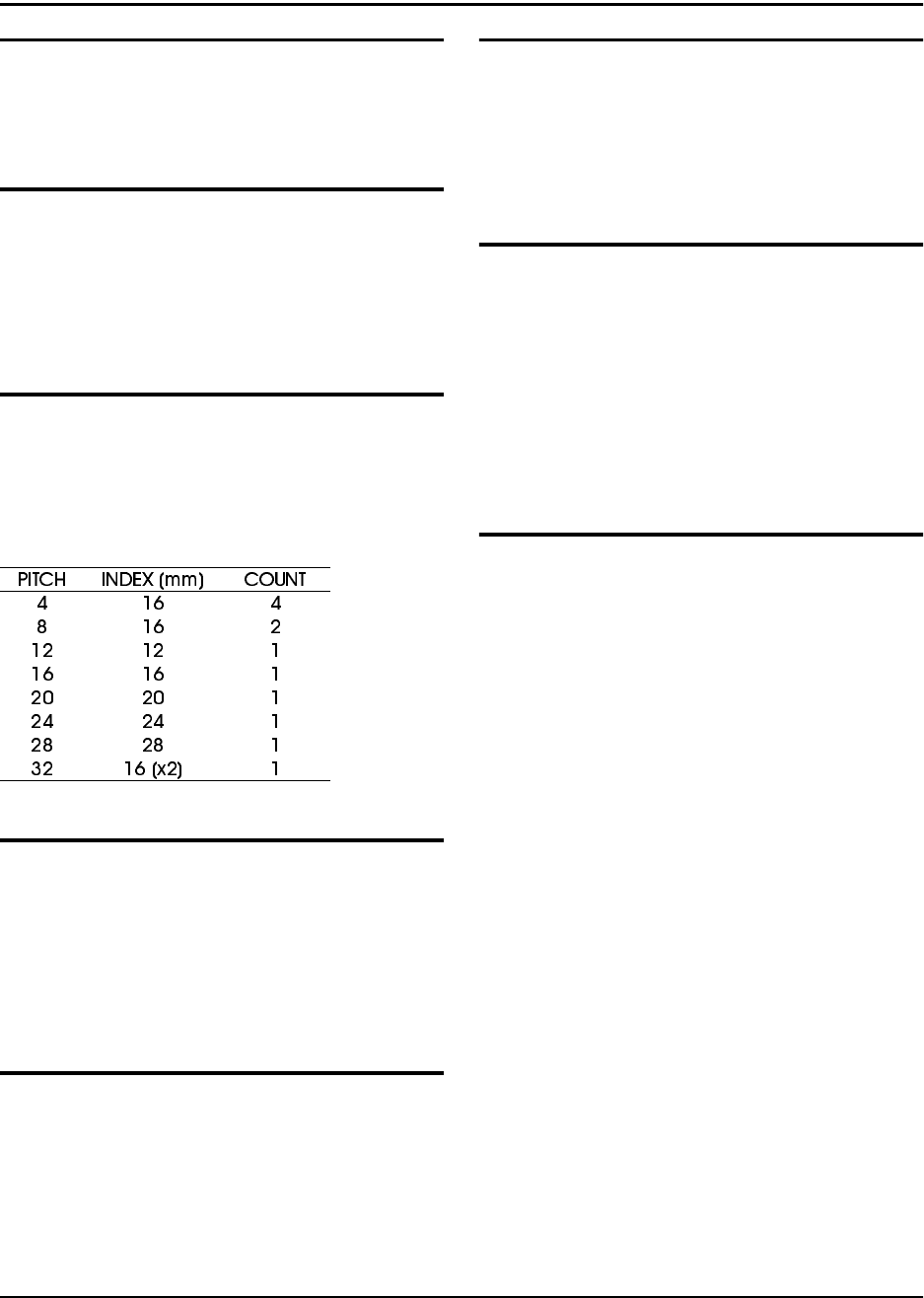
Pitch
For operation, it is essential that the PITCH
setting is correct for the type of carrier tape
used. The PITCH input allows the controlling
software to determine the correct carrier tape
movement and keep an accurate part count.
Tape Speed
Any time a motion begins, the controller reads
the TAPE SPEED inputs to determine the
velocity at which the carrier tape will travel.
Speed is entered in pps (pulses per second)
units. Any new TAPE SPEED setting will take
effect the next time a new motion is begun.
Dwell
After the carrier tape has advanced, the inter-
nal software reads the DWELL dial to deter-
mine how long the seal head should stay
down on the cover tape. Dwell times can be
selected from 0.25 to 1.00 second.
Controller Operation
Foot Switch (FSW)
Any time the FSW is momentarily pressed, the
TM-300 will advance the carrier tape, seal the
tape, and increment the counter. If the FSW is
pressed and held down, the previous cycle will
repeat until the FSW is deactivated.
Stop
If, for any reason, the operator needs to stop
any motion in progress, pressing the STOP
button will bring all motion to a controlled halt.
To continue a previously halted motion, press-
ing START will allow the motion to continue
from where it left off. Press the RESET button
followed by the START button to return to nor-
mal program mode.
Jog Mode (Tape Adjust)
In this mode, the operator may make fine
adjustments in the positioning of the carrier
tape. This feature is intended for initial posi-
tioning of the carrier tape before taping parts.
Fine positioning can be performed in either the
forward (FWD) or reverse (REV) directions.
FWD - Momentarily pressing the FWD button
advances the tape by 0.25mm. Pressing and
holding this button causes the tape to advance
4 times in 0.25mm increments, pause for one
second, and then jog continuously until the
button is released.
REV - Momentarily pressing the REV button
reverses the tape by 0.25mm. Pressing and
holding this button causes the tape to move
backwards in 0.25mm increments. Reverse
jogging is not allowed.
(Note: Care should be used when using the
REVERSE positioning button. The carrier/
cover tape may not freely feed back through
the sealer, cover tape guides, or loading track
mechanisms, causing a tape jam.)