TM-300_0wners_Manual.pdf - 第23页
TM-300 Ope ration Ins truct ion s 61170613. fm Page 17 of 27 Sof tware D own loa d Procedu r e TM-300 Controll e r Setup 1. Disconnec t the pow er cord fro m the back of th e machi ne. 2. Remo ve t he cover on the con t …
TM-300 Operation Instructions 61170613.fm Page 16 of 27
Startup Procedure
Turn the TM-300 Controller POWER switch to
ON. Press the START button to begin pro-
gram execution.
Run Mode
The Run Mode is the normal mode of opera-
tion for taping parts. In this mode the internal
software constantly monitors the PITCH,
TAPE SPEED, DWELL, and Emergency
STOP controls.
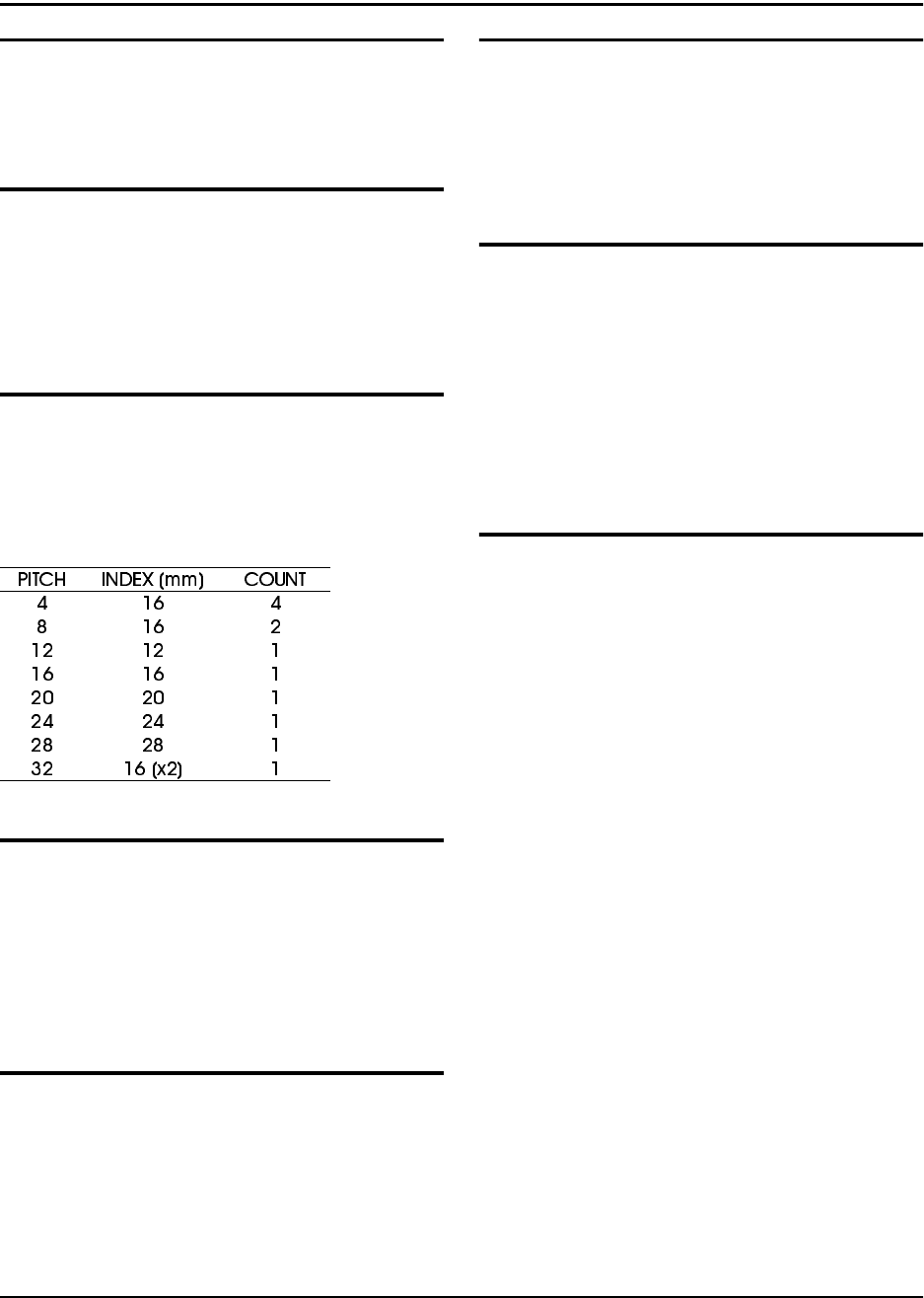
Pitch
For operation, it is essential that the PITCH
setting is correct for the type of carrier tape
used. The PITCH input allows the controlling
software to determine the correct carrier tape
movement and keep an accurate part count.
Tape Speed
Any time a motion begins, the controller reads
the TAPE SPEED inputs to determine the
velocity at which the carrier tape will travel.
Speed is entered in pps (pulses per second)
units. Any new TAPE SPEED setting will take
effect the next time a new motion is begun.
Dwell
After the carrier tape has advanced, the inter-
nal software reads the DWELL dial to deter-
mine how long the seal head should stay
down on the cover tape. Dwell times can be
selected from 0.25 to 1.00 second.
Controller Operation
Foot Switch (FSW)
Any time the FSW is momentarily pressed, the
TM-300 will advance the carrier tape, seal the
tape, and increment the counter. If the FSW is
pressed and held down, the previous cycle will
repeat until the FSW is deactivated.
Stop
If, for any reason, the operator needs to stop
any motion in progress, pressing the STOP
button will bring all motion to a controlled halt.
To continue a previously halted motion, press-
ing START will allow the motion to continue
from where it left off. Press the RESET button
followed by the START button to return to nor-
mal program mode.
Jog Mode (Tape Adjust)
In this mode, the operator may make fine
adjustments in the positioning of the carrier
tape. This feature is intended for initial posi-
tioning of the carrier tape before taping parts.
Fine positioning can be performed in either the
forward (FWD) or reverse (REV) directions.
FWD - Momentarily pressing the FWD button
advances the tape by 0.25mm. Pressing and
holding this button causes the tape to advance
4 times in 0.25mm increments, pause for one
second, and then jog continuously until the
button is released.
REV - Momentarily pressing the REV button
reverses the tape by 0.25mm. Pressing and
holding this button causes the tape to move
backwards in 0.25mm increments. Reverse
jogging is not allowed.
(Note: Care should be used when using the
REVERSE positioning button. The carrier/
cover tape may not freely feed back through
the sealer, cover tape guides, or loading track
mechanisms, causing a tape jam.)
TM-300 Operation Instructions 61170613.fm Page 17 of 27
Software Download Procedure
TM-300 Controller Setup
1. Disconnect the power cord from the back of
the machine.
2. Remove the cover on the controller to allow
for access to the components inside.
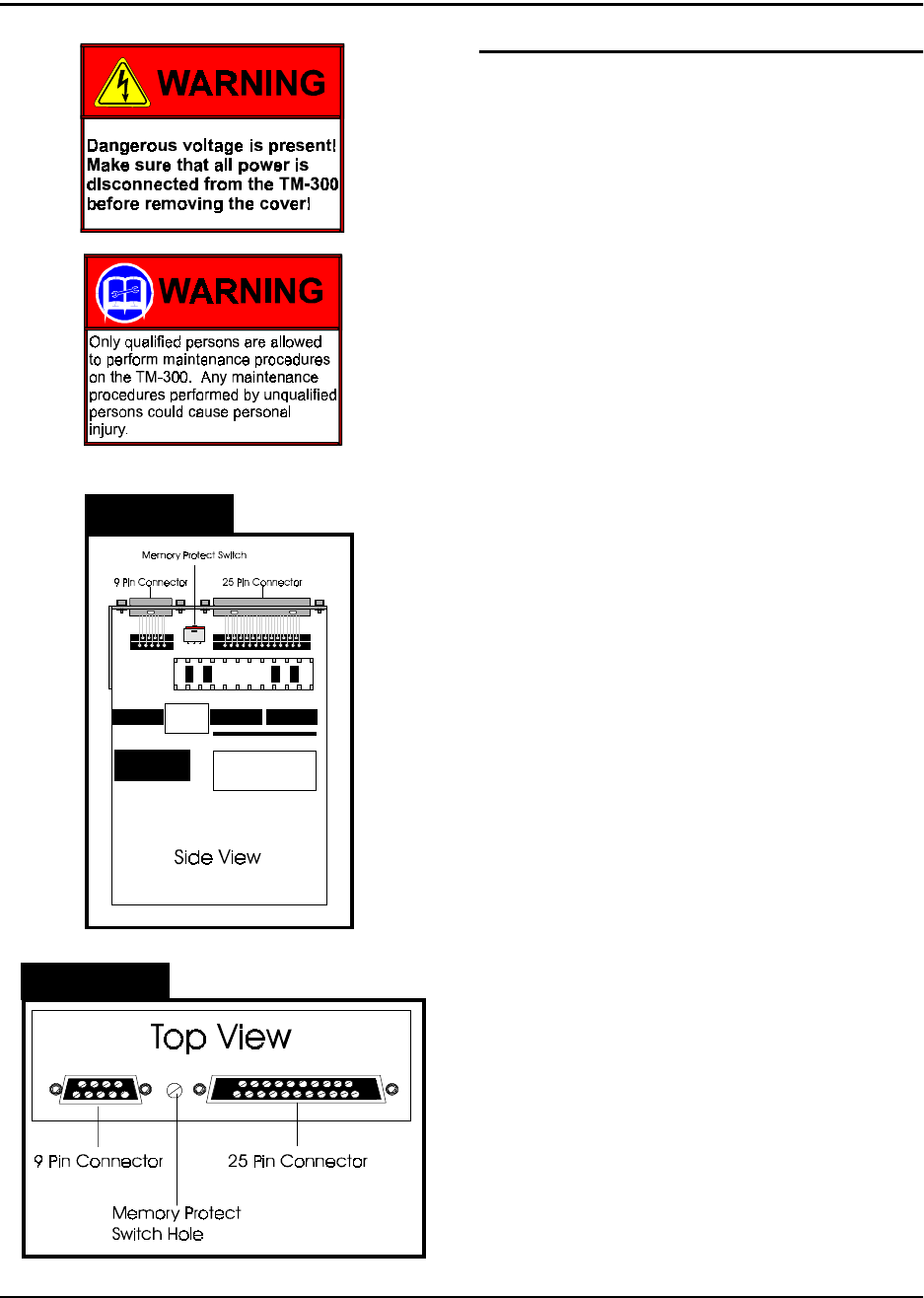
3. Locate the Slo-Syn Indexer Drive Module.
This module contains a memory protect switch
to help prevent accidental program and/or
parameter changes. When the switch is in the
PROTECT position changes can’t be made to
the program or the parameters. When the
switch is in the WRITE position, changes can
be made to the program or the parameters.
The memory protect switch is located between
the 9-pin and 25-pin connectors. When the
switch is positioned toward the 25-pin connec-
tor , the switch is in the WRITE position.
When the switch is positioned toward the 9-pin
connector the switch is in the PROTECT posi-
tion.
Set the switch in the WRITE position. This
can be done by using a small screwdriver to
either set the switch through the provided
hole, or by setting the switch on the board. If
setting the switch on the board, be careful not
to damage any components.
4. Connect the 9 pin 'D' male end of the com-
munications cable to the RS-232 port on the
rear panel of the TM-300 (Figure 4, Ref. C).
5. Verify that the TM-300 POWER switch is
ON.
6. Verify that the SERIAL/PARALLEL switch,
located on the rear panel, is set to the SERIAL
position.
7. Press the RESET button.
Figure 2.8
Figure 2.9

TM-300 Operation Instructions 61170613.fm Page 18 of 27
PC Setup
1. Connect the 9-pin 'D' female end of the
communications cable to the COM1 port on a
PC (IBM compatible personal computer).
2. Insert TM-300 SOFTWARE disk into PC.
3. Change directory to the drive containing
the DOWNLOAD disk.
Download Operation
1. Run the 'MS1.EXE' program on the TM-300
DOWNLOAD disk.
2. Select the 'UTILITY' pull down menu and
choose the 'DISK TO INDEXER' option.
3. At the "Program Name" prompt window,
type the <drive:> <filename.ext> of the pro-
gram to be downloaded.
(Example: 'A:TM300EXT.A01' )
4. At the "Indexer ID#" prompt window, verify
ID# <1>. Press ENTER and the PC terminal
will display the message ‘Transmitting File
<filename.ext> to Indexer’. The downloading
process takes approximately 20-30 seconds.
(Note: Do not press START or RESET while
download transmission is in progress, or the
download will be terminated and an error mes-
sage will occur).
5. If the error message (‘Indexer 1 did not
respond and is unable to accept program’)
appears on the screen, ensure that the SET-
UP conditions for both the TM-300 and PC are
correct and retry the downloading operation.
Software Download Procedure (cont.)
When Finished Downloading Program
1. Turn the main power OFF.
2. Once again, disconnect the power cord
from the back of the machine.
3. Place the memory protect switch in the
PROTECT position.
4. Remove the RS-232 Cable.
5. Replace the cover to the controller.
6. Set the SERIAL/PARALLEL switch to the
PARALLEL position so that the machine will
run.
7. Replace the power cord and turn the main
power ON.
8. Press the RESET and START buttons on
the controller to start the program.
Software Modification
The TM-300 Controller Software is factory set
with specific default values. However, some
applications may require special parameter
settings.
The following two (stepper motor) parameters
may be changed:
Ramping Profiles:
0- Trapezoidal
1- "S"
2- Hyperbolic
Acceleration/Deceleration constant
Additional software modifications may be
made for specific applications requiring fea-
tures not available in the current software for
the TM-300. Contact your V-TEK representa-
tive for more detailed information on making
software modifications.