TM-300_0wners_Manual.pdf - 第25页
TM-300 Ope ration Ins truct ion s 61170613. fm Page 19 of 27 Se tup T apin g As sembl y Setu p 1. Mount He at Sealer Ass em bly ( Fig. 2.2, Ref. T) A se aler mu st be used w hic h m at c h es the wi dth of the ca rrier t…

TM-300 Operation Instructions 61170613.fm Page 18 of 27
PC Setup
1. Connect the 9-pin 'D' female end of the
communications cable to the COM1 port on a
PC (IBM compatible personal computer).
2. Insert TM-300 SOFTWARE disk into PC.
3. Change directory to the drive containing
the DOWNLOAD disk.
Download Operation
1. Run the 'MS1.EXE' program on the TM-300
DOWNLOAD disk.
2. Select the 'UTILITY' pull down menu and
choose the 'DISK TO INDEXER' option.
3. At the "Program Name" prompt window,
type the <drive:> <filename.ext> of the pro-
gram to be downloaded.
(Example: 'A:TM300EXT.A01' )
4. At the "Indexer ID#" prompt window, verify
ID# <1>. Press ENTER and the PC terminal
will display the message ‘Transmitting File
<filename.ext> to Indexer’. The downloading
process takes approximately 20-30 seconds.
(Note: Do not press START or RESET while
download transmission is in progress, or the
download will be terminated and an error mes-
sage will occur).
5. If the error message (‘Indexer 1 did not
respond and is unable to accept program’)
appears on the screen, ensure that the SET-
UP conditions for both the TM-300 and PC are
correct and retry the downloading operation.
Software Download Procedure (cont.)
When Finished Downloading Program
1. Turn the main power OFF.
2. Once again, disconnect the power cord
from the back of the machine.
3. Place the memory protect switch in the
PROTECT position.
4. Remove the RS-232 Cable.
5. Replace the cover to the controller.
6. Set the SERIAL/PARALLEL switch to the
PARALLEL position so that the machine will
run.
7. Replace the power cord and turn the main
power ON.
8. Press the RESET and START buttons on
the controller to start the program.
Software Modification
The TM-300 Controller Software is factory set
with specific default values. However, some
applications may require special parameter
settings.
The following two (stepper motor) parameters
may be changed:
Ramping Profiles:
0- Trapezoidal
1- "S"
2- Hyperbolic
Acceleration/Deceleration constant
Additional software modifications may be
made for specific applications requiring fea-
tures not available in the current software for
the TM-300. Contact your V-TEK representa-
tive for more detailed information on making
software modifications.
TM-300 Operation Instructions 61170613.fm Page 19 of 27
Setup
Taping Assembly Setup
1. Mount Heat Sealer Assembly (Fig. 2.2,
Ref. T)
A sealer must be used which matches the
width of the carrier tape being used. To
remove an existing sealer, turn the sealer air
pressure switch OFF, disconnect the sealer
connector, and remove the two bolts which
secure the sealer to the up-right plate. Care-
fully lift the sealer away from the upright plate.
*CAUTION*-Sealers which have been in
use will be hot. Serious burns can result if
the heat shoes are touched.
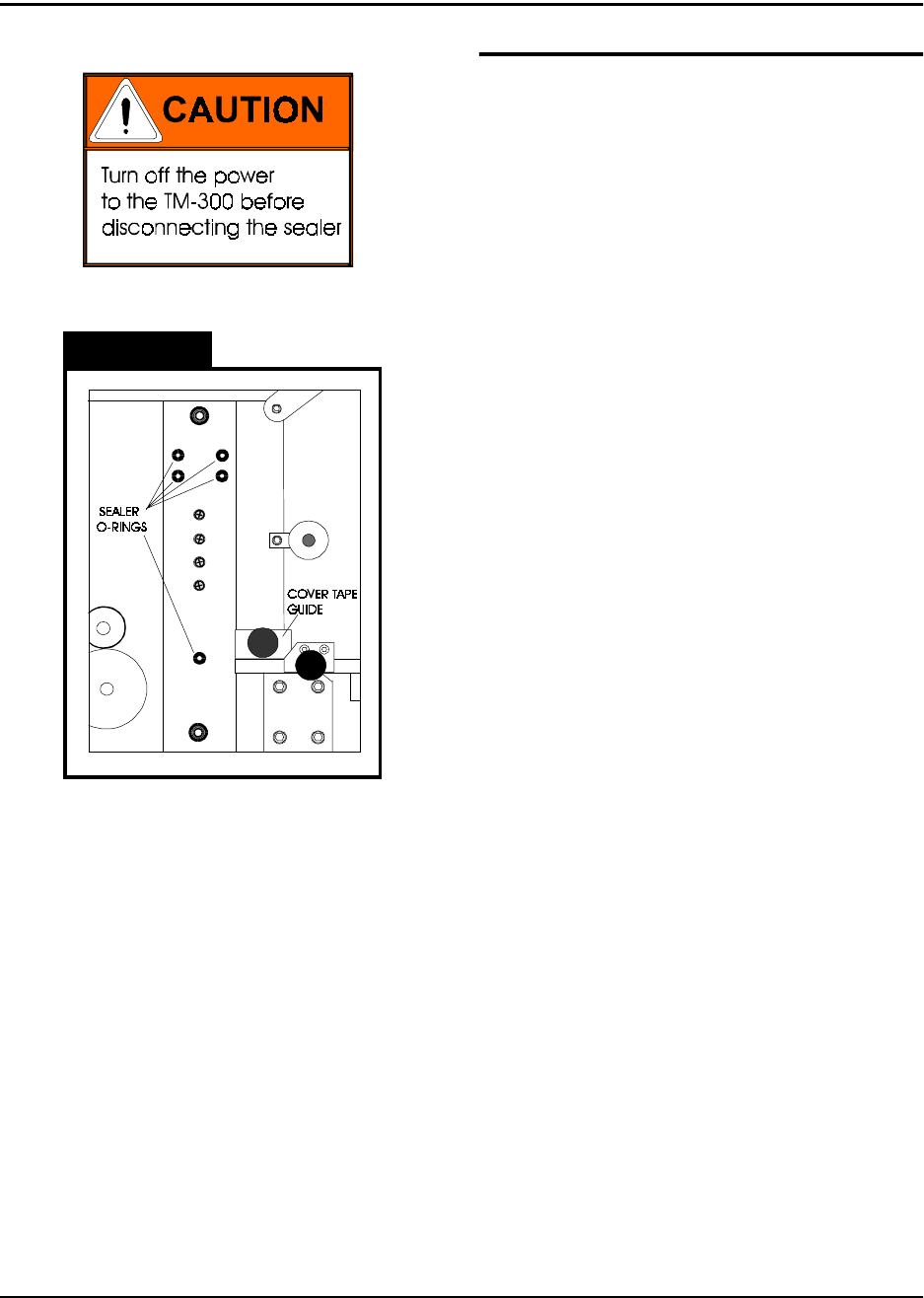
When mounting a new sealer, first inspect the
up-right plate where the sealer is mounted to
make sure all of the O-rings are in place.
There are (5) O-rings at the places shown
which must be in place for the sealer to func-
tion properly. Replace any missing or dam-
aged O-rings. A small amount of glue can be
used to secure the O-rings in their holes if they
are replaced.
Carefully lower the new sealer into position.
Do not hit the exposed corners of the loading
track with the sealer or they may be damaged.
Run the sealer connector and cord over the
top of the up-right plate and plug the connec-
tor into the receptacle on the back of the con-
troller. Secure the sealer with its two mounting
bolts.
There is a cover tape guide which accompa-
nies every sealer (Fig. 2.2, Ref. S). When
changing sealers, this guide must also be
changed. To do so, remove the knurled, metal
knob which secures it in place and slide the
guide straight off. Once the new sealer is in
place, mount the new cover tape guide, mak-
ing sure its marked tape width matches that of
the sealer.
Figure 2.10
TM-300 Operation Instructions 61170613.fm Page 20 of 27
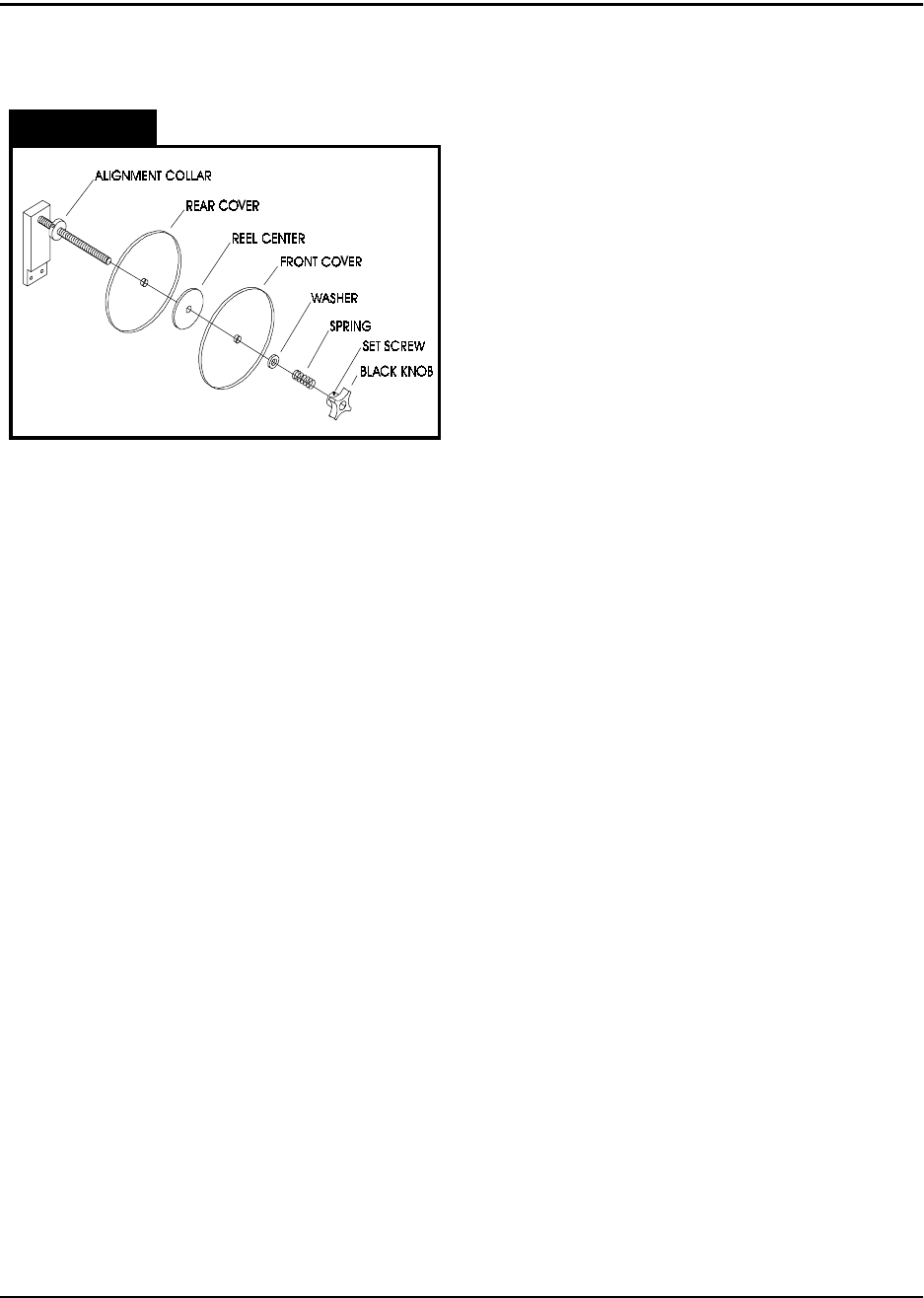
2. Load the Cover Tape
Remove the large black knob from the cover
tape spindle (loosen the brass set screw if
necessary). Remove the spring, washer, and
front plastic cover from the spindle. Place a
reel of cover tape (correct width to match the
carrier tape) on the reel center, so the tape
unwinds to the right from the bottom of the
reel. Replace the plastic cover, washer,
spring, and black knob. Tighten the knob until
there is some tension on the cover tape as it
unwinds, but make sure the tension is not
excessive. Tighten the brass set screw on the
black knob to secure it in place.
3. Load the Carrier Tape
Remove the carrier tape clamp (Fig. 2.2, Ref.
L) from the carrier tape spindle (Fig. 2.2, Ref.
K) and mount the bulk carrier tape reel on the
spindle (the sprocket holes on the carrier tape
must be on the inside). Replace the clamp
and position it so the reel is supported and
spins freely on the spindle. Trim the end of the
carrier tape so it is clean and straight.
The loading track (Fig. 2.2, Ref. P) is adjust-
able for tape width. Set the track width to
match the sealer mounted on the TM-300 by
pulling out, or pushing in, evenly on both ends
of the track. There are detents which will
cause the track to lock in at each tape width.
Open the parts cover (Fig. 2.2, Ref. Q) by lift-
ing on the black knob and remove carrier tape
guide #2 (Fig.2. 2Ref. R) by unscrewing its
black knob. Guide the carrier tape under car-
rier tape guide #1 (Fig. 2.2, Ref. N) and into
the loading track. The carrier tape should feed
through the loading track easily. Lower the
feed reel support arm if necessary to allow the
tape to feed more easily into the loading track.
Bring the end of the tape just up to cover tape
guide #3 (Fig. 2.2, Ref. S).
Setup (cont.)
Figure 2.11