TM-300_0wners_Manual.pdf - 第32页
TM-300 Ope ration Ins truct ion s 61170613. fm Page 26 of 27 Pl acing Par ts St artin g with the lef t-mos t p ocke t, pla ce a part in ea ch em pty poc ket for the full leng th of t he load ing trac k. Clos e the p arts…
TM-300 Operation Instructions 61170613.fm Page 25 of 27
Operation
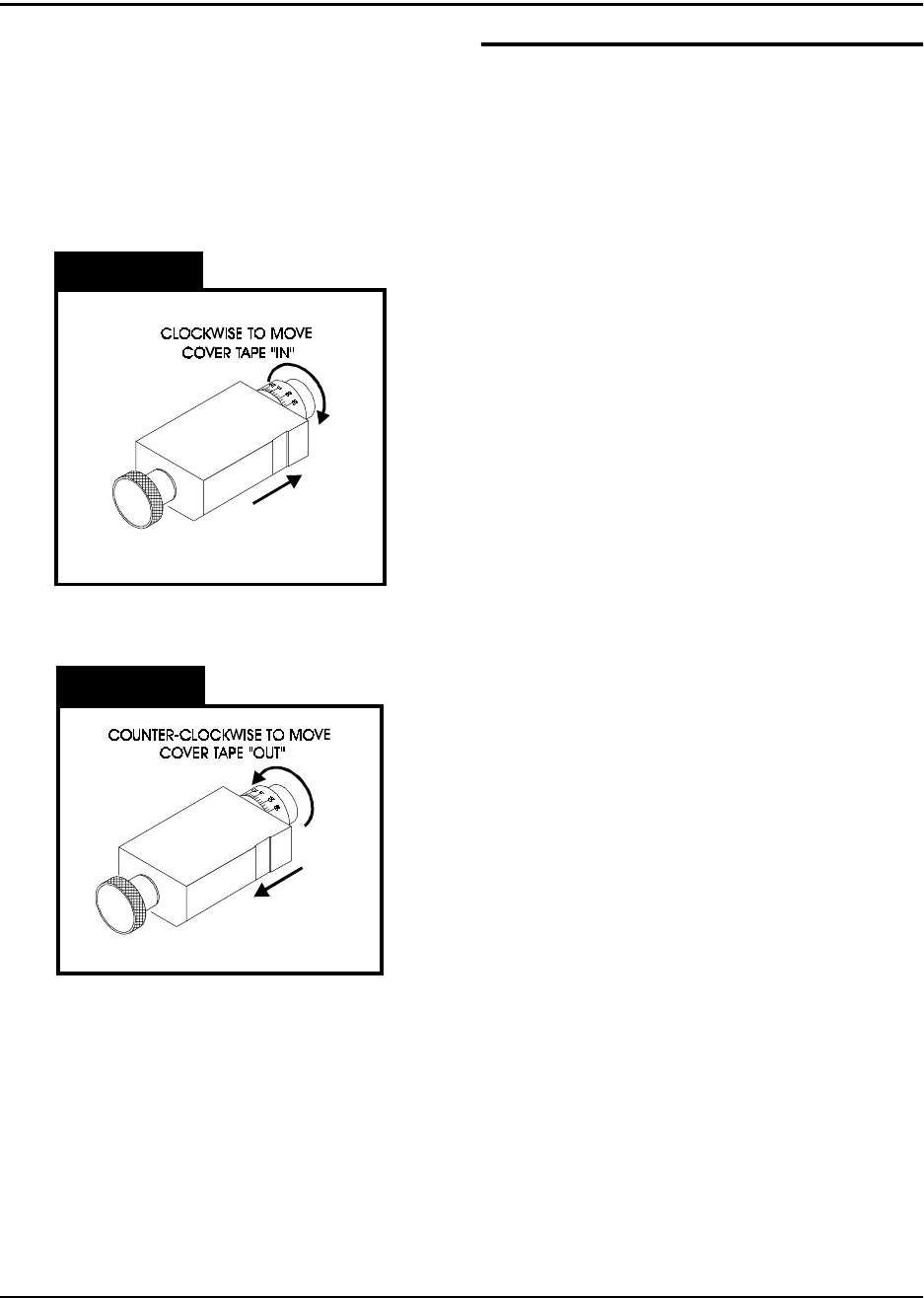
Figure 2.19
Figure 2.20
Refer to Figures 2.19 and 2.20 for information
on this page.
Initial Procedures
1. Set the Take-up Reel Adjust control to 0
(fully CCW).
2. Turn the TM-300 main power switch ON.
3. Perform the Taping Assembly Setup pro-
cedures described in this manual.
4. Set the Counter Module Preset and Pres-
cale values.
5. Set the sealer controls at the appropriate
levels. Wait for the temperature controls
to stabilize near their set temperature.
To move the cover tape in relation to the car-
rier, loosen the knob on cover tape guide #3
and pull the guide slightly away from the
adjustment dial so the dial will turn freely.
Turning the dial clockwise will move the cover
tape closer to the sprocket holes on the inside
edge of the carrier (ten divisions on the dial
will move the tape .005 inches).
Turning the dial counter-clockwise will move
the cover tape closer to the outside edge of
the carrier (ten divisions on the dial will move
the tape .005 inches).
Push the tape guide back against the dial after
the adjustment has been made and tighten
the knob. Run the tape out again until the
cover tape stops shifting and check the align-
ment. Repeat this procedure until the proper
alignment has been achieved.
Peel Force
In most taping applications a peel force test is
needed to determine the seal characteristics.
Take as many peel force tests as are needed,
while adjusting the sealer controls, to obtain
the desired seal.

TM-300 Operation Instructions 61170613.fm Page 26 of 27
Placing Parts
Starting with the left-most pocket, place a part
in each empty pocket for the full length of the
loading track. Close the parts cover (Fig.2.2,
Ref. Q) if desired. Press on the foot switch to
advance the carrier tape through the taping
assembly. Stop the tape advance prior to an
empty pocket reaching carrier tape guide #2
and refill the carrier tape in the loading track.
Repeat until the trailer has advanced to a posi-
tion where the end of the sealed tape reaches
the take-up reel and attach it to the inside hub
of the reel. Adjust the take-up reel tension with
just enough tension to wrap the tape on the
take-up reel. DO NOT APPLY EXCESSIVE
TENSION. Use only enough tension to wrap
the tape. Adjust tension as needed as parts
are added. Continue taping parts until the
counter module reaches its Preset value and
stops the tape advance.
To End Taping
Preset
When the End Count value on the counter
module is reached, the TM-300 will stop. The
last part to pass under carrier tape guide #2
will be the last part counted. Any additional
parts in the loading track must be removed.
Reset
Press the RST button on the counter module to
enable taping of the leader.
Leader
Seal the desired number of empty pockets.
When the last sealed empty pocket has
cleared the drive sprocket, cut the tape just to
the left of the sprocket.
Operation (cont.)
To Begin Taping
Leader/Trailer
Before beginning a production reel, you must
decide how long the trailer and the leader
need to be.
Trailer - The strip of empty pockets needed
at the end of the reel.
Leader - The strip of empty pockets needed
at the beginning of the reel to feed into a
pick and place machine.
The trailer of each reel is taped first. After the
cover tape alignment and any peel force tests
are completed, run out enough sealed empty
pockets to make the trailer. After the trailer is
taped, check the counter display to ensure it
reads 0. If not, press the counter module
RESET button.
Tape Alignment
To ensure an accurate count, the first pocket
in the loading track (left-most) must be a full
pocket. That is, the left-most edge of the
pocket must be aligned with the right edge of
carrier tape guide #2 (Fig. 2.2, Ref. R). If a full
pocket is not showing, lift the carrier tape free
of the drive sprocket and move it back until a
full pocket is showing, then engage the carrier
tape on the drive sprocket at that point.
Counter Enable
Verify that the COUNTER ENABLE SWITCH
is UP and that the counter has been reset.
TM-300 Operation Instructions 61170613.fm Page 27 of 27
Maintenance
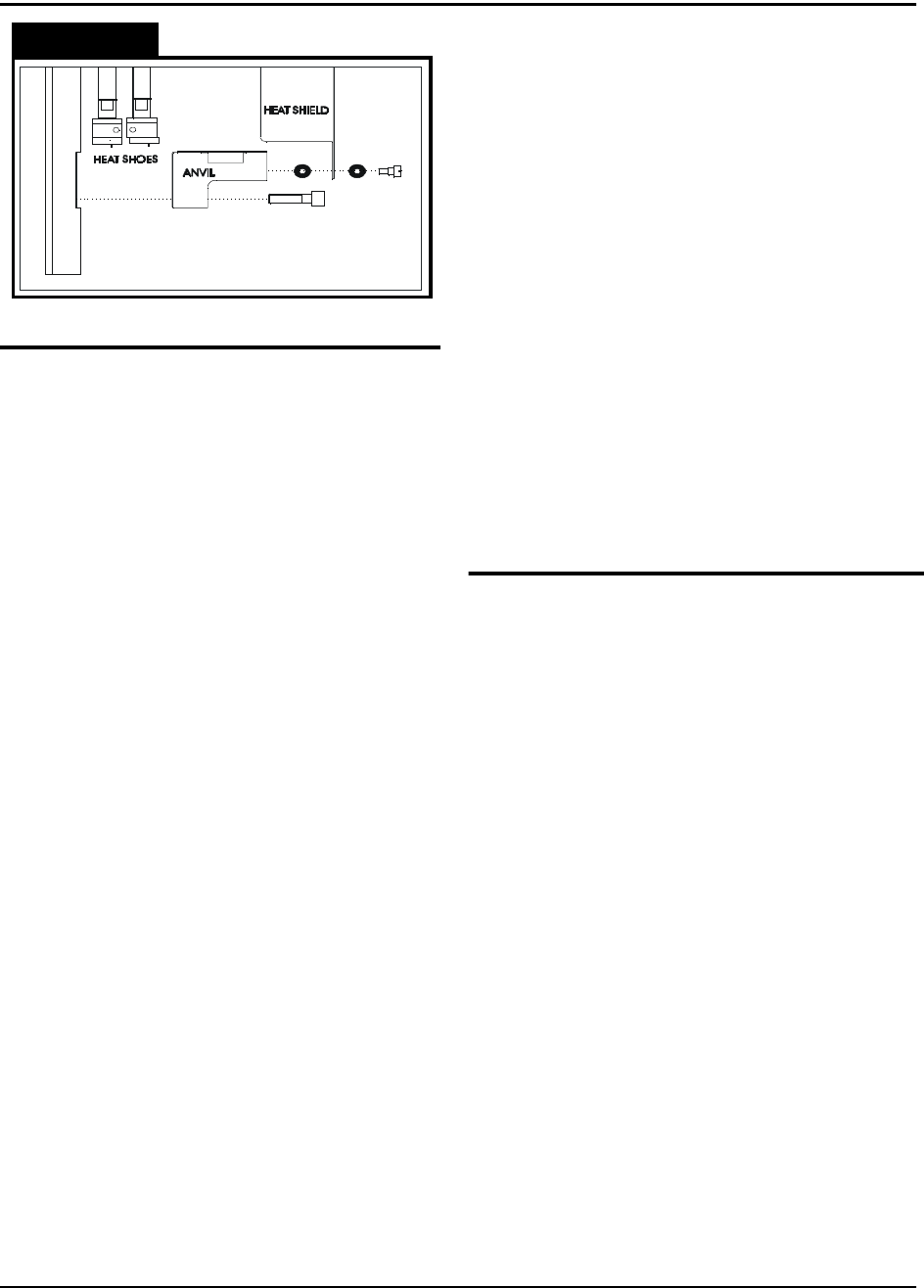
Figure 2.21
Seal Assembly
DO NOT TOUCH THE HEAT SHOE ASSEM-
BLY WHEN IT IS HOT! IT WILL STAY HOT
ENOUGH TO BURN FINGERS SEVERAL
MINUTES AFTER THE SEALER HAS BEEN
TURNED OFF!
Heat Sealer
Heat sealer maintenance consists mainly of
cleaning built-up residues from the heat
shoes. These residues occur due to a mixture
of dust, tape debris, and cover tape adhesive
which accumulate during taping. Remove the
two bottom screws holding the heat shield to
the sealer. Be careful not to lose the O-rings
which are under the head of these screws and
between the heat shield and the anvil.
Remove the two bolts which hold the anvil to
the sealer assembly. Remove the anvil by
sliding it to one side.
*CAUTION* - DO NOT USE ALCOHOL ON A
HOT SEALER.
Clean the residues from the heat shoes by
using a plastic or brass brush soaked in alco-
hol. DO NOT USE A STEEL BRISTLED
BRUSH. If there are some tough spots, such
as melted plastic, which do not want to come
clean, the sealer can be heated by plugging it
into the taping machine, and then scraped
with the handle of a wood brush or some other
wooden implement.
Alignment
If the seal becomes uneven, where one end of
the heat shoe seems to be striking harder than
the other, DO NOT DISASSEMBLE THE HEAT
SHOE ASSEMBLY. To realign the heat shoes
the sealer must be sent back to the factory.
O-Rings
There are five O-rings between the sealer
assembly and the seal assembly up-right which
provide a seal between the two for the air pres-
sure that drives the sealer. When changing
sealer assemblies, check that these O-rings are
in place and not damaged. When replacing,
place a small amount of adhesive, such as
super glue, on the O-ring before inserting into
the recess. Make sure that the airway is not
blocked.
Tape Path
Loading Track
Occasionally, when the machine is stripped and
cover tape guide #3 is removed, brush the dust
and debris from the track with a small, stiff bris-
tled paint brush.
Cover Tape Guide #3
This may become coated with adhesive and dirt
during taping. It is important to keep the tape
groove clean for proper alignment of the cover
tape. Clean the tape groove with alcohol and a
cotton swab whenever it appears dirty.
Encoder Wheel
The slotted wheel and adjacent sensors may
become covered in dust and debris which may
cause erroneous counting. Brush these off with
a stiff bristled brush whenever they appear dirty.
Air Pressure Regulator
Inspect the air regulator for moisture accumula-
tion (see page 22). Check periodically depend-
ing on air quality and press the petcock on the
bottom of regulator to release the fluid if mois-
ture is present.