00194888-01_DE_EN.pdf - 第81页
Installation Manual, Station Software Version 603.01 Issue 11/2006 3.4 Network configuration Station computer Machine controller 10Base-T 100Base-T Private network between station computer, Vision computer (op tional) an…

Installation Manual, Station Software Version 603.01 Issue 11/2006
18 of 62
3.3.1 Station computer
Name SIMATIC Box PC 627
CPU / clock frequency Pentium M / 2 GHz
RAM 1 GB
Hard disk 40 GB
External DVD drive Yes
Serial interfaces 1
USB interfaces
and external USB hub
Yes
Network 2x 100 MBit
Table 3-8: Station computer hardware (SIPLACE D series)
3.3.2 Machine controller
Name
SIMATIC Microbox 420
CPU / clock frequency
Pentium III / 933 MHz
RAM
256 MB
Hard disk
40 GB
External DVD drive Yes
Serial interfaces 1
USB interfaces
and external USB hub
Yes
Network
2x 100 MBit
Table 3-9: Machine controller hardware (SIPLACE D series)
Installation Manual, Station Software Version 603.01 Issue 11/2006
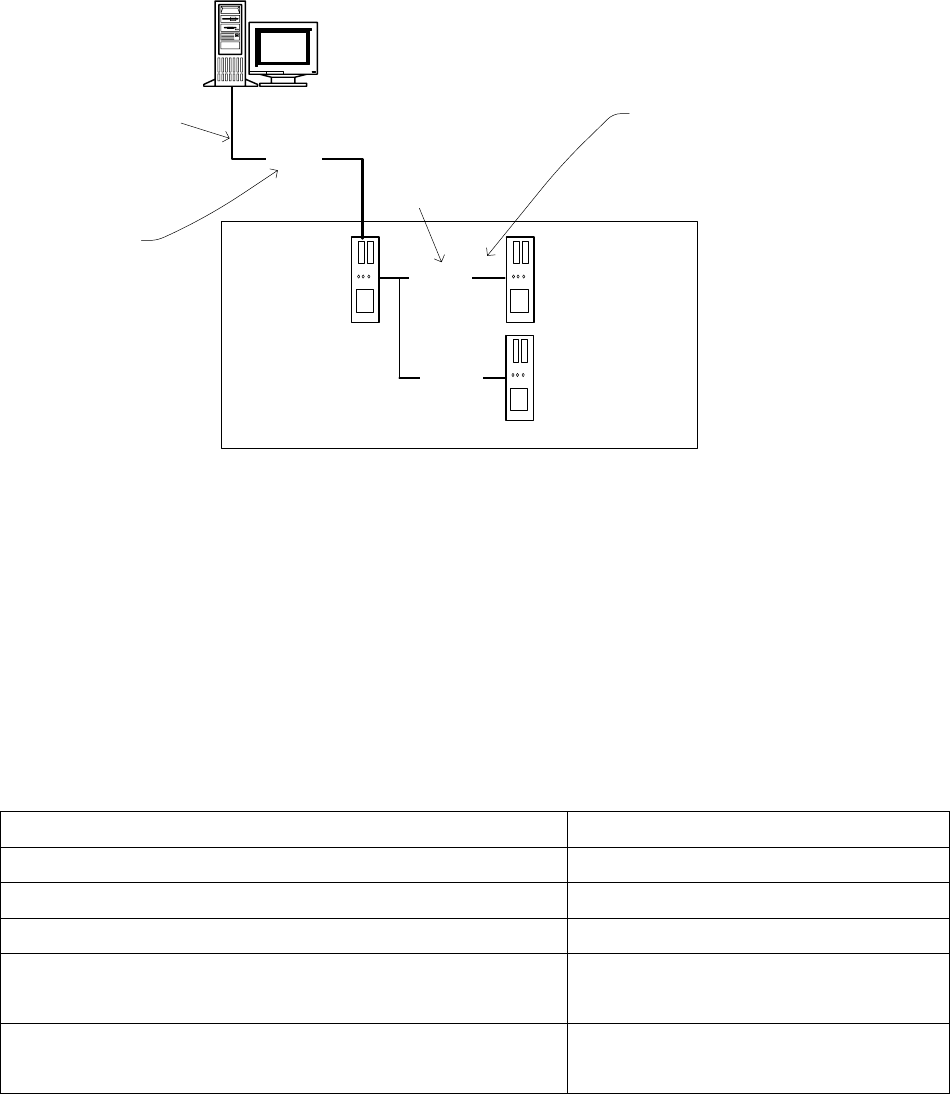
3.4 Network configuration
Station computer
Machine controller
10Base-T
100Base-T
Private network between
station computer,
Vision computer (optional)
and machine controller
SIPLACE LAN
SIPLACE Pro
Twisted Pair TP
(100 MB)
Twisted Pair TP
(10 MB)
Vision computer
(optional)
100Base-T
Fig. 3-4: Network connections between the machine and SIPLACE Pro
A separate private network (100 Mbit) is set up between the station computer (and optionally the Vision
computer) and the machine controller via a subnet mask.
Fixed IP addresses for the station computer, Vision computer and machine controller can thus be assigned
for all SIPLACE machines. These IP addresses are not known outside the private network, for instance in
the SIPLACE LAN or customer LAN.
These IP addresses need not be further configured by the operator while the station software is being
installed.
IP address, station computer 192.168.255.249
IP address, machine controller 192.168.255.250
Vision computer IP Address 192.168.255.251
Subnet mask, station computer/machine controller 255.255.255.248
IP address range, SIPLACE LAN or
IP address range, customer LAN
172.22.xxx.xxx
is configured on-site
Subnet mask for SIPLACE-LAN or
subnet mask for customer LAN
255.255.0.0
is configured on-site
Table 3-10: Network configuration
19 of 62
Installation Manual, Station Software Version 603.01 Issue 11/2006
4 Installation Manual
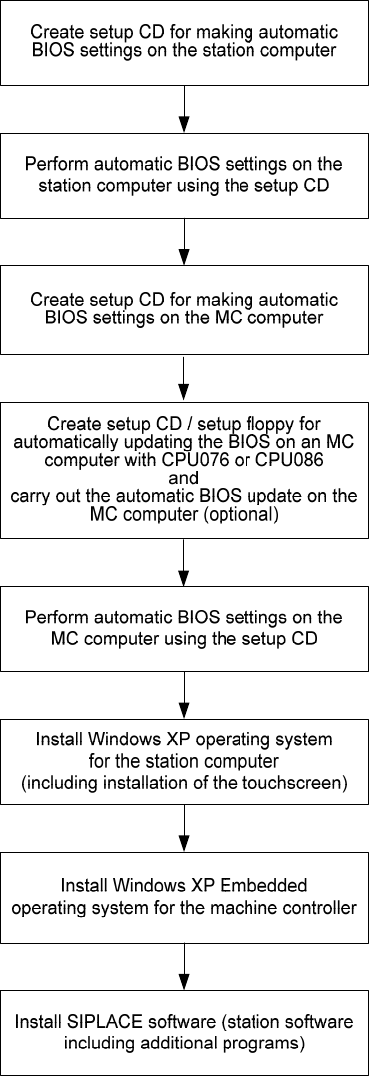
4.1 Installation sequence
See section
4.2.1
20 of 62
See section
4.2.1
See section
4.3.1
See section
4.10.3
See section
4.10.4
See separate manual for details on installing the Windows XP
operating system (item no. 00194575-02)
4.4.3
For details on calibrating the touchscreen, see sections
and
4.4.4.
See separate manual for details on installing the Windows XP
Embedded operating system (item no. 00195327-01)
4.4 and 4.5
See sections