00194888-01_DE_EN.pdf - 第95页
Installation Manual, Station Software Version 603.01 Issue 11/2006 → Touch the monitor you wish to calibrate wi th the pen supplied. You are now prompted to Touch the red square . Fig. 4-15: Calibration marks Notes: Touc…
Installation Manual, Station Software Version 603.01 Issue 11/2006
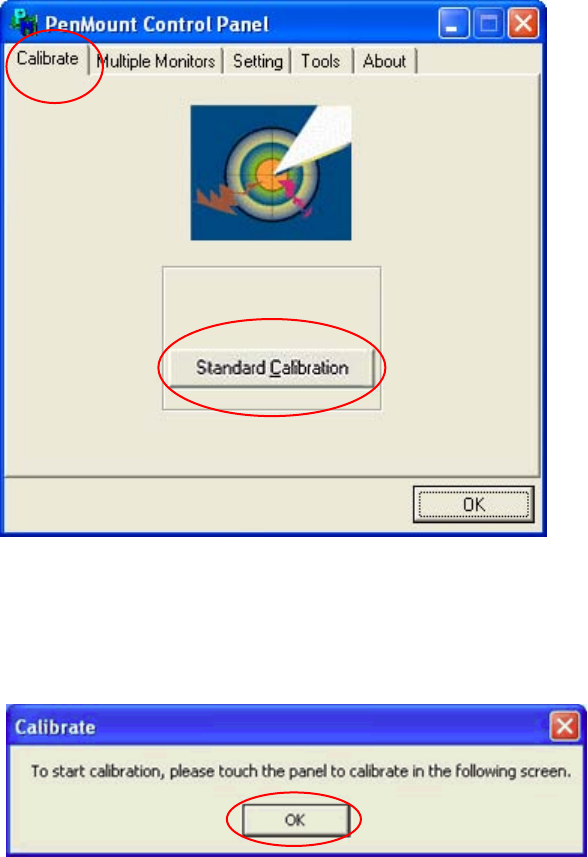
→ Open the Calibrate tab.
32 of 62
Fig. 4-13: PenMount Control Panel – Calibrate tab
→ Click the Standard Calibration button. The Calibrate dialog box opens.
Fig. 4-14: “Calibrate” dialog box
→ Acknowledge the dialog box by clicking on OK.

Installation Manual, Station Software Version 603.01 Issue 11/2006
→ Touch the monitor you wish to calibrate with the pen supplied. You are now prompted to Touch the
red square.
Fig. 4-15: Calibration marks
Notes:
Touch the calibration marks within 20 seconds, otherwise calibration is automatically
canceled.
Make sure that you are standing directly in front of the monitor.
Carry out calibration in the position (standing or seated) you normally adopt when working
at this screen.
Touch the calibration icon firmly and accurately with the pen.
Make sure that you to not inadvertently touch the screen with anything else.
→ Touch the red calibration marks with the pen in the numbered sequence shown.
→ Carry out the steps described above for the second screen as well.
→ Click OK in the PenMount Control Panel to close the program.
33 of 62
Installation Manual, Station Software Version 603.01 Issue 11/2006
34 of 62
4.4.5 Definitions
4.4.5.1 Initial installation
The first time the station software is installed on a SIPLACE placement machine is known as the initial
installation.
4.4.5.2 Update
If an initial installation has already been performed and a more recent release version of the station
software is to be loaded, then this procedure is referred to as an update.
The release version is identified by the last two digits of the complete version number.
Example:
603.01 = The number 603 identifies the software functions
The number 01 is the release version 1.
4.4.5.3 Upgrade
The range of functions of the software is indicated by the three digit number contained within the complete
version number.
The installation of a software version with a version number higher than the existing, installed version is
known as an upgrade procedure.
Example:
Changing software from 602.01 to 603.01 = Upgrade