SOM-1732-001.pdf - 第9页
6. T ape Feeders • A tape feeder provided with a tag assembly (a tag and a handle) can be used in the ACV system. See Fig. 2. Note that the shape of the T ag differs from that of the tape feeder used in the SIF system. •…

5. ACV System
In ACV system, the data including the number of components used for
each feeder can be managed integrally in the server.
The production history and component use state can be traced by reg-
istering the ACV terminal name and the operator name.
The ACV system can be used combining the following specially de-
signed functions. For the combination, contact our marketing depart-
ment or sales agency
Table 4
Special Specifications Name Remarks
ACV System for ACV System for TCM-X Series C-S368-01:
TCM-X Series TCM-X110,210,300(D)
C-S368-02:
TCM-X100,200,300
Specially for ACV System Feeders
• Tape Feeder with Tag Memory
• Dual Tape Feeder with Tag Memory
• Bulk Feeder with Tag Memory
ACV System for ACV System for TIM-X Series I-S162-01
TIM-X Series Specially for ACV System Feeders
• Tape Feeder with Barcode Label
• Pallet with Barcode Label
(Multi-Layer Tray Feeder)
• Pallet with Tag Memory
(Multi-Layer Tray Feeder) (Select Option)
ACV Terminal PC for ACV Terminal* These are also in com-
Software mon use in NT-100.
ACV Terminal ACV Terminal Software NP01102
Barcode Scanner*
Label Printer*
Barcode Label / Ink Ribbon*
ACV Server Software ACV Line Server
ACV Line Server ACV Control Server
Backup Device
ACV Server Software NP01101
Uninterruptive Power Supply*
- LAN Connection Kit (HUB)* E-S041-01
Note : Prepare for the * -marked devices on the customer side.
5. ACV System
0310-001 7 AIP01EGP
6. Tape Feeders
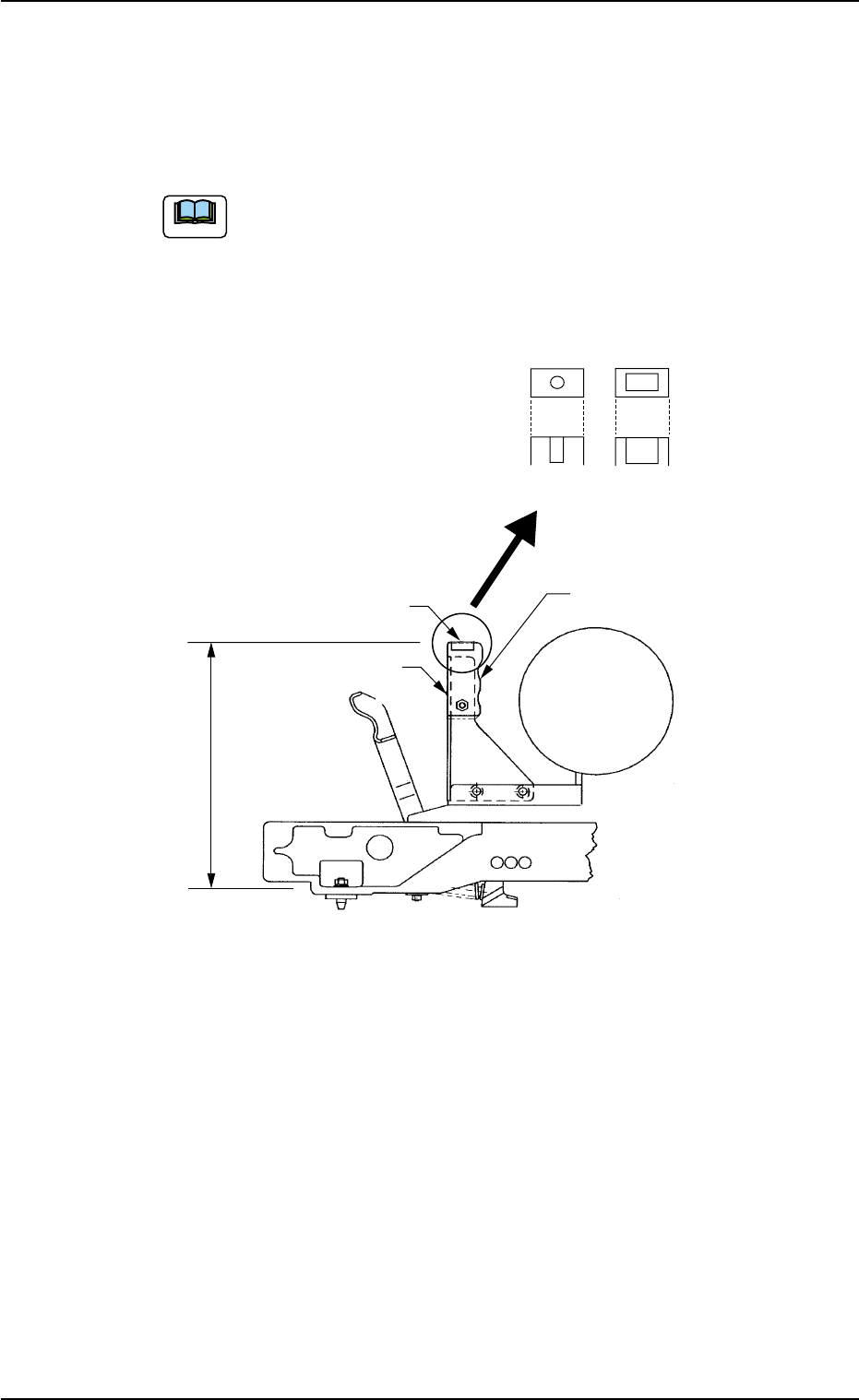
• A tape feeder provided with a tag assembly (a tag and a handle) can
be used in the ACV system. See Fig. 2.
Note that the shape of the Tag differs from that of the tape
feeder used in the SIF system.
• A tape feeder without a tag assembly can be used in the ACV system
after it is provided with a tag assembly.
Fig. 2
6. Tape Feeders
0310-001 8 AIP01EGP
Note
175.0 ± 0.5 (Tag Assembly
Mounting Dimension)
Tag Assy
Tag
SIF ACV
Handle
7. Scope of Actions
• At Start of Automatic Operation
When the [START] button on the operation panel is pressed, the ACV
data for all feeders used in the current program is checked. When no
error is detected, the operation continues.
When the feeders are checked in advance at the "ACV Check
Status" tab sheet, no checking operation is performed at
starting time of the machine.
• When a feeder is not installed correctly on the feeder carriage or a
feeder is short of components, an error message is issued and
the machine stops running.
• When an error is detected after all feeders are checked, the ma-
chine stops immediately in an error condition and an error mes-
sage is issued.
• All feeders are checked when the machine is restarted ([START]
Button "ON") after the data check is completed without any error
detection for all feeders and the automatic operation is stopped.
When the [FEEDER READY] button is turned OFF and
the door of a feeder carriage is opened or closed, all feed-
ers on the feeder carriage are checked.
• When a feeder is installed incorrectly and the machine stops in an
error condition, re-set it correctly. The machine is set ready to be
operated.
• At Re-Starting after Component Shortage or Pickup Error
The ACV data is checked for all feeders in the same manner as taken
when the automatic operation is started.
• At Program Change
The ACV data is checked for all feeders in the same manner as taken
when the automatic operation is started.
7. Scope of Actions
Note
Note
0310-001 9 AIP01EGP