00191374-04.pdf - 第156页
7 Collect & Place Head DLM1 Adjustment Instructions SIPLACE HS-50 7.4 Dynamic Adjustment of the Axes Edition 12/00 156 2VFLOORV FRSH6 HWWLQJV – If the dyna mics of the star a re cor rect, each s ignal wi ll appe…
Adjustment Instructions SIPLACE HS-50 7 Collect & Place Head DLM1
Edition 12/00 7.4 Dynamic Adjustment of the Axes
155
=$[LV
*HQHUDO3UHSDUDWLRQV
Å Start SITEST.
Å Turn on the compressed air supply.
Å Prepare the measurement setup for the star-axis acoording to fig 7.4 - 4.
Å Use standard nozzle 914.
Å Set the oscilloscope according to the table below.
Å Perform a head reference run.
NOTE
Use an RC - filter to record the current curve
In order to measure the actual current on the servo amplifier, connect only the actual current and
no *1'.
Measure the end signal on the measuring adapter of the axis control card, with the switch
activated.
$GMXVWPHQWRI7DFKR
3UHSDUDWLRQ
Å Positioning the gantries, position the z-axis into free space.
6,7(67
Å Select "C&P heads" ==> "Select head" ==>
"Axis functions" ==> "Select z-axis" ==> "Tacho adjustment" ==>
"Edit and accept values: Start position = 0; target position = 685; positioning mode = absolute;
waiting time = 1000".
Å If necessary, press the START button.
7 Collect & Place Head DLM1 Adjustment Instructions SIPLACE HS-50
7.4 Dynamic Adjustment of the Axes Edition 12/00
156
2VFLOORVFRSH6HWWLQJV
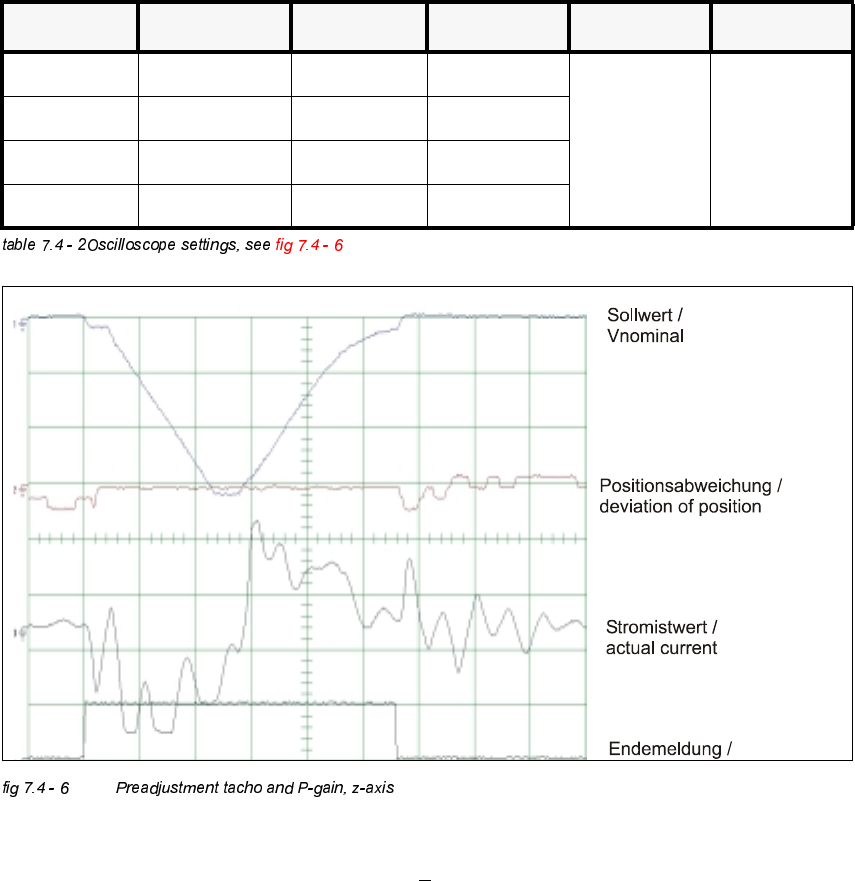
– If the dynamics of the star are correct, each signal will appear as illustrated above.
– Nominal - positioning time: 685 dgts: 28 ms +
2 ms.
&KDQQHO 6LJQDO &RXSOLQJ <'HIOHFWLRQ 7ULJJHU ;'HIOHFWLRQ
CH1 Vnominal DC 2.0 V/ DIV
CH1
negative
10% pre
5 ms/ DIV
CH2 deviat. of pos. DC 0.5 V/ DIV
CH3 actual current DC 5.0 V/ DIV
CH4 end signal DC 5.0 V/ DIV
Adjustment Instructions SIPLACE HS-50 7 Collect & Place Head DLM1
Edition 12/00 7.4 Dynamic Adjustment of the Axes
157
$GMXVWPHQWRI3*DLQZLWK&XUUHQW6HQVRU0RGH
NOTE
Adjusting the P-gain, you may only finely readjust the tacho potentiometer.
6,7(67
Å Select "C&P Heads" ==> "Select head" ==>
"Axis functions" ==> "Select z-axis" ==> "Calibration tool position" ==>
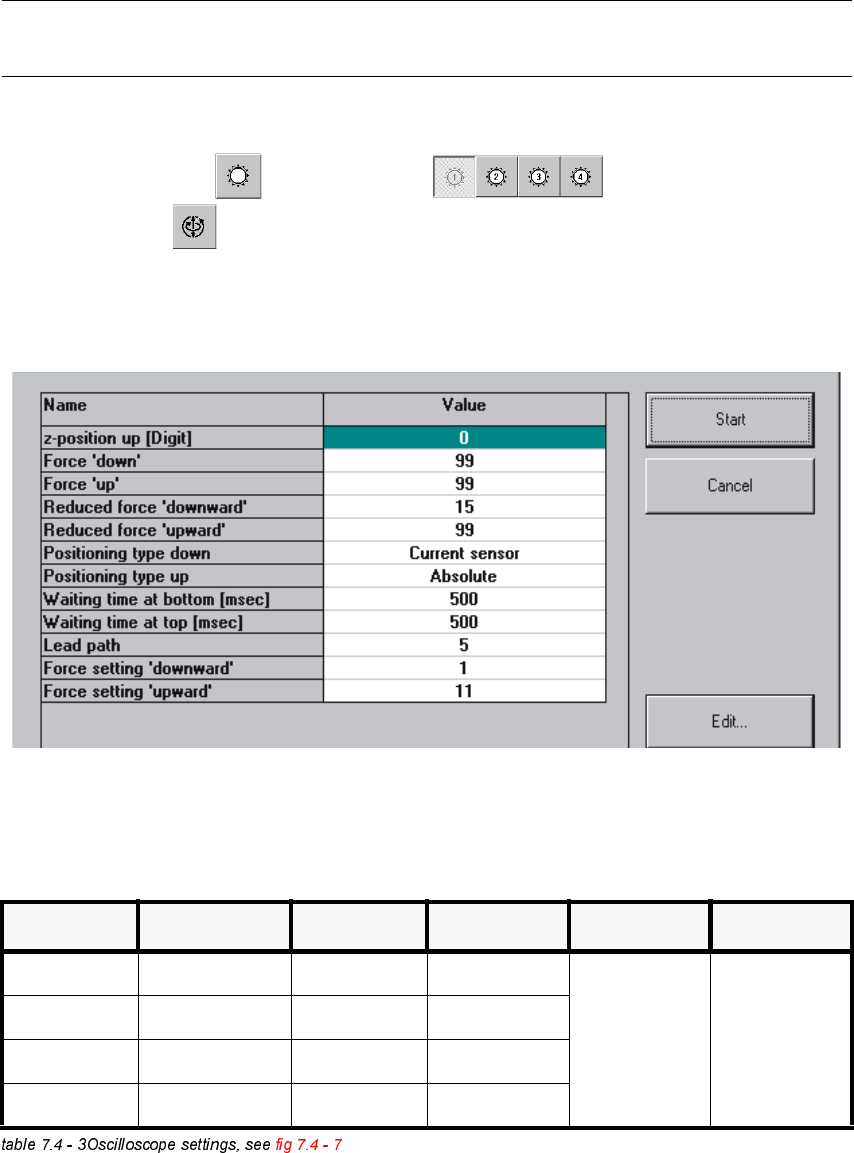
"Adjust P-gain" ==> "Edit values and accept: If necessary, press the START button.
Å If necessary, press the START button.
2VFLOORVFRSH6HWWLQJV
&KDQQHO 6LJQDO &RXSOLQJ <'HIOHFWLRQ 7ULJJHU ;'HIOHFWLRQ
CH1 Vnominal DC 1.0 V/ DIV
CH1
negative
0 % pre
10 ms/ DIV
CH2 deviation of pos. DC 1.0 V/ DIV
CH3 actual current DC 5.0 V/ DIV
CH 4 end signal DC 5.0 V/ DIV