00191374-04.pdf - 第172页
172 9 Calibration of SI PLACE HS-50 (incl. SITES T version 501.xx ) Adjustment Instructions S IPLACE HS-50 9.5 Calibration of Calibration P osition Softwareversion SR.501.xx Edition 12/00 &DOLEUDWLRQ RI&…
Adjustment Instructions SIPLACE HS-50 9 Calibration of SIPLACE HS-50 (incl. SITEST version 501.xx)
Softwareversion SR.501.xx Edition 12/00 9.4 Calibration of Machine Zero Point
171
&DOLEUDWLRQRI0DFKLQH=HUR3RLQW
Example: Placement area 1.
6,7(67
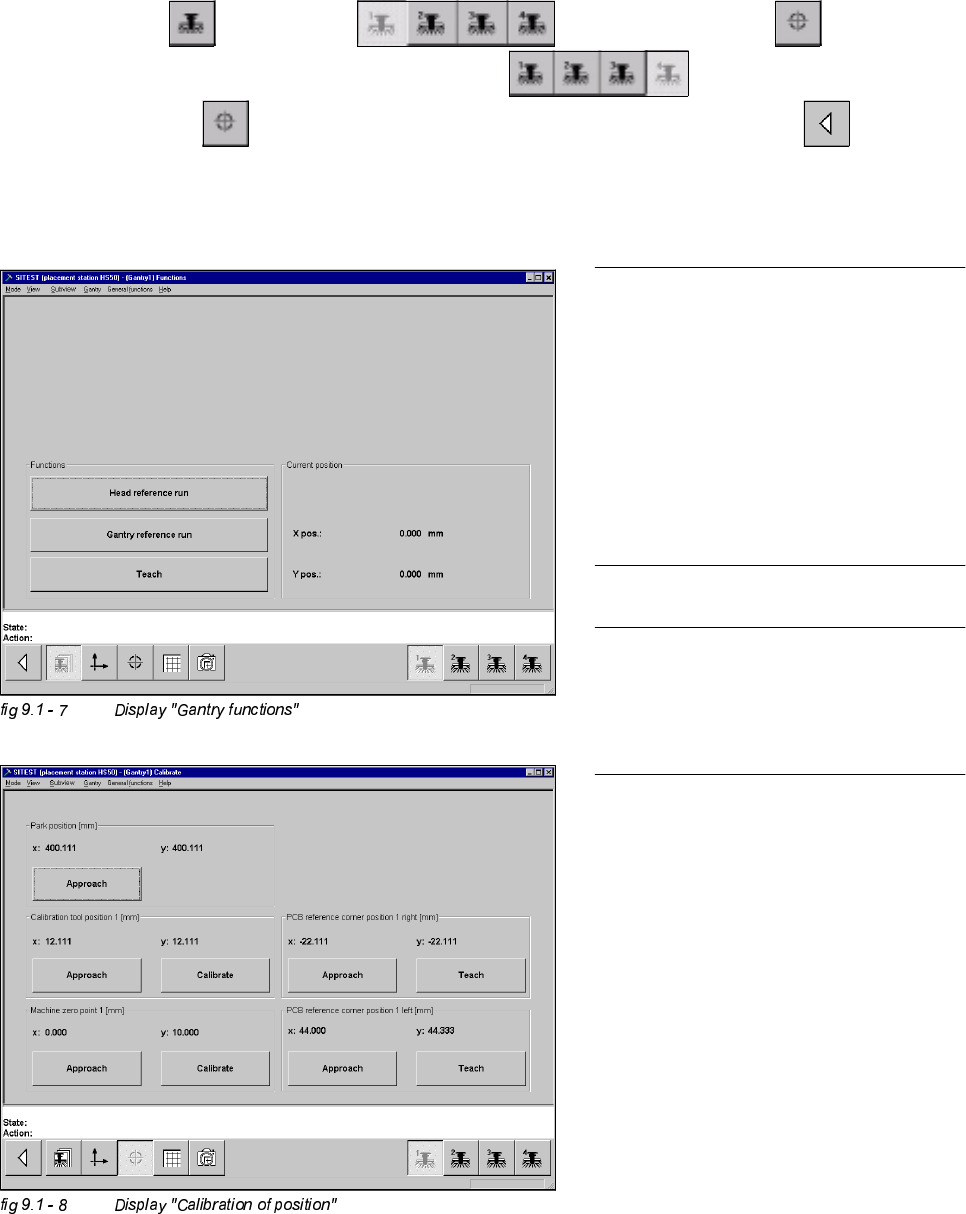
Å Select "Gantry" ==> "Gantry 1" ==> "Calibrate position" ==>
"Calibrate (field "Machine zero point")" ==> "Gantry 4" ==>
"Calibrate position" ==> "Calibrate (field "Machine zero point 1")" ==> "Main view" ==>
"Save machine data".
NOTE
Make sure that all calibration data for the
C&P camera, the segment offset II (C&P -
PCB camera offset) and the PCB camera
have been determined.
The calibration of the machine zero point
must be performed with both gantries
each in placement area 1 or 2,
respectively.
NOTE
Proceed the same way with gantries 2 and
3, in order to determine the machine zero
point in placement area 2.
172
9 Calibration of SIPLACE HS-50 (incl. SITEST version 501.xx) Adjustment Instructions SIPLACE HS-50
9.5 Calibration of Calibration Position Softwareversion SR.501.xx Edition 12/00
&DOLEUDWLRQRI&DOLEUDWLRQ3RVLWLRQ
Example: Placement area 1.
Å Insert the calibration tool in to the "calibration bag 1" in placement area 1.
(See
fig 9.1 - 1).
6,7(67
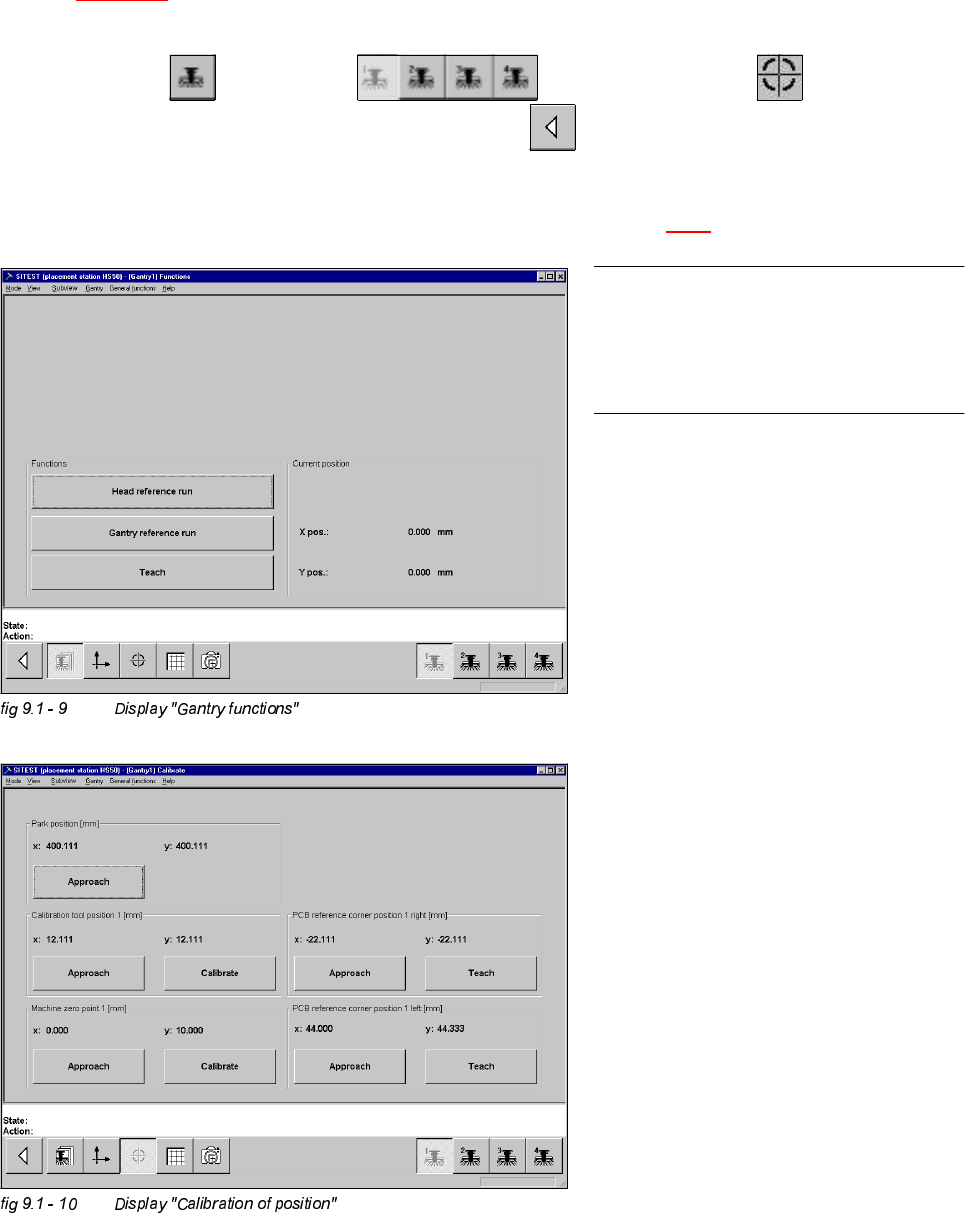
Å Select "Gantry" ==> "Gantry 1" ==> "Calibrate position" ==>
"Calibrate (field "calibration position 1")"==> "Main view" ==> "Save machine data".
Å Proceed under section "Calibration of the Pick-Up Height". (See section 9.6.3).
NOTE
Proceed the same way with gantry 2, in
order to determine the calibration position
in placement area 2.
Adjustment Instructions SIPLACE HS-50 9 Calibration of SIPLACE HS-50 (incl. SITEST version 501.xx)
Softwareversion SR.501.xx Edition 12/00 9.6 Calibration Collect & Place Head Nozzle Changer
173
&DOLEUDWLRQ&ROOHFW3ODFH+HDG1R]]OH&KDQJHU
&RPSOHWH&DOLEUDWLRQ
Example: Nozzle changer for C&P Head 1, completely supplied with all 5 or 10 magazines.
6,7(67
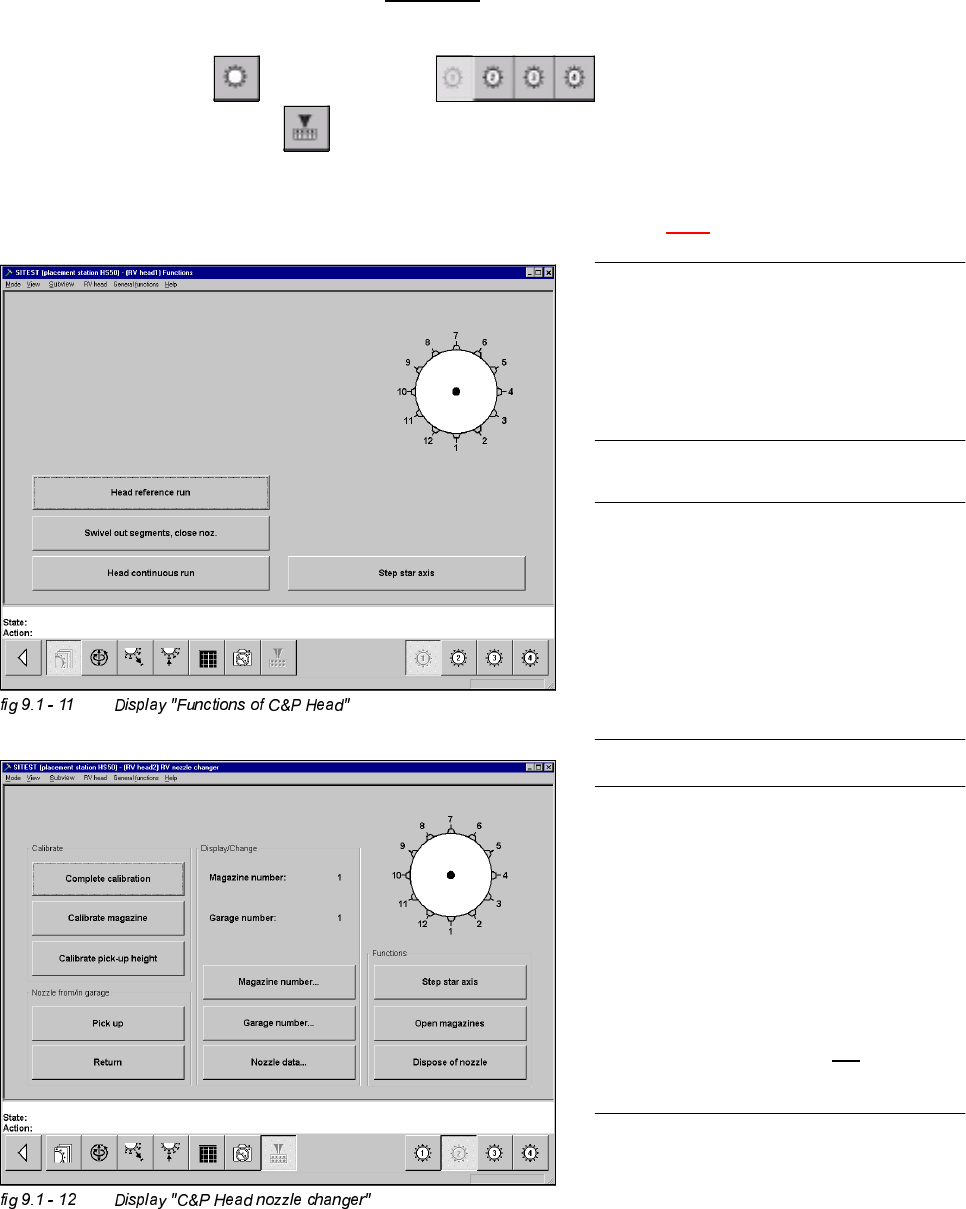
Å Select "C&P Heads" ==> "C&P Head 1" ==>
"C&P Head nozzle changer" ==> "Complete calibration".
Å Proceed under section "Calibration of the Pick-Up Height". (See section 9.6.3).
NOTE
Make sure that the calibration data for the
PCB camera, the segment offset II (C&P
PCB camera offset) and the machine zero
point have been determined already.
NOTE
A nozzle changer contains 5 magazines
maximum, with 12 nozzle garages each.
For every single C&P Head, 2 nozzle
changers may be installed. During
calibration these will be handled like one
single nozzle changer with 10 magazines.
NOTE
The function "Complete calibration" is
used, if the nozzle changer is completely
loaded with all 5 or 10 magazines.
All 12 nozzles must be on the C&P Head.
With the help of the function "Calibrate
current magazine", x- and y-values must
be individually determined for each
magazine if the changer is not
completely
loaded.