BT3564_user_manual_chi_20191017H.pdf - 第160页
8.8 示例程序 154 下面所示为使用 Visual Basic ® 2017 进行 RS-232C 通讯, 设置本仪器的测量条 件并读入测量结果, 然后保存到文 件中的示例程序。 示例程序记述如下。 为开始测量而创建的按钮 .................. .............. .............. ............ .............. .. “ Start ” 为结束应用程序而创建的按钮 ..…
8.8
示例程序
153
8
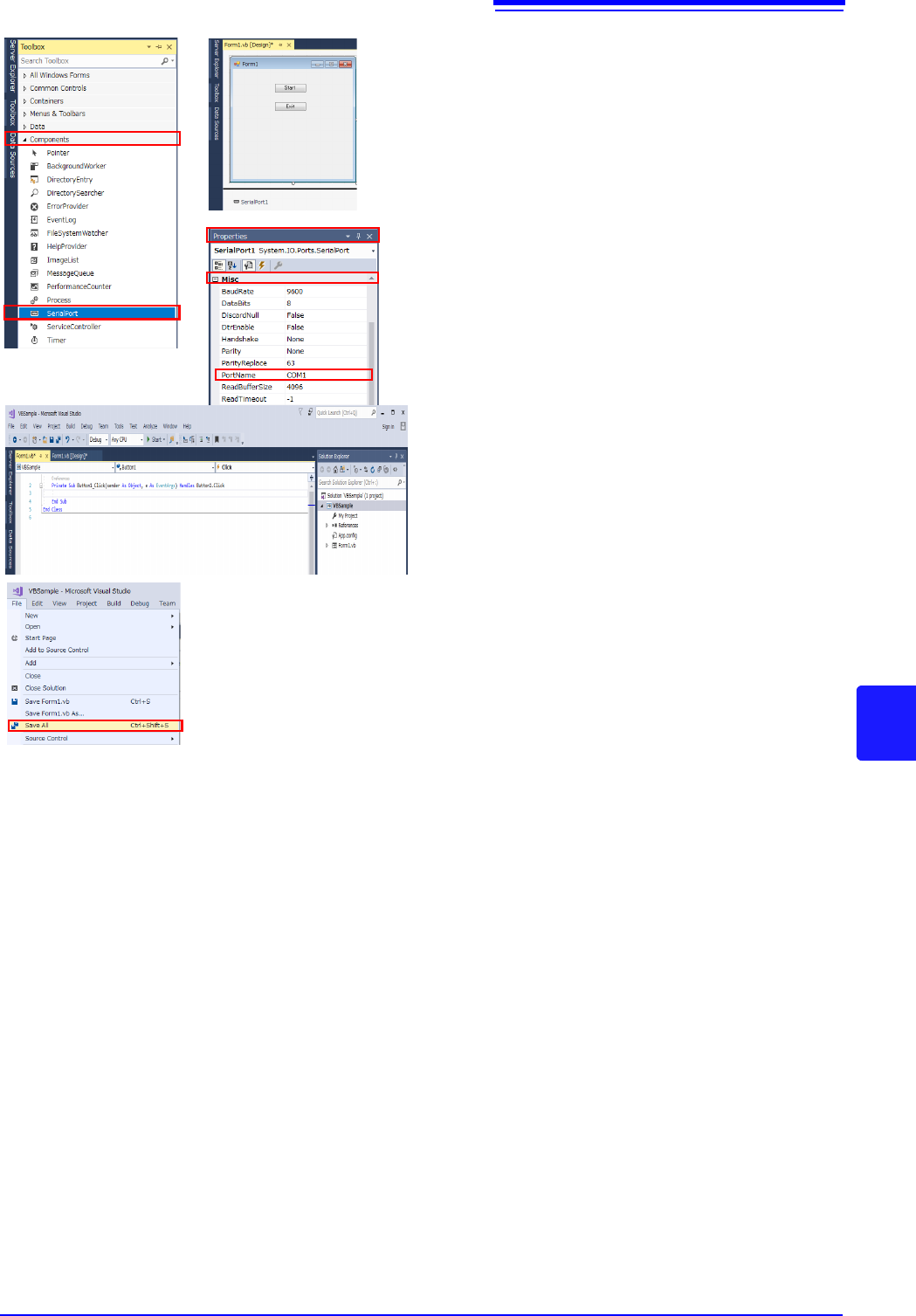
5 配置串行通信组件。
1. 单击“Toolbox”-“Components”-“Serial
Port”。
2. 将“Serial Port”组件拖拽到表格设计画面
中。
3. 设置“Serial Port”-“Properties”-“Misc”。
4. 确认 “Control Panels” - “Hardware and
Sound”-“Device Manager”-“Ports”,在
要使用的端口名中变更 “Port Name”。
6 记述代码。
如果双击已配置的 “Start”,则会显示代码编辑
器。
7 选择“File”-“Save All”并结束 Visual Stu-
dio
®
2017。

8.8
示例程序
154
下面所示为使用 Visual Basic
®
2017 进行 RS-232C 通讯,设置本仪器的测量条件并读入测量结果,然后保存到文
件中的示例程序。
示例程序记述如下。
为开始测量而创建的按钮 .......................................................................... “
Start”
为结束应用程序而创建的按钮 .................................................................... “
Exit”
如果按下 “测量开始”按钮,则进行 10 次测量,并将测量值写入到 “data.csv”文件中。
按下 “Stop”按钮,结束程序。
以下所示程序全部记述为 “Form1”的代码。
示例程序 (Visual Basic
®
2017)
using System;
using System.Collections.Generic;
using System.ComponentModel;
using System.Data;
using System.Drawing;
using System.Linq;
using System.Text;
using System.Threading.Tasks;
using System.Windows.Forms;
using System.IO;
using System.IO.Ports;
namespace CSSample
{
public partial class Form1 : Form
{
public Form1()
{
InitializeComponent();
}
//Perform process when Button1 is pressed
private void button1_Click(object sender, EventArgs e)
{
StreamWriter sw;
string recvstr;
int i;
try
{
button1.Enabled = false; //Disable buttons during communication........(a)
button2.Enabled = false;
//Communication port setting..............................................................(b)
SerialPort1.PortName = "COM1";
SerialPort1.BaudRate = 9600;
SerialPort1.DataBits = 8;
SerialPort1.Parity = Parity.None;
SerialPort1.StopBits = StopBits.One;
SerialPort1.NewLine = "\r\n"; //Terminator setting..........................(c)
SerialPort1.ReadTimeout = 2000; //2 seconds time out..........................(d)
SerialPort1.Open(); //Open a port
SendSetting(); //Instrument settings
sw = new StreamWriter(@"data.csv"); //Create text file to be saved................(e)
for (i = 0; i < 10; i++)
{
//Begin measurement and read measurement results Command..............................(f)
SerialPort1.WriteLine(":FETCH?");
recvstr = SerialPort1.ReadLine(); //Read measurement results
sw.WriteLine(recvstr); //Write to file
}
sw.Close(); //Close file
SerialPort1.Close(); //Close port
button1.Enabled = true;
button2.Enabled = true;
}
8.8
示例程序
155
8
catch (Exception ex)
{
MessageBox.Show(ex.Message);
}
}
//Set measurement conditions
private void SendSetting()
{
try
{
SerialPort1.WriteLine(":TRIG:SOUR IMM"); //Select internal triggering
SerialPort1.WriteLine(":INIT:CONT ON"); //Continuous measurement ON
}
catch (Exception ex)
{
MessageBox.Show(ex.Message);
}
}
//Close program when Button2 is pressed
private void button2_Click(object sender, EventArgs e)
{
Dispose();
}
}
}