00194576_Install_WinXP_unattended.pdf - 第13页
Installation Manual for Windows XP (unattended setup) 11/2007 US+DE Installationsanleitung für Windows XP (unattended setup) → After that you have to exit the BIOS setup and save your changes. 6.1.2 SIMATIC Box PC 627 → …

Installation Manual for Windows XP (unattended setup) 11/2007 US+DE
Installationsanleitung für Windows XP (unattended setup)
6 Installation
Note:
In the general part of the setup, you have to answer with “Yes” or “No”. In the second part you
can switch between the wizard dialogs with “Next” or “Back” buttons.
With the “Cancel” button you can abort the whole installation procedure.
6.1 Hardware specific requirements and restrictions
6.1.1 SCENIC C 610
If you connect your keyboard via USB interface, you have to ensure the “legacy USB” option in the System BIOS to
be enabled. To do this:
→ Press the F2 key at boot time.
→ Navigate to the “Advanced” menu.
The following settings are displayed:
Advanced
Peripheral Configuration
------------------------------------------------
Serial 1: [Enabled]
Serial 1 Address: [3F8h, IRQ 4]
Serial 2: [Enabled]
Serial 1 Address: [2F8h, IRQ 3]
Parallel: [Enabled]
Parallel Mode: [Printer]
Parallel Address: [378h, IRQ 7]
USB Host Controller: [Enabled]
USB 2.0 Host Controller: [Enabled]
USB Legacy Support: [Disabled]
Serial ATA Configuration
Diskette Controller: [Enabled]
Mouse Controller: [Enabled]
LAN Controller: [Enabled]
LAN Remote Boot: [Disabled]
Audio Controller: [Disabled]
Item Specific Help
-----------------------------------
F1 Info
12 / 58
→ To activate the option “USB Legacy Support”, navigate to it and press the space bar.
Installation Manual for Windows XP (unattended setup) 11/2007 US+DE
Installationsanleitung für Windows XP (unattended setup)
→ After that you have to exit the BIOS setup and save your changes.
6.1.2 SIMATIC Box PC 627
→ Ensure you have the appropriate BIOS version and the corresponding settings, delivered on CDs. The
minimum BIOS version is V05.01.09.
→ Ensure the BIOS setting “Installed O/S” is set to “WinXP/2000” and “SATA Controller Mode” is set to
“Compatible” for the operating system installation
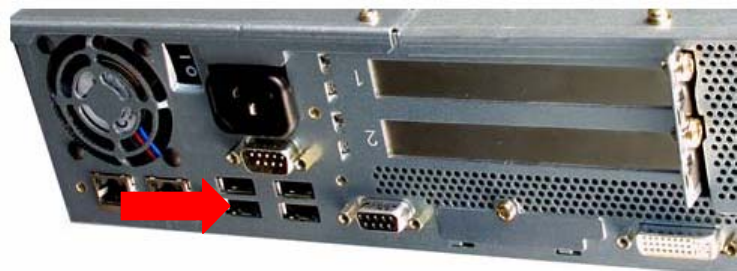
→ To avoid crashes, ensure your USB Hub is connected to Port 0, as shown in the following picture.
Port 0
6.2 Installation procedure
→ Insert the BOOT CD-ROM (Boot CDROM for Windows XP Professional) to start the unattended setup
into the CD ROM drive.
→ Please remove all external drives like USB sticks or USB harddisks. This would confuse the setup.
→ Reboot the computer.
→ Please change the boot devices in your BIOS if the system doesn’t accept the CD ROM drive as the
boot medium.
13 / 58
Installation Manual for Windows XP (unattended setup) 11/2007 US+DE
Installationsanleitung für Windows XP (unattended setup)
6.3 Preparation for the unattended setup Windows XP
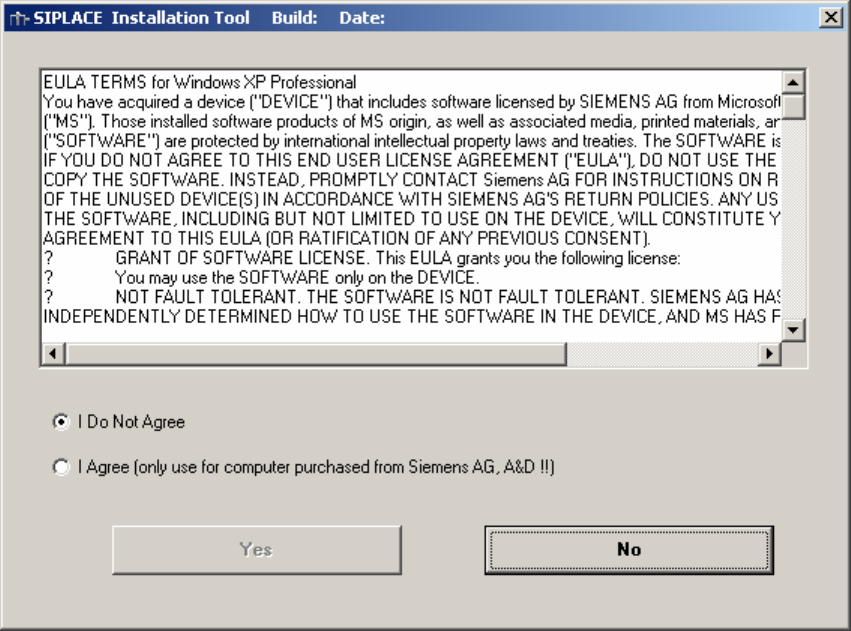
Fig. 6-1: License Agreement
14 / 58