2.VGOS V30 application software installation_upgrade manual.pdf - 第2页
For Users Serv i ce Information SI090100 2E- 003=VGOS V3 0 applicatio n software installatio n /upgrade manua l 2/24 trademark s of their respective owners. Table of contents 1 Preparation ...............................…
For Users
Service Information
SI0901002E-003=VGOS V30 application software installation/upgrade manual
1/24
MACHINE TYPE: YGOS V30 machines (YG300, YG12(F)
YS series and others)
SOFTWARE VERSION: Application V3.04STD R1.000 or later
CLASSIFICATION: Installation and troubleshooting
REFERENCE: H011773, H018450, H018616, H019641
SI1108004E: YS series, YG12, YG300 system board replacement
“The Procedure of System Software Install” and “V30 System Patch Manual” in
YAMAHA YDO website, Software > Software New Function Information
VGOS V30 application software installation/upgrade manual
This document describes how to install and upgrade the application software of YS series machines
(VGOS V30).
Update history
Revision No. Updated contents Issued date
-000 (First release) 5 February 2009
-001 Added Y24 and YSP as applicable machine models. 2 September 2009
-002 Added installation procedure of VGOS V30 application
software. Added an applicable machine model.
8 January 2013
-003 Added procedures of “V30 System Update Patch”. 13 September 2013
Added procedures of “V30 System Update Patch” for later
application versions.
11 October 2013
Added Note about patched system version V3.04
Patch3.05a/E exclusively for machines with “KJJ-M6590-00
E.COM BOARD ASSY”.
25 June 2014
Warning
· Make sure to use this document under the instruction of a YAMAHA service engineer or those
who completed necessary maintenance training.
· YAMAHA is not responsible for any problems caused by the misuse of the document.
· This document contains editing of the system data that can affect the operating condition of the
machine. Make sure to thoroughly understand the contents of the document and perform the
service work on your own responsibility.
Safety note
Strictly follow the precautions in the “Safety” section in the machine user’s manual.
Disclaimer
This document contains the preliminary information subject to change in the future.
The information contained in this document represents the current view of YAMAHA on the issues
discussed as of the date of issuance. As YAMAHA must respond to changing market conditions, it
should not be interpreted to be a commitment on the part of YAMAHA, and YAMAHA cannot
guarantee the accuracy of any information presented after the date of issuance.
This document is provided for information purposes only, and it is provided without any warranties,
either express or implied.
It is the responsibility of the user to comply with all applicable copyright laws. Without limiting the
rights under copyright, no part of this document may be reproduced, stored in or introduced into a
retrieval system, or transmitted in any form or by any means (electronic, mechanical, photocopying,
recording, or otherwise), or for any purpose, without the written permission of YAMAHA.
However, this shall not be construed to limit the user’s right granted by Copyright law.
YAMAHA may have patents, patent applications, trademarks, copyrights, or other intellectual property
rights covering subject matter in this document. Except as expressly provided in any written license
agreement from YAMAHA, this document does not give users any license to these patents,
trademarks, copyrights, or other intellectual property.
The names of actual companies and products mentioned in this document may contain the
No: SI0901002E-003
ISSUED DATE: 5 February 2009
REVISED DATE: 25 June 2014

For Users
Service Information
SI0901002E-003=VGOS V30 application software installation/upgrade manual
2/24
trademarks of their respective owners.
Table of contents
1
Preparation ..................................................................................................................................... 3
1.1
Source media for installing/upgrading the application software ................................................. 3
1.2
Save “system data backup” ........................................................................................................ 3
1.3
System software updating function ............................................................................................ 4
2
Copy contents of installation/upgrade CD to the USB flash drive ............................................ 5
2.1
Required items ........................................................................................................................... 5
2.2
Copy install/upgrade image to the USB flash drive .................................................................... 6
3
Initial installation of the application software ............................................................................. 8
4
Upgrade the application software .............................................................................................. 14
5
Update the system software ....................................................................................................... 20
5.1
System full back-up .................................................................................................................. 20
5.2
V30 System Update.................................................................................................................. 21
5.2.1
Preparation ..................................................................................................................... 21
5.2.2
Execute “V30 System Update” for earlier than V3.41STD R2.000 ................................. 22
5.2.3
Execute “V30 System Update” for V3.41STD R2.000 or later ........................................ 24
For Users
Service Information
SI0901002E-003=VGOS V30 application software installation/upgrade manual
3/24
1 Preparation
1.1 Source media for installing/upgrading the application software
Application installation/upgrade software is provided in a CD.
As some of the machines are not equipped with the CD drive, source media used for
installing/upgrading the application software vary depending on the model.
Model CD drive Source media
YG300 Installed CD (see Note 1 below)
or USB flash drive
YG12(F), YS series, YSH20, YSC1
YC8, YSP20
Not installed USB flash drive
Note 1
As for application V3.41 STD R1.000 or later, please use a USB flash drive. System
software version log files are saved in the USB flash drive.
Note 2
Please be sure to use the USB flash drive that comes with the machine or a designated one
you can purchase from YAMAHA. Other USB flash drives may cause error conditions of the
machine.
1.2 Save “system data backup”
Before installation/upgrading process, make a backup copy of the system data just in case.
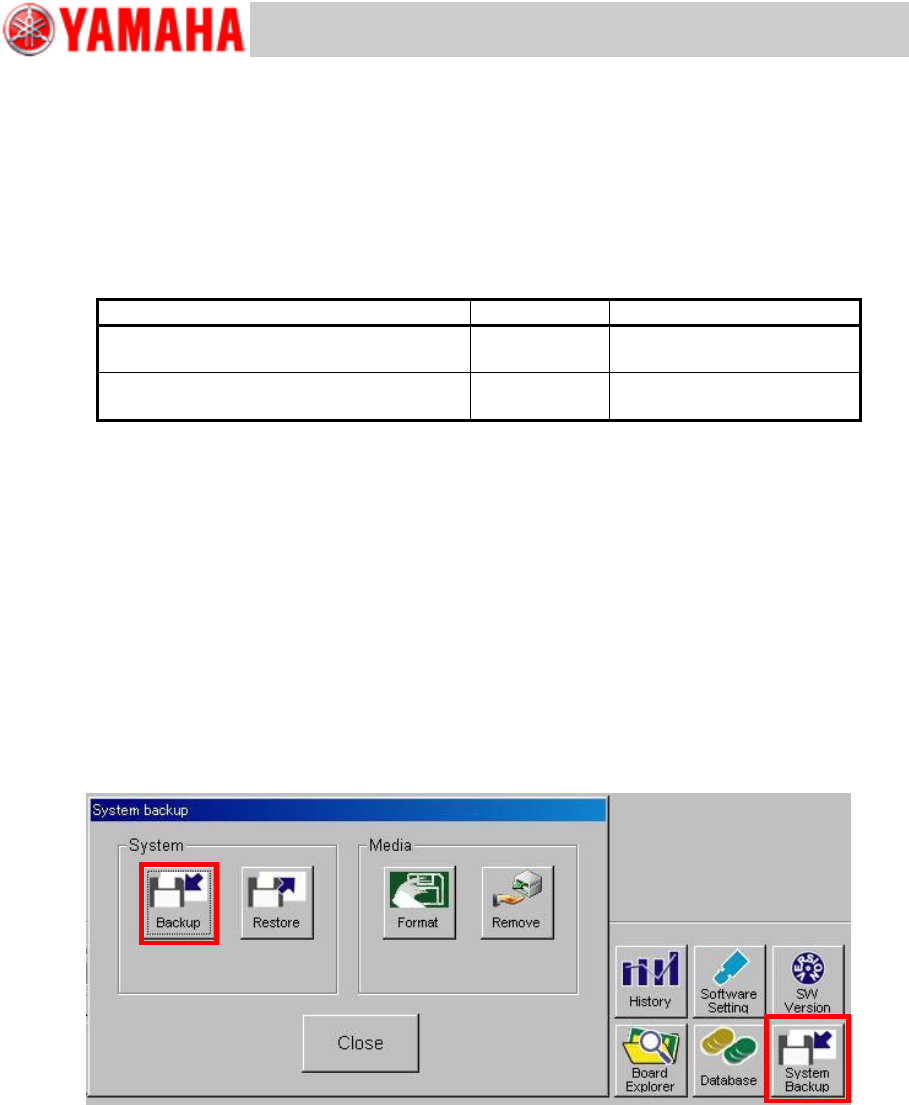
Click the [System Backup] button on the [Setup] window to display the “System Backup”
window. Insert the USB flash drive into the USB port of the machine and click the [Backup]
button and then the [Yes] button to start copying.
Note
For further information, see “YS series Programming Manual”, Chapter 6 Managing the
data.