2.VGOS V30 application software installation_upgrade manual.pdf - 第20页
For Users Serv i ce Information SI090100 2E- 003=VGOS V3 0 applicatio n software installatio n /upgrade manua l 20/24 5 Up date the sy stem software During appl ication upgrading process, if a m essage appears prompting …
For Users
Service Information
SI0901002E-003=VGOS V30 application software installation/upgrade manual
19/24
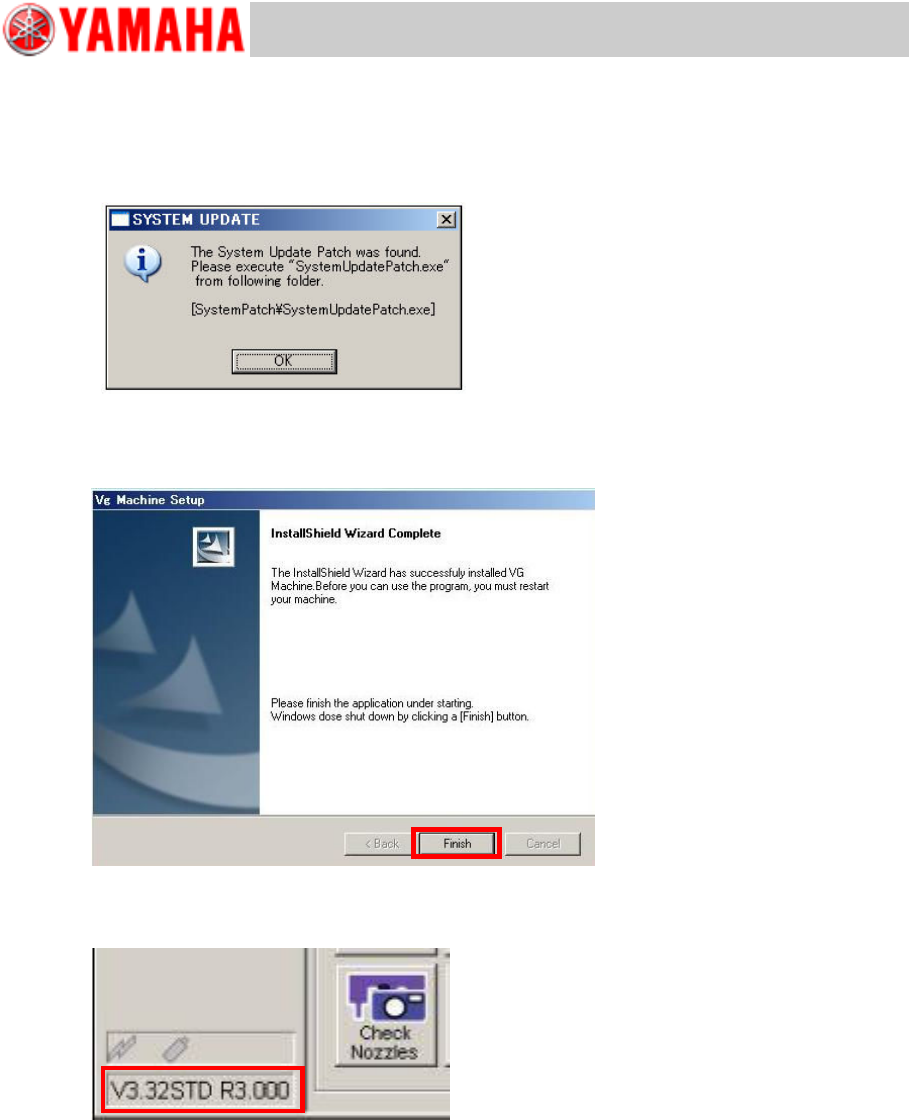
Step 12 If the system software needs to be updated, the below message appears.
Complete the application upgrading first. Then back up the system full back-up data and
execute “V30 System Update”.
Note
For details about the system software updating, see “5 Update the system software”.
Step 13 Exit the installation wizard.
The InstallShield Wizard Completed window appears. Click the [Finish] button. The machine
automatically executes shutdown process.
Step 14 Restart the machine and check the machine application version displayed at the lower
left of the screen.
For Users
Service Information
SI0901002E-003=VGOS V30 application software installation/upgrade manual
20/24
5 Update the system software
During application upgrading process, if a message appears prompting you to update the system
software, perform the following:
n Perform system full backup.
n Execute “V30 System Update” (V30 system patch program).
5.1 System full back-up
Back up the system full back-up data as data security routine.
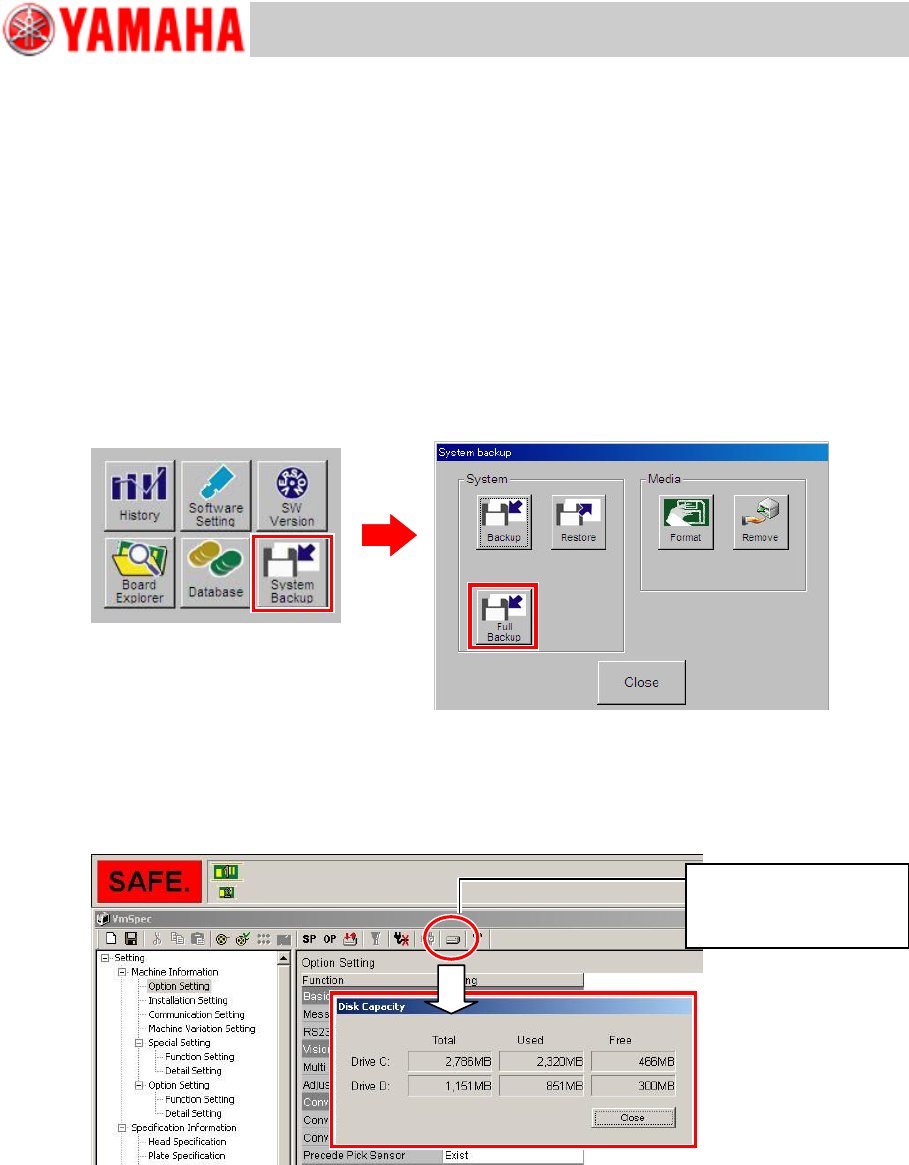
n Menu selection
Open the [Setup] window and click the [System Backup] button. Then in the System backup
window, click the [Full Backup] button. Plug a USB flash drive into the machine and click the
[Yes] button to execute copying.
n Required space for system full back-up
Destination drive to store full back-up data must have more free space than the CF capacity.
The CF capacity may vary depending on machine models, so be sure to check the CF
capacity beforehand.
Note
For further information about the system full back-up, see “YS series Programming Manual”,
Chapter 6 Managing the data.
In the VmSpec window,
press the HDD button to
show disc capacities.
For Users
Service Information
SI0901002E-003=VGOS V30 application software installation/upgrade manual
21/24
5.2 V30 System Update
“V30 System Update” is designed to install a patch to update the system software. With this
patch you don’t have to reinstall the entire system software to update the existing system
software.
Note
Be sure to perform the system full back-up before executing “V30 System Update”.
5.2.1 Preparation
n Preparation
· Back up “system full back-up” data.
See “5.1 System full back-up” for information.
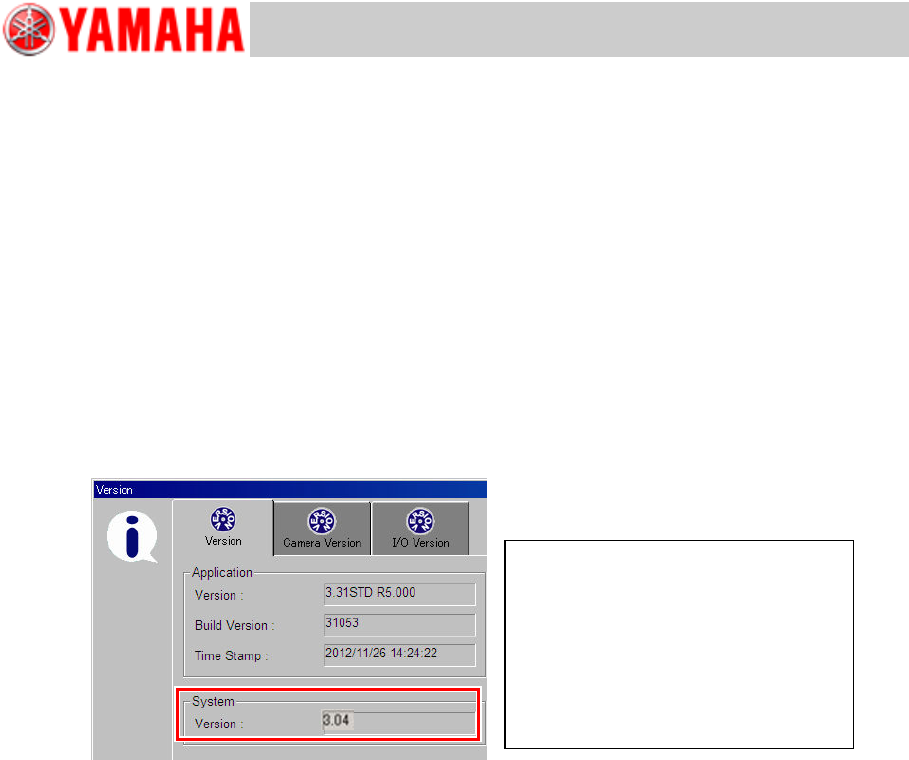
· Check the system software version.
Click the [Setup] button > [SW Version] button to open the Version window. Check the
version under [System].
Note
Only for machines equipped with a “KJJ-M6590-00 E.COM BOARD ASSY”.
· Copy the “SystemPatch” folder onto the USB flash drive.
The “SystemPatch” folder is part of the application install/upgrade image, which is to be
copied onto the USB flash drive. See “2 Copy contents of installation/upgrade CD
to the USB flash drive” for information.
n Notes
The following conditions must be met to execute V30 System Update.
· Free space in D: drive is 25 MB or larger.
· The machine application is not started.
· Executable within 10 minutes after the machine is powered on.
· You logged into Windows as User.
· Path to “SystemUpdatePatch.exe” consists only of single-byte alphanumerals.
· Executable only from the USB flash drive plugged into the machine.
Note
If the system software updating fails, failure logs are saved in the USB flash drive.
Examples
Original system software versions
・ 3.04
・ 3.05
Patched system software version
・ 3.04 Patch3.05a
・ 3.04 Patch3.05a/E (see Note)