YG100R_Ope_E - 第91页
Chapter 3 Star ting and ending production Contents 1 . S t a r t i n g p r o d u c t i o n 3 - 1 1 . 1 R e s u m i n g o p e r a t i o n f ro m t h e s t o p p e d p o i n t 3 - 4 1 . 1 . 1 L o a d i n g t h e s a v e d …

2-37
2
Basic operation
6
Insert the new magazine.
Align the grooves in the bottom of the magazine with the guides on the inner side of the magazine door,
and slowly insert in until the magazine stops.
7
Clamp the magazine.
While pulling the clamp lever, turn it to the right to clamp the magazine.
8
Close the magazine door.
9
Return the door switch to "CLOSE".
The magazine door is closed and the door switch lamp lights up.
c
CAUTION
Automatic operation stops due to an error if an instruction to replace the currently used pallet is issued while you are
exchanging a magazine or pallets.

Chapter 3 Starting and ending production
Contents
1. Starting production 3-1
1.1 Resuming operation from the stopped point 3-4
1.1.1 Loading the saved data 3-4
1.1.2 Editing mount flags 3-4
2.
Ending production and turning power off
3-6
3. Displaying the production monitors 3-
8
3.1 Main 3-8
3.2 Detail 3-1
0
3.3 Vision 3-1
2
3.4 Alignment 3-1
4
3.5 Retry 3-1
5
3.6 Fiducial 3-1
5
3.7 Badmark 3-1
6
3.8 Pick Pos. (Pickup position offset) 3-1
7
3.9 Pick Rate Warning 3-1
8
3.10 Coplanarity checker (YG100R and YG88R only) 3-2
1
3-1
3
Starting and ending production
1. Starting production
This section describes how to select the board data which is already registered and perform component
mounting.
1
Select the board data.
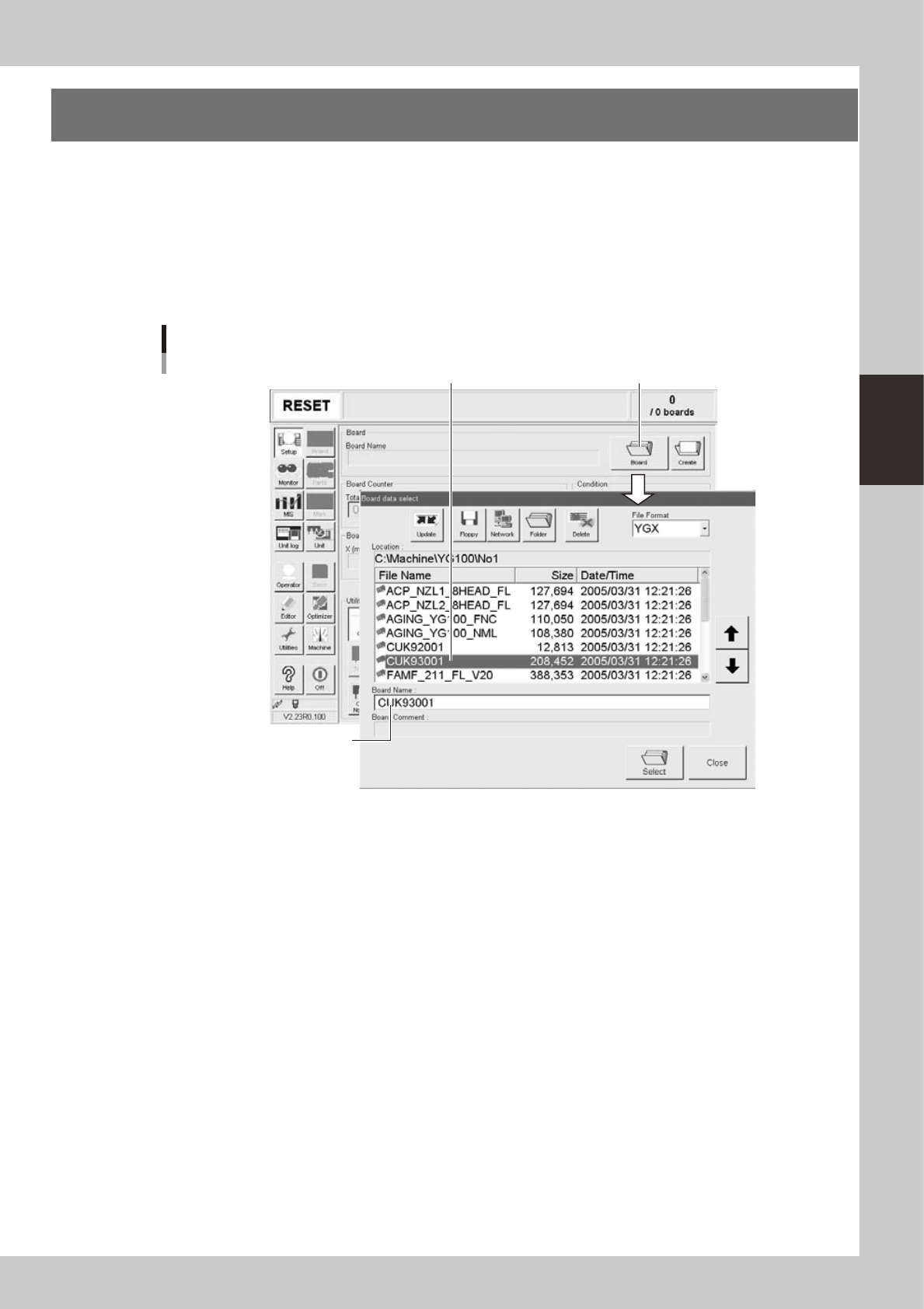
1. When the board data is not yet selected, press the [Board] button on the Setup screen.
A list of registered board data appears.
2. Line up the cursor with the board data to use for production and press the [Select] button.
The machine loads the seleted board data.
Press [Board] button.
Selecting the board data
Select board data from list.
Selected board name is displayed.
24300-M0-00