00196098-02_IM_SIPLACE_Explorer_2.4_DE.pdf - 第17页
Installations- und Konfigurationsanleitung SIPLACE Explorer 2 Systemkomponenten und -Konfigurationen Ausgabe 08/2008 DE 2.3 Standard-Installations-Varianten des SIPLACE Explorer 17 2.3 S t andard-Inst allations-V ariante…
2 Systemkomponenten und -Konfigurationen Installations- und Konfigurationsanleitung SIPLACE Explorer
2.2 SIPLACE Explorer in der SIPLACE Softwarelandschaft Ausgabe 08/2008 DE
16
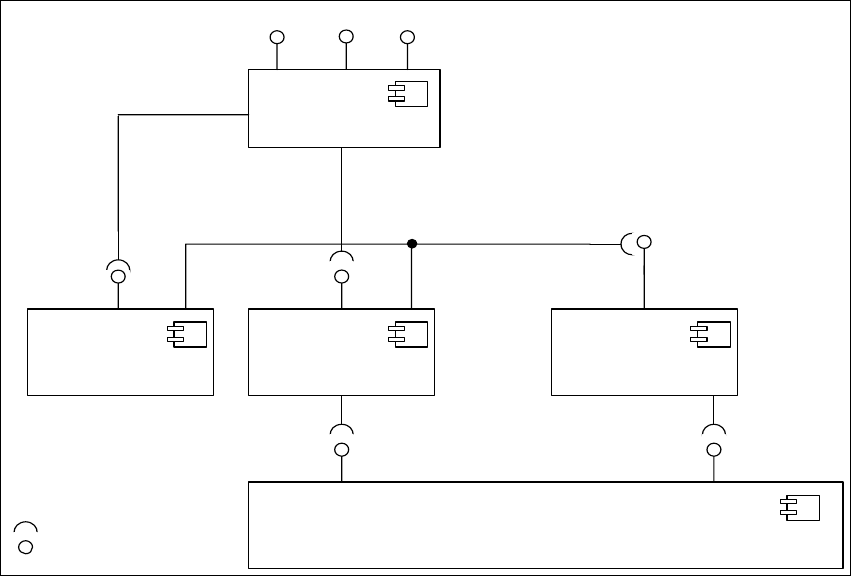
– SIPLACE Explorer:
SIPLACE Explorer liest die Daten aus OIS und SIS, speichert sie in der SIPLACE Explorer
Datenbank und stellt diese dem Benutzer zur Verfügung.
Die folgende Übersicht stellt die nötigen Software-Komponenten im SIPLACE-LAN dar: 2
2
Abb. 2.2 - 1 Software-Komponenten im SIPLACE-LAN
Station-SW
<<Bauelement >>
IDownload
SIPLACE Pro
<< Bauelement >>
SPI
IOIS
OIS
<< Bauelement >>
SIPLACE Explorer
<< Bauelement >>
SIS
<< Bauelement >>
SIS DB-View
OIS DB - View
IBackflush
Schnittstellen
IMaintenance
Manager
ITraceHost

Installations- und Konfigurationsanleitung SIPLACE Explorer 2 Systemkomponenten und -Konfigurationen
Ausgabe 08/2008 DE 2.3 Standard-Installations-Varianten des SIPLACE Explorer
17
2.3 Standard-Installations-Varianten des SIPLACE
Explorer
In SIPLACE Explorer V2.4 gibt es verschiedene Installations-Varianten für die unterschiedlichen
Komponenten. In diesem Abschnitt werden folgende Installations-Varianten aufgezeigt: 2
– Factory Layout Cl (siehe Seite 17)
– Factory Layout Dl (siehe Seite 19)
– Single-Line-Layout (siehe Seite 21)
Diese Installations-Varianten gelten als Empfehlungen. Wählen Sie eine dieser Installations-
Varianten für Ihre Installation aus. 2
2.3.1 Factory Layout Central Installation (CI)
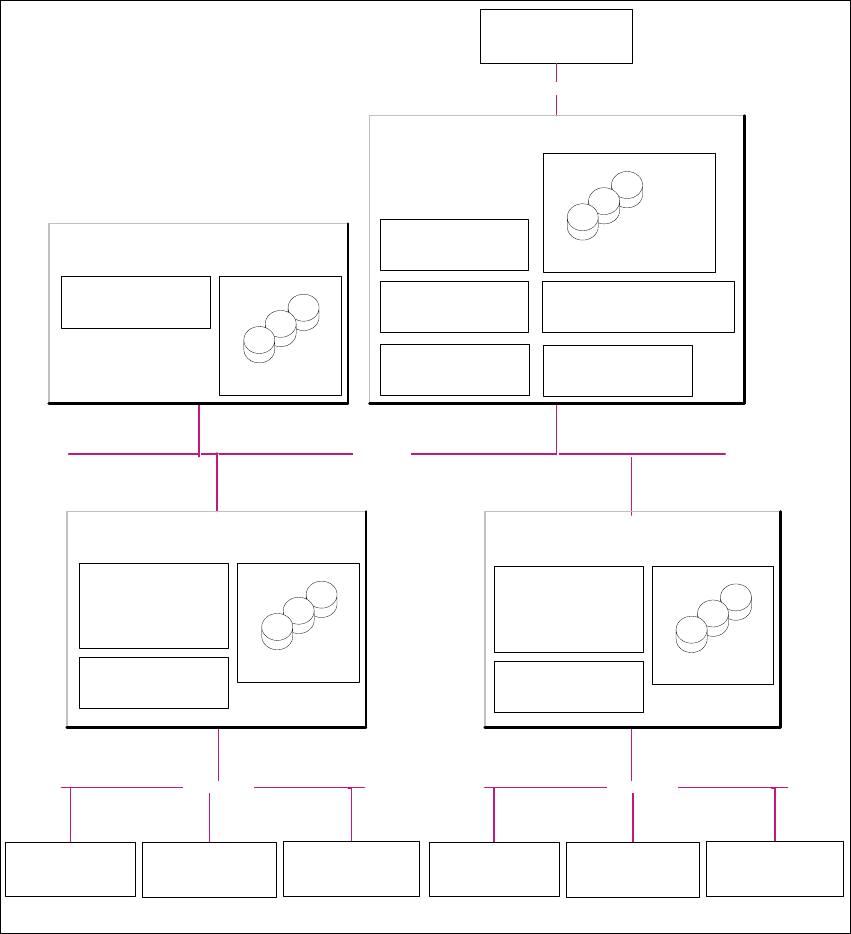
Mit dem Factory-Layout-Cl werden sog. "Multi Lines" unterstützt, d.h. innerhalb einer Fertigungs-
linie werden verschiedene Plattformen der Stations-Software unterstützt. Der gesamte Betrieb der
Fertigungslinien wird über ein zentrales SIPLACE Pro mit den entsprechenden OIS-/SIS-Installa-
tionen gesteuert. 2
SIPLACE Pro ist auf dem SIPLACE Linien-Server und auf dem Factory-Server installiert und OIS/
SIS auf dem SIPLACE Linien-Server. 2
Bei dieser Installations-Variante wird SIPLACE Explorer V2.4 immer auf einem separaten
SIPLACE Explorer Server installiert. Dabei werden alle Komponenten von SIPLACE Explorer auf
diesem Server installiert. Somit kann die Administration und ein möglicher Update von SIPLACE
Explorer zentral an einer Stelle erfolgen. 2
Auf dem SIPLACE Explorer Server werden die zu überwachenden Daten von allen dazugehöri-
gen Fertigungslinien gesammelt. 2
HINWEIS
Auf diesem Computer können die Daten von bis zu 5 Applikationen mit bis zu 20 Maschinen
überwacht werden. 2
Die folgende Übersicht stellt ein Beispiel für die Installations-Variante "Factory-Layout Cl" dar: 2
2 Systemkomponenten und -Konfigurationen Installations- und Konfigurationsanleitung SIPLACE Explorer
2.3 Standard-Installations-Varianten des SIPLACE Explorer Ausgabe 08/2008 DE
18
2
Abb. 2.3 - 1 Installations-Variante: Factory-Layout Cl
Kunden-LAN
SIPLACE-LAN
Stations-Computer:
- OIS Client
- SW Software, Plattform I
Multi-Linie "A"
- Line Control Server /GUI
- SIPLACE Pro Desk
- OIS Server/ OIS Client
-SIS Server
SIPLACE Explorer
Webpages :
- MS internet Explorer
-OIS-DB
-SIS-DB
SIPLACE Line Server
(schon vorhanden)
Stations-Computer:
- OIS Client
- SW Software, Plattform II
- Line Control Server /GUI
- SIPLACE Pro Desk
- OIS Server/ OIS Client
- SIS Server
SIPLACE Explorer
Webpages :
- MS internet Explorer
SIPLACE Line Server
(schon vorhanden)
SIPLACE Explorer
Webpages:
- MS internet Explorer
SIPLACE Explorer Server
SIPLACE Explorer
Factory Host
SIPLACE Explorer
Runtime Environment
SIPLACE Explorer Webserver:
-Tomcat
- Java 2SE
Berichts -Generierung :
-MSXM
- Excel
SQL-Server
-OIS-DB
-SIS-DB
SQL-Server
- SIPLACE Explorer-DB
- SIPLACE Explorer Factory-DB
SQL-Server
- SIPLACE Pro Server
- SIPLACE Pro Desk
- SIPLACE Pro-DB
Factory- Server
(schon vorhanden)
SQL-Server
Kunden-Computer
SIPLACE Explorer Websites:
- MS Internet Explorer
Kunden-LAN
Stations-Computer:
- OIS Client
- SW Software, Plattform III
SIPLACE-LAN
Stations-Computer:
- OIS Client
- SW Software, Plattform I
Multi-Linie "B"
Stations-Computer:
- OIS Client
- SW Software, Plattform II
Stations-Computer:
- OIS Client
- SW Software, Plattform III