00197961-01_UM_JTF-MW_on_SIPLACE_E_en_FINAL - 第41页
Tasks on the Machine Powering up the Feeder User Manual JTF-MW on SIPLACE E 41 5 5 T a s k s o n t h e M a c h in e Tasks on the Machine This chapter describes how to ope rate the JTF-MW in the product ion process. 5.1 5…
Setting up and Commissioning
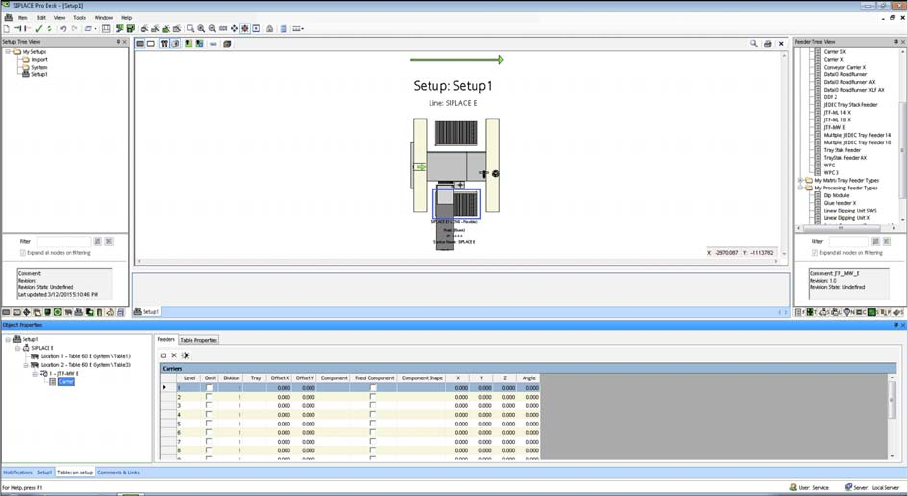
Configuration of SIPLACE JTF-MW in SIPLACE Pro
40 User Manual JTF-MW on SIPLACE E
The SIPLACE JTF-MW is automatically configured on the track that is permitted for the machine.
This track cannot be changed.
SIPLACE JTF-MW Carrier Level
For the Multiple JEDEC tray feeder 15, Carrier lists the number of trays (15) as well as their settings and
their component occupancy (per tray).
Tasks on the Machine
Powering up the Feeder
User Manual JTF-MW on SIPLACE E 41
5
5 Tasks on the Machine
Tasks on the Machine
This chapter describes how to operate the JTF-MW in the production process.
5.1
5.1 Powering up the Feeder
Powering up the Feeder
After connecting the feeder to the machine (see "4.6.2 Connecting the JTF-MW to the Machine" [➙35]),
the feeder initializes by driving the magazine upwards.
If no magazine is detected, the elevator drives down and switches to stands by.
If a magazine is detected, the first tray is positioned on the feeding level.
Now the feeder is ready to accept commands.
5.2
5.2 Controls and Displays on the Feeder Control Panel
Controls and Displays on the Feeder Control Panel
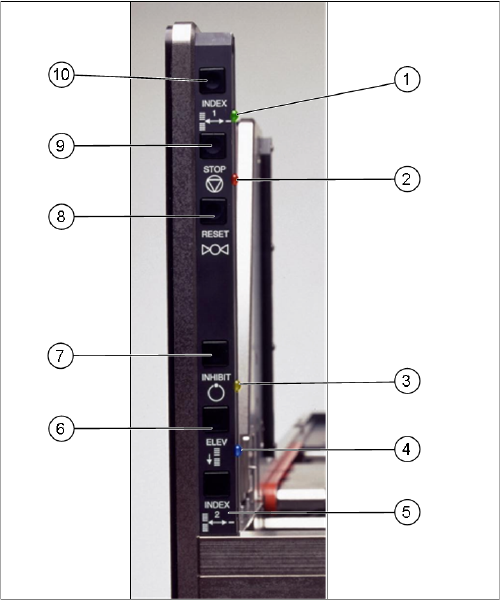
The diagram shows the control panel on the feeder.
The functions "Index, Inhibit and Elevator Down" are regulated by the controller.
The functions "Stop and Reset" are an electronic stopping function for the pneumatic system. If you
press the stop button, the pneumatic system immediately switches off and the motors will stop. The sta-
tus is read by the controller but not regulated by it.
Tasks on the Machine
Controls and Displays on the Feeder Control Panel
42 User Manual JTF-MW on SIPLACE E
The precise functions are described below:
Index 1 (10) and index 2 (5)
Index 1 (10) and 2 (5) only trigger a tray changeover if
they are both pressed (series connection). The next tray
in the series is moved into the magazine. A connection to
the serial interface is needed for the various feeder com-
mands.
This function is disabled in production mode.
Stop (9)
If you press the stop button (9), the pneumatic system im-
mediately switches off and the motors will stop. The stop
button supports the stopping function of the pneumatics
system. A signal is sent to the host.
The "Stop and Reset" functions can not be switched off
by the production mode.
Reset (8)
The reset button (8) resets the feeder after a stop condi-
tion. A signal is sent to the host.
The "Stop and Reset" functions can not be switched off
by the production mode.
Inhibit (7)
The inhibit button (7) locks the remote control for the
SIPLACE JTF-MW. The feeder does not receive any con-
trol commands from the host. This lock is released when
the button is pressed again.
This function is disabled in production mode.
Elevator down (6)
This function allows you to change the trays in the maga-
zine without stopping production. The magazine moves
down and the current tray in the pick position remains
clamped and the ready LED (green) continues to shine.
► As soon as the lift stops at the bottom, the door can
be opened and the trays can be changed.
► Open the door once the lift has reached the bottom.
► Leave the empty slot (for the tray currently used in the
pick position) empty.
This function is disabled in production mode.