M3plus_OperationManual_e.pdf - 第100页
3 - 35 4. Creating the component information 3 Creating the PCB data Mini-mold transistors and SOT A, B: Body Size X, Body Size Y Enter the correct dimensions (mm) including the leads, measured with a vernier caliper or …
3 -34
3
Creating the PCB data
4. Creating the component information
4.6 Shape parameters
Set these parameters after specifying "Alignment Type". If "Alignment Type" is unde-
fined, the following parameters are not displayed.
Chip components
Chip components
27417-5E-20
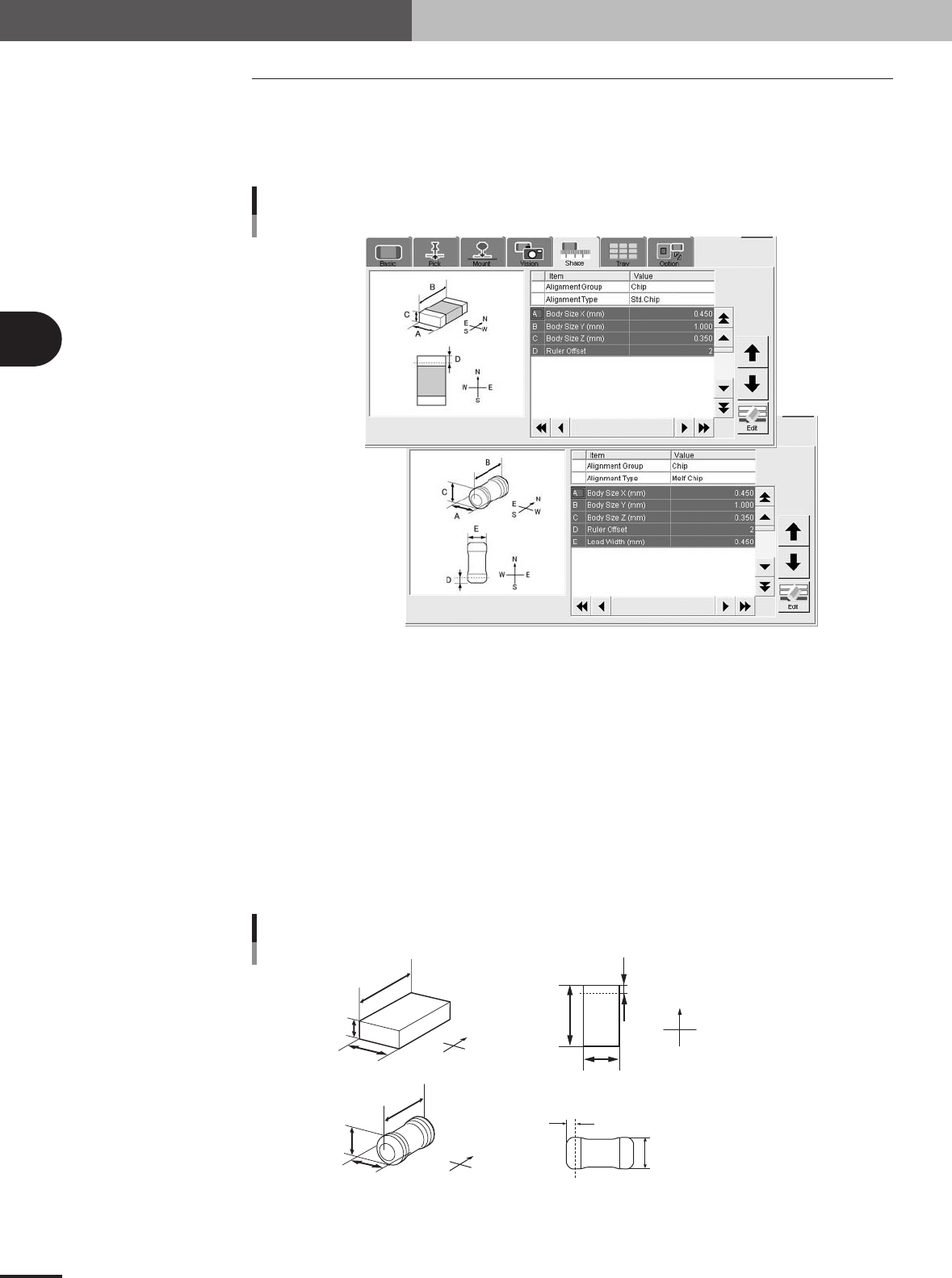
A, B: Body Size X, Body Size Y
Enter the correct dimensions (mm) measured with a vernier caliper or micrometer.
C: Body Size Z
Enter the correct thickness (mm) measured with a vernier caliper or micrometer.
D: Ruler Offset
This parameter specifies the distance in pixels, from the end of the component to an imaginary
ruler line used to measure the lead width. Use the default setting in most cases.
E: Lead Width
Enter the width of the leads provided on both ends of the component. This can be checked later in
the Parts Adjust mode. (Standard box type chip components do not use this parameter.)
N
S
E
W
A
C
B
N
S
W
E
A
B
D
N
S
E
W
C
A
B
E
D
Top view
A : Body Size X
B : Body Size Y
C : Body Size Z
D : Ruler Offset
A : Body Size X
B : Body Size Y
C : Body Size Z
D : Ruler Offset
E : Lead Width
Shape parameters for chip components
23417-5E-20
3 -35
4. Creating the component information
3
Creating the PCB data
Mini-mold transistors and SOT
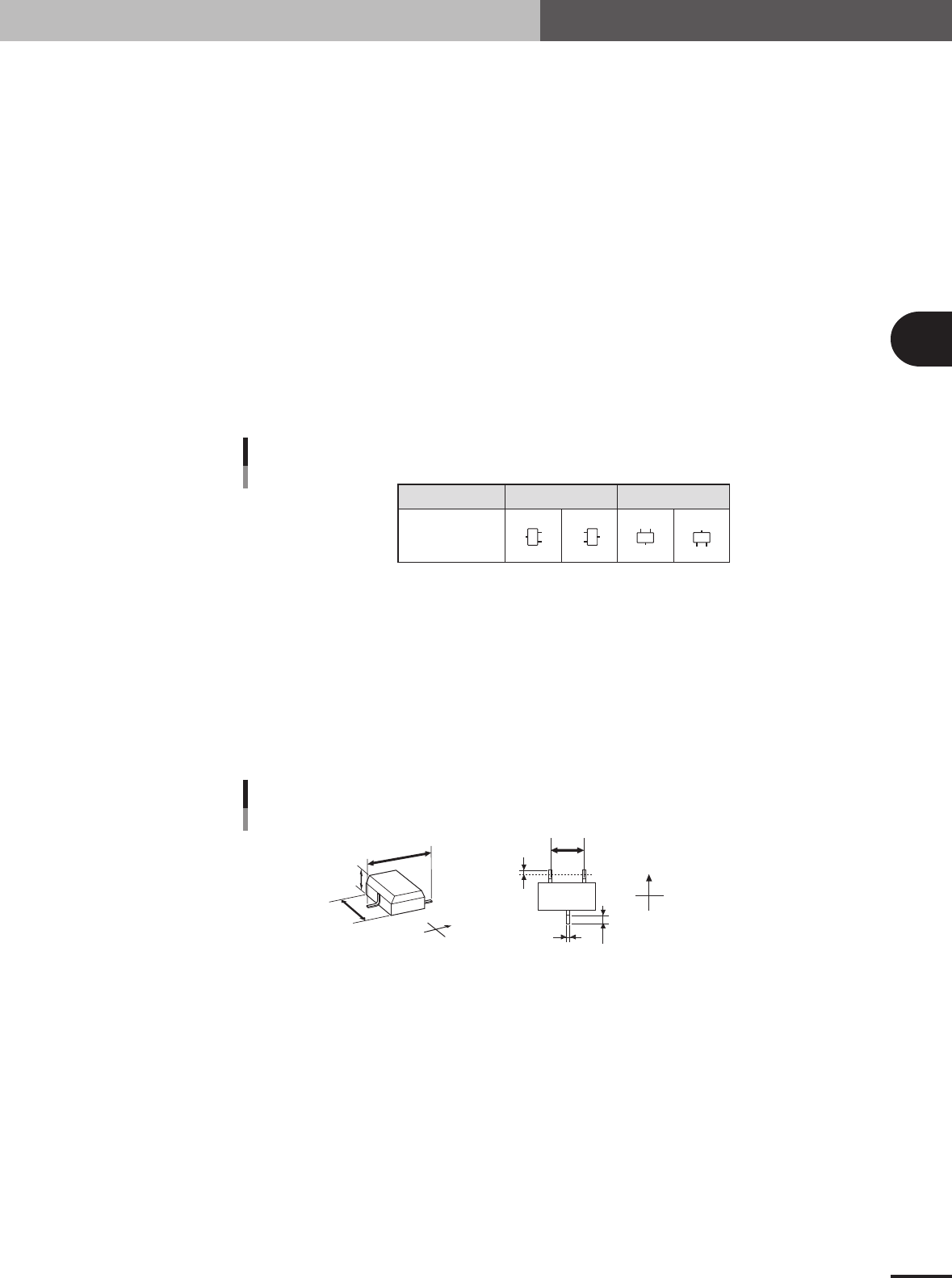
A, B: Body Size X, Body Size Y
Enter the correct dimensions (mm) including the leads, measured with a vernier caliper or mi-
crometer.
C: Body Size Z
Enter the correct thickness (mm) measured with a vernier caliper or micrometer.
D: Ruler Offset
Enter the distance in pixels from the end of the component to an imaginary line used to measure
the lead width and pitch. Use the default setting in most cases.
E: Ruler Width
Enter the width of an imaginary line used to measure the lead width and pitch. Set this parameter
to "1 to 2" for components with a lead length shorter than 0.3mm, and to "2 to 3" for components
with a lead length longer than 0.3mm. Use the default setting in most cases.
F, G: Lead Number NS
Enter the number of leads existing in the N and S directions.
Pickup angle
Loading position
0° 90°
NSNS
N
S
N
S
Mini-mold transistor and SOP lead direction
25408-5E-20
H, I: Lead Pitch NS
Enter the correct lead pitch (lead-to-lead spacing).
J: Lead Width
Enter the correct lead width
K: ReflectLL
Enter the projected length of leads which reflect light during recognition. Use the default setting in
most cases.
N
S
E
W
B
C
A
N
S
E
W
H
K
D
J
A : Body Size X
B : Body Size Y
C : Body Size Z
D : Ruler Offset
H : Lead Pitch
J: Lead Width
K: Reflect LL
Bottom view
Shape parameters for mini-mold transistors
23420-5E-20
3 -36
3
Creating the PCB data
4. Creating the component information
SOP
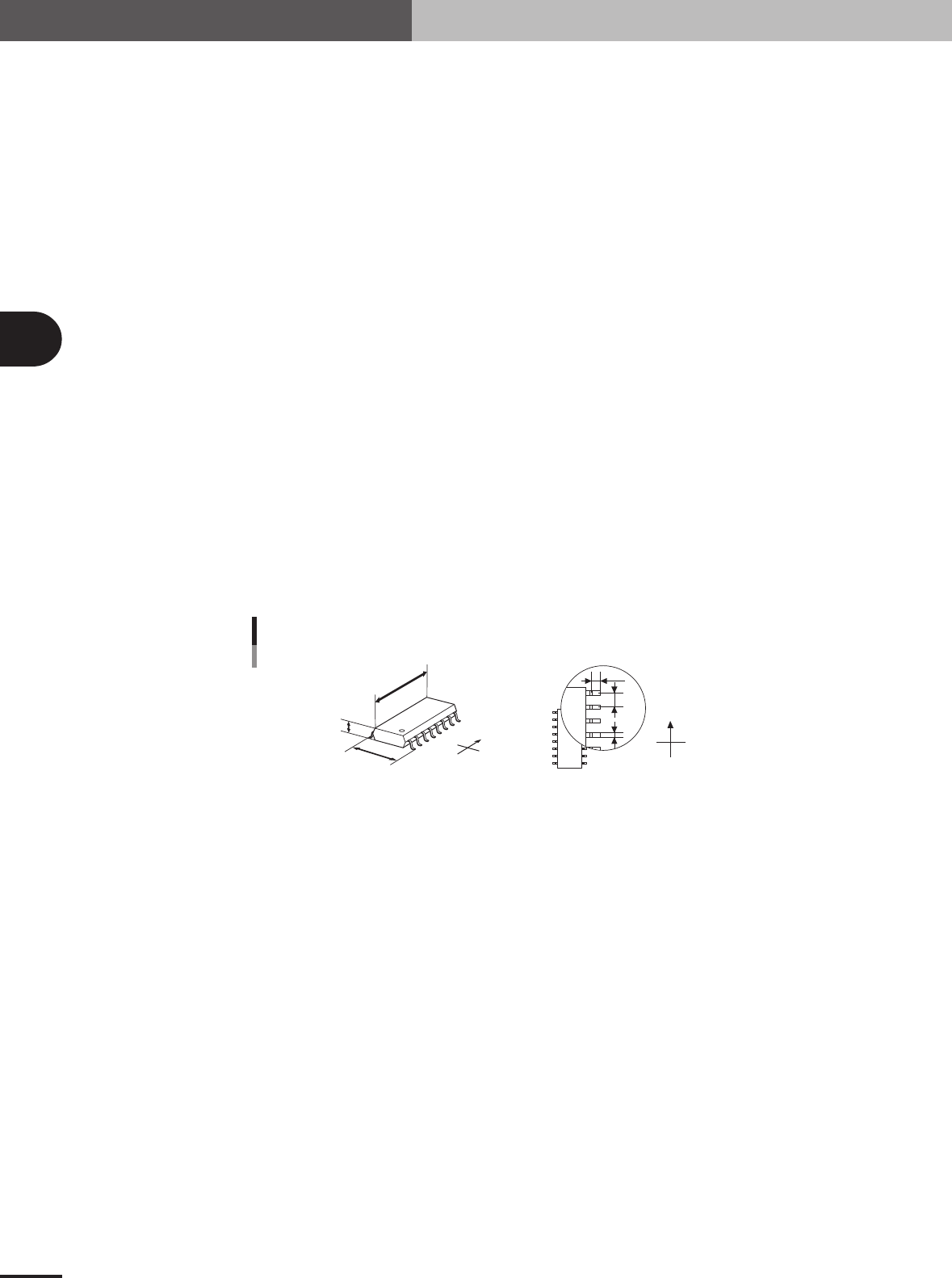
A, B: Body Size X, Body Size Y
Enter the correct dimensions (mm) including the leads, measured with a vernier caliper or mi-
crometer.
C: Body Size Z
Enter the correct thickness (mm) measured with a vernier caliper or micrometer.
D: Ruler Offset
Enter the distance in pixels from the end of the leads to an imaginary line used to measure the lead
width and pitch. Use the default setting in most cases.
E: Ruler Width
Enter the width of the imaginary line used to measure the lead width and pitch. Set this parameter
to "1 to 2" for components with a lead length shorter than 0.3mm, and to "2 to 3" for components
with a lead length longer than 0.3mm. Use the default setting in most cases.
F: Lead Number
Enter the number of leads existing in the E or W direction.
G: Lead Pitch
Enter the correct lead pitch (lead-to-lead spacing).
H: Lead Width
Enter the correct lead width
I: ReflectLL
Enter the projected length of leads which reflect light during recognition. Use the default setting in
most cases.
N
S
E
W
N
S
W
E
B
C
A
I
G
H
A : Body Size X
B : Body Size Y
C : Body Size Z
G : Lead Pitch
H : Lead Width
I : Reflect LL
Bottom view
Shape parameters for SOP
23421-5E-20