M3plus_OperationManual_e.pdf - 第159页
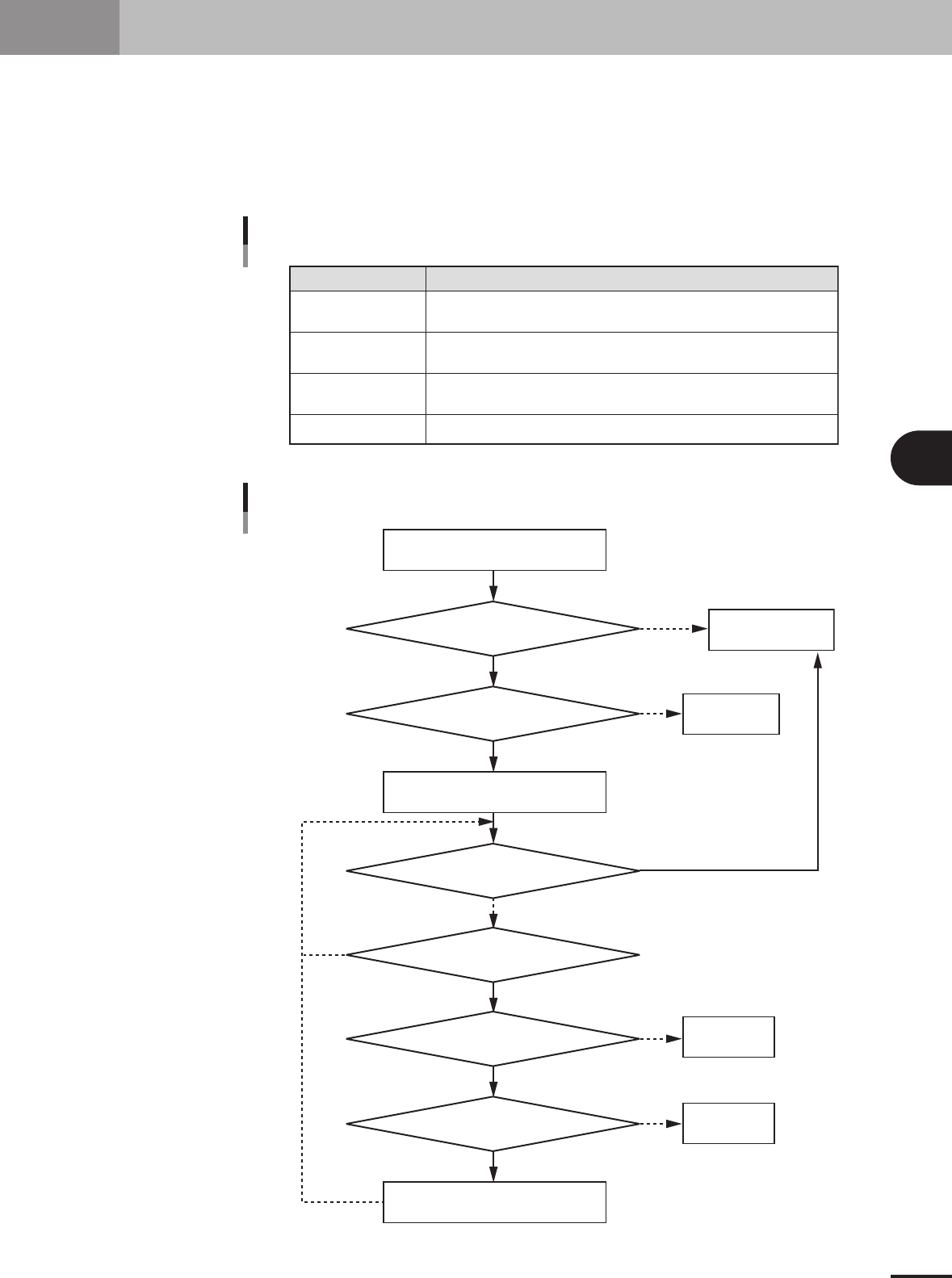
4 - 24 7. Fixed board matching 4 Using the adv anced functions Was a fixed board specified? Is there a fixed board B? Is matching for all component data finished? Is component name the same? Is there valid data? Is the f…
4 -23
4
Using the advanced functions
7. Fixed board matching
When you select PCB data to load it while the "fixed board matching" function is enabled, a search is
performed for all component information in the PCB data being loaded to check whether there are
components with the same name registered in fixed board data. When components with the same
name are found, their information is automatically copied into the PCB data being loaded. So for
example if using components that are always set on the feeder plate, there is no need to create such
component data for each PCB data. Fixed board matching can also be used just to copy component
information having the same name which helps shorten the time you need to create PCB data.
Maximum registerable
fixed board data
Matching timing
Matching condition
Data format
A maximum of 5 types of PCB data can be registered as fixed board data.
When this function is enabled, fixed board matching is automatically executed
each time the target PCB data is loaded.
Component data is copied only when the "Parts Name" and "Feeder Type"
match the fixed board data.
Only VIOX data is usable. XML and text format PCB data are unusable.
Item Description
Specifications for fixed board matching function
25420-5E-20
Yes
No
Yes
No
Yes
No
Yes
No
Yes
No
Yes
No
Load board data A
Load the fixed board B data
Copy component data from B to A
Was a fixed board specified?
Is there a fixed board B?
Is matching for all component data finished?
Is component name the same?
Is there valid data?
Is the feeder type the same?
End the board
data loading
Error processing
Ea721
Error processing
Ea723
Error processing
Ea725
Operation flow for fixed board matching
23450-5E-20
4 -24
7. Fixed board matching
4
Using the advanced functions
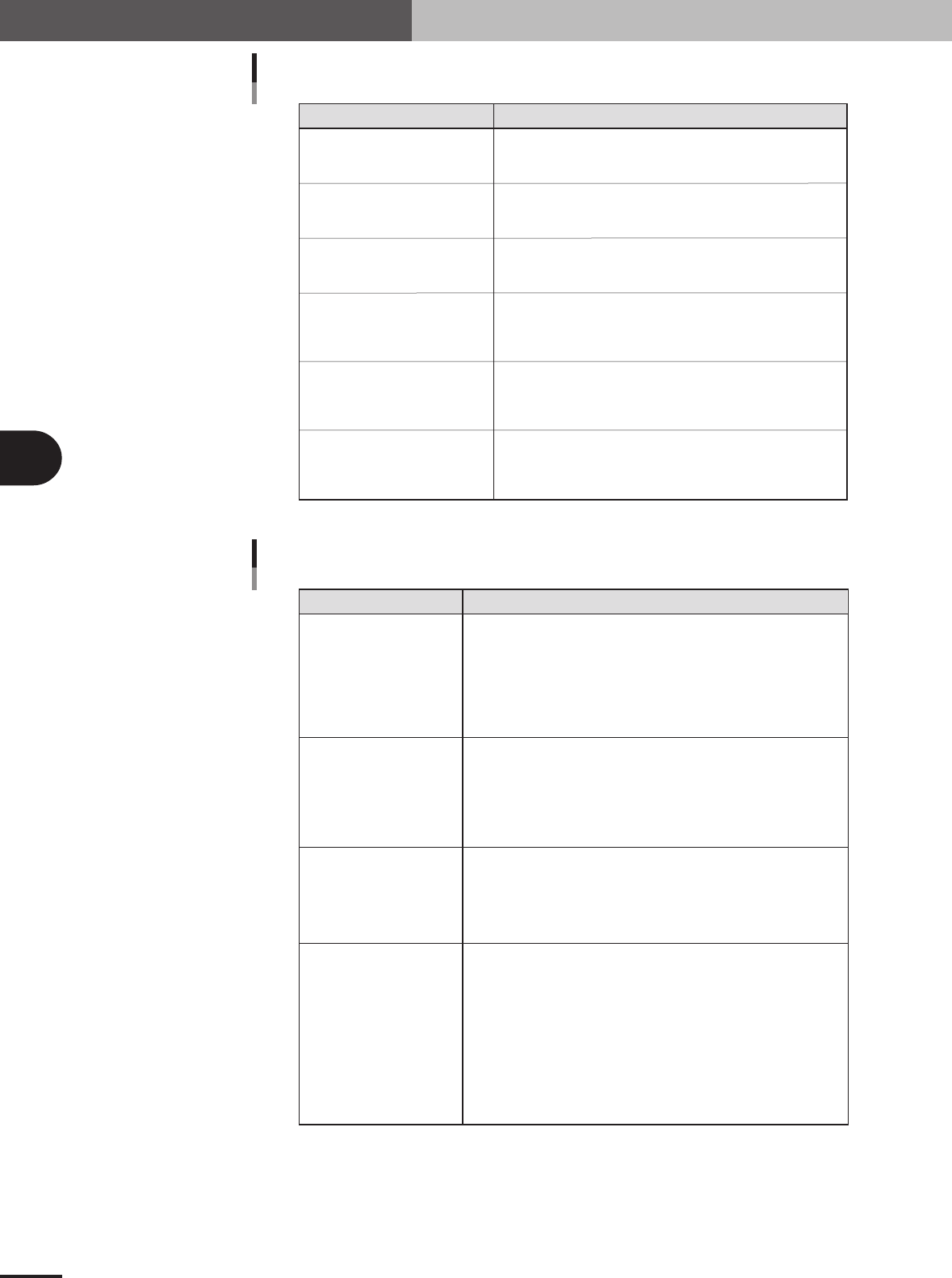
Was a fixed board specified?
Is there a fixed board B?
Is matching for all component
data finished?
Is component name the same?
Is there valid data?
Is the feeder type the same?
Checks if fixed board matching function is enabled and branches
the processing if enabled. Data loading ends with no changes made
if this function is not used.
Checks if fixed board data is registered when fixed board matching
function is enabled, and branches the processing if registered.
If no fixed board data is registered, an error (Ea721) is issued.
Checks if matching for all component data registered in the loaded
PCB data is finished or not, and branches the processing.
If not yet finished, the matching process continues.
Searches for a component name match between the loaded
PCB data and the fixed board data. If a component with the same
name is found, then the operation proceeds to the next process.
If not found, then a search is made for the next component.
Checks if the contents of the fixed board data for a component
with a matching name are valid or not. If valid, the operation
proceeds to the next process. If not valid, an error (Ea723)
is issued and the matching process is stopped.
Checks if the feeder type of the target component matches
the fixed board component feeder type. If a match, the operation
proceeds to the next process. If there is no match an error (Ea725)
is issued and the matching process is stopped.
Flow item Description
Description of flow items
25421-5E-20
Ea721
Fixed board loading error
Ea723
No component data
Ea725
Feeder type mismatch error
Component information
in PCB data was changed.
Error Cause and countermeasure
Errors and countermeasures
[Cause]
This error occurs if no fixed board data is registered even when the fixed
board matching function is enabled. When multiple fixed board data is
registered and a check is placed in the "Use" check box, an error occurs
if even just one of those fixed board data is not present.
[Countermeasure]
Check if fixed board data is registered properly and then reload the target
PCB data.
[Cause]
This error occurs if the component name on the loaded PCB data matches
a component name in the fixed board data but there is no component data
on the fixed board side.
[Countermeasure]
Check and correct the fixed board component data and then reload the
target PCB data.
[Cause]
This error occurs if the component name on the loaded PCB data matches
a component name in the fixed board data but the feeder type is different.
[Countermeasure]
After changing the feeder type of the target component, register the
PCB data and reload it.
[Cause]
The component data may have been rewritten due to the fixed
board matching. The matching and copying of component data will
continue every time PCB data is loaded, as long as fixed board matching
is enabled on the "Fixed Board Matching" dialog box (see section 7.1).
In other words, when component data and also feeder type component
data with the same name as component data registered for the fixed board
have been changed, they are then substituted into the fixed board
component data at the instant the PCB data is loaded.
[Countermeasure]
Disable the fixed board matching function if you don’t want to rewrite
board data in the fixed board matching process.
25422-5E-20
4 -25
7. Fixed board matching
4
Using the advanced functions
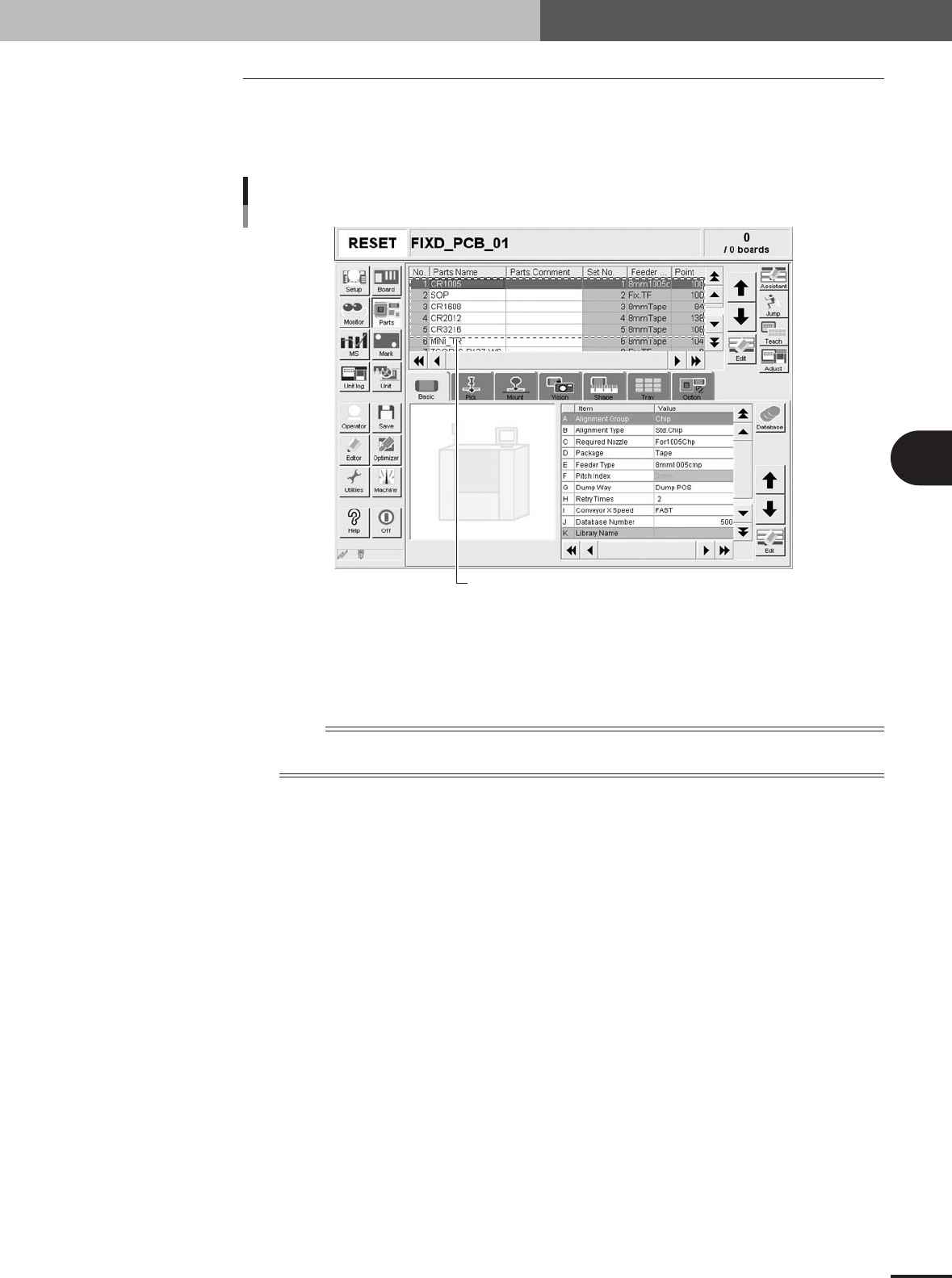
7.1 How to set up the fixed board matching function
1
Prepare the board data to register.
Before starting, prepare the board data to register as fixed board data. (You can
register up to a maximum of 5 types of board data.)
Components to be registered in fixed board data
Setup screen showing components for fixed board data
27488-5E-20
2
Store the fixed board data in a designated location.
The fixed board data you prepared in step 1 must be stored in a folder in the specified
location. Store the fixed board data in "D:\Machine\No.1" when the "Machine"
folder is created in drive D.
n
NOTE
Those customers with board data managed via a network should store the fixed board data in the specified
location in the host server.