M3plus_OperationManual_e.pdf - 第163页
在线预览 M3plus_OperationManual_e.pdf PDF 文档。
4 -27
7. Fixed board matching
4
Using the advanced functions
6
End the setup.
When finished making the setup, press the [Close] button. The fixed board matching
setup is now complete.
7
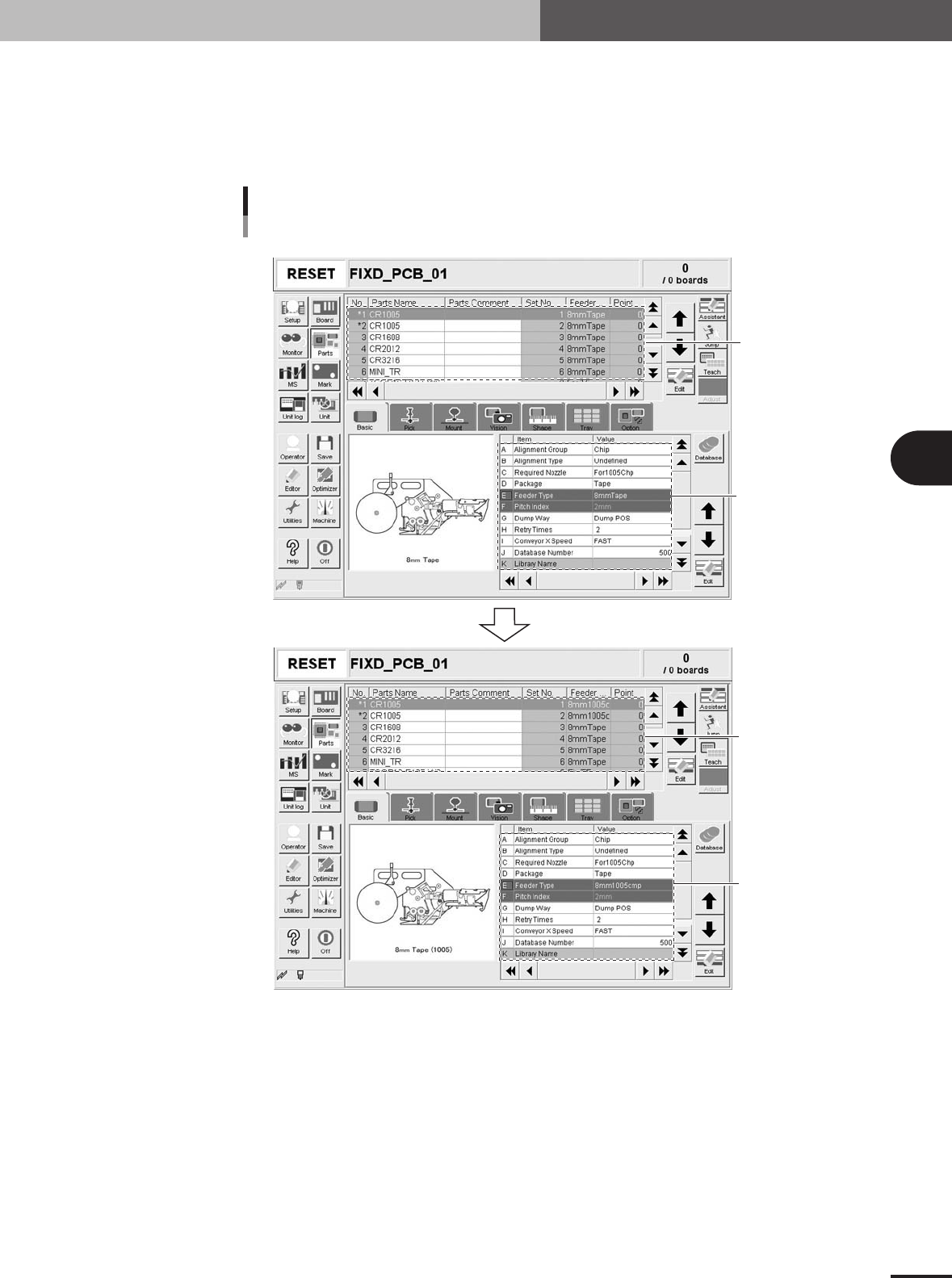
Check the operation.
Load PCB data, and check that the fixed board data is copied.
Enter just the component
name and feeder type.
Default value
Fixed board data is copied
Checking the fixed board matching
Copied items and data
Before loading
After loading
Loading PCB data
27491-5E-20

Table of Contents
1. Using the Editor . . . . . . . . . . . . . . . . . . . . . . . . . . . . . . . . 5-1
1.1 Jump . . . . . . . . . . . . . . . . . . . . . . . . . . . . . . . . . . . . . . . . . . . . . . . 5-1
1.1.1 Specifying the line number to jump . . . . . . . . . . . . . . . . . . . . . . . . 5-1
1.1.2 Jump to the top line . . . . . . . . . . . . . . . . . . . . . . . . . . . . . . . . . . . . 5-2
1.1.3 Jump to the bottom line . . . . . . . . . . . . . . . . . . . . . . . . . . . . . . . . . 5-3
1.1.4 Copying and pasting the data . . . . . . . . . . . . . . . . . . . . . . . . . . . . 5-4
1.2 Filtering . . . . . . . . . . . . . . . . . . . . . . . . . . . . . . . . . . . . . . . . . . . . 5-6
1.2.1 Filtering . . . . . . . . . . . . . . . . . . . . . . . . . . . . . . . . . . . . . . . . . . . . . 5-6
1.2.2 Canceling the filter . . . . . . . . . . . . . . . . . . . . . . . . . . . . . . . . . . . . 5-7
1.3 Find and Replace . . . . . . . . . . . . . . . . . . . . . . . . . . . . . . . . . . . . . 5-8
1.3.1 Find . . . . . . . . . . . . . . . . . . . . . . . . . . . . . . . . . . . . . . . . . . . . . . . . 5-8
1.3.2 Replace . . . . . . . . . . . . . . . . . . . . . . . . . . . . . . . . . . . . . . . . . . . . 5-10
1.4 Sort . . . . . . . . . . . . . . . . . . . . . . . . . . . . . . . . . . . . . . . . . . . . . . 5-12
1.5 Multiplying the Component Data . . . . . . . . . . . . . . . . . . . . . . . 5-13
2. Block offset . . . . . . . . . . . . . . . . . . . . . . . . . . . . . . . . . . . 5-14
2.1 Creating the block offset data . . . . . . . . . . . . . . . . . . . . . . . . . . 5-14
2.2 Block offset conversion and reconversion . . . . . . . . . . . . . . . . . 5-17
2.2.1 Executing the block offset conversion . . . . . . . . . . . . . . . . . . . . . 5-17
2.2.2 Reconverting to the multi-block data . . . . . . . . . . . . . . . . . . . . . . 5-19
3. Optimizing the data . . . . . . . . . . . . . . . . . . . . . . . . . . . . 5-20
3.1 Setting the optimizing conditions . . . . . . . . . . . . . . . . . . . . . . . 5-21
3.2 Executing . . . . . . . . . . . . . . . . . . . . . . . . . . . . . . . . . . . . . . . . . . 5-24
4. PCB file format conversion . . . . . . . . . . . . . . . . . . . . . . 5-25
4.1 Converting VIOS into XML . . . . . . . . . . . . . . . . . . . . . . . . . . . . . 5-25
4.2 Converting XML into VIOS . . . . . . . . . . . . . . . . . . . . . . . . . . . . . 5-27
Chapter 5 Editing the PCB data