M3plus_OperationManual_e.pdf - 第195页
在线预览 M3plus_OperationManual_e.pdf PDF 文档。

Table of Contents
1. Data backup . . . . . . . . . . . . . . . . . . . . . . . . . . . . . . . . . . . 6-1
1.1 Creating a PCB data disk . . . . . . . . . . . . . . . . . . . . . . . . . . . . . . . 6-1
1.1.1 Data backup . . . . . . . . . . . . . . . . . . . . . . . . . . . . . . . . . . . . . . . . . 6-2
2. Creating the user database . . . . . . . . . . . . . . . . . . . . . . . 6-4
2.1 Copying the data into the database . . . . . . . . . . . . . . . . . . . . . . . 6-4
3. Creating XML library. . . . . . . . . . . . . . . . . . . . . . . . . . . . . 6-6
3.1 Setting the library path . . . . . . . . . . . . . . . . . . . . . . . . . . . . . . . . 6-6
3.2 Setting the PCB data links . . . . . . . . . . . . . . . . . . . . . . . . . . . . . . 6-8
3.2.1 Setting links from the VGOS . . . . . . . . . . . . . . . . . . . . . . . . . . . . . 6-8
3.2.2 Setting links from the Editor . . . . . . . . . . . . . . . . . . . . . . . . . . . . . 6-10
3.2.3 Using library matching (Editor only) . . . . . . . . . . . . . . . . . . . . . . 6-11
3.3 Saving the library data . . . . . . . . . . . . . . . . . . . . . . . . . . . . . . . . 6-13
Chapter 6 Managing the data
6
Managing the data
6 -1
1. Data backup
To make a backup copy of PCB data, you need a PCB data disk specially formatted for the mounters.
This section explains how to format a PCB data disk and make a backup.
1.1 Creating a PCB data disk
1
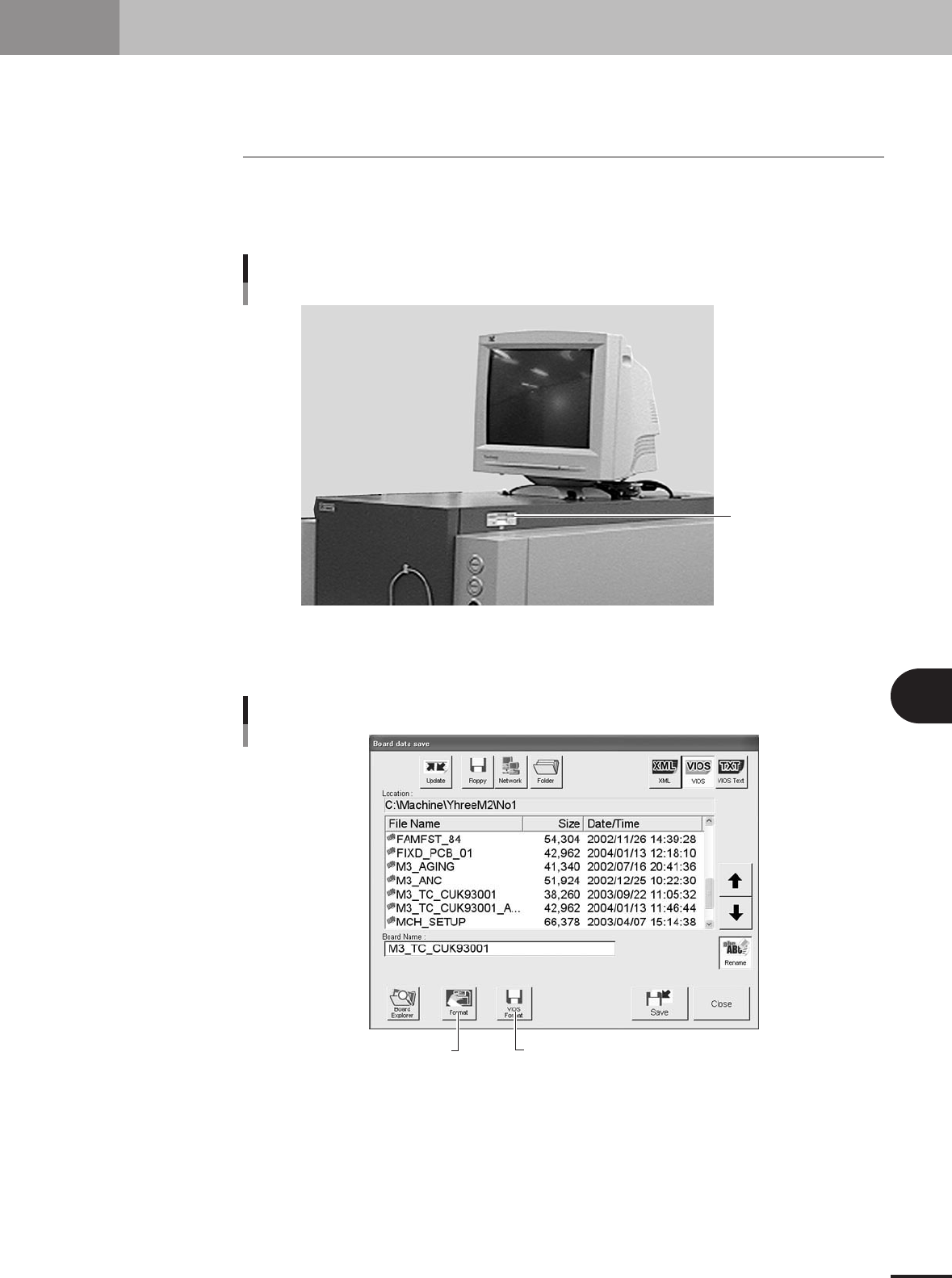
Insert a floppy disk into the floppy disk drive.
Insert a floppy disk (2HD) for backup into the floppy disk drive of the machine. (The
FD drive is located at the upper right of the machine.)
Insert a 3.5'' floppy disk
into the FD drive
FD drive
23447-5E-20
2
Press the [Save] button in the main menu button area.
The Save dialog box appears.
[VIOS Format] button
[Format] button
Save dialog box
27466-5E-20
3
Create a PCB data disk.
For unformatted disk:
Press the [Format] button and follow the instruction that appears on the screen.
For Windows-formatted disk:
When a floppy disk already formatted for Windows is inserted into the FD drive, press
the [VIOS Format] button.