M3plus_OperationManual_e.pdf - 第241页
在线预览 M3plus_OperationManual_e.pdf PDF 文档。

Table of Contents
1. Part names and functions . . . . . . . . . . . . . . . . . . . . . . . . 1-1
1.1 TSF1 main unit . . . . . . . . . . . . . . . . . . . . . . . . . . . . . . . . . . . . . . . . 1-1
1.2 Operation switch description . . . . . . . . . . . . . . . . . . . . . . . . . . . . . 1-4
2. How to handle and operate the TSF1 . . . . . . . . . . . . . . . 2-1
2.1 Installing the TSF1 . . . . . . . . . . . . . . . . . . . . . . . . . . . . . . . . . . . . . 2-1
2.2 Setting up the component tray . . . . . . . . . . . . . . . . . . . . . . . . . . . . 2-3
2.3 Detaching the TSF1 . . . . . . . . . . . . . . . . . . . . . . . . . . . . . . . . . . . . 2-5
2.4 Manual operations . . . . . . . . . . . . . . . . . . . . . . . . . . . . . . . . . . . . . 2-6
2.5 Production . . . . . . . . . . . . . . . . . . . . . . . . . . . . . . . . . . . . . . . . . . . 2-8
3. Setup . . . . . . . . . . . . . . . . . . . . . . . . . . . . . . . . . . . . . . . . . 3-1
3.1 Changing the TSF1 setups . . . . . . . . . . . . . . . . . . . . . . . . . . . . . . . . 3-2
3.1.1 Changing the setups: from specifications A to B . . . . . . . . . . . . . . . . . 3-2
3.1.2 Changing the setups: from specifications A to C . . . . . . . . . . . . . . . . . 3-4
3.2 Changing the mounter setups . . . . . . . . . . . . . . . . . . . . . . . . . . . . 3-5
3.2.1 Changing the setups to use one or two TSF1 . . . . . . . . . . . . . . . . . . . . 3-5
3.2.2 Changing back to the initial setups that do not use TSF1 . . . . . . . . . . . 3-6
3.2.3 Checking the machine settings . . . . . . . . . . . . . . . . . . . . . . . . . . . . . . 3-6
4. Inspection and maintenance work . . . . . . . . . . . . . . . . . 4-1
4.1 Precautions . . . . . . . . . . . . . . . . . . . . . . . . . . . . . . . . . . . . . . . . . . 4-1
4.2 Inspection points before operation . . . . . . . . . . . . . . . . . . . . . . . . 4-1
4.3 Inspection and maintenance . . . . . . . . . . . . . . . . . . . . . . . . . . . . . 4-2
4.3.1 Inspection location and period . . . . . . . . . . . . . . . . . . . . . . . . . . . . . . 4-2
4.3.2 Applying grease . . . . . . . . . . . . . . . . . . . . . . . . . . . . . . . . . . . . . . . . . . 4-3
4.3.3 Supplementary description of the overrun sensors and origin sensor . 4-4
TSF1 Tray Shuttle Feeder
1
Part names and functions
1 -1
1. Part names and functions
This section describes major part names and functions of the tray shuttle feeder (hereafter called
"TSF1").
1.1 TSF1 main unit
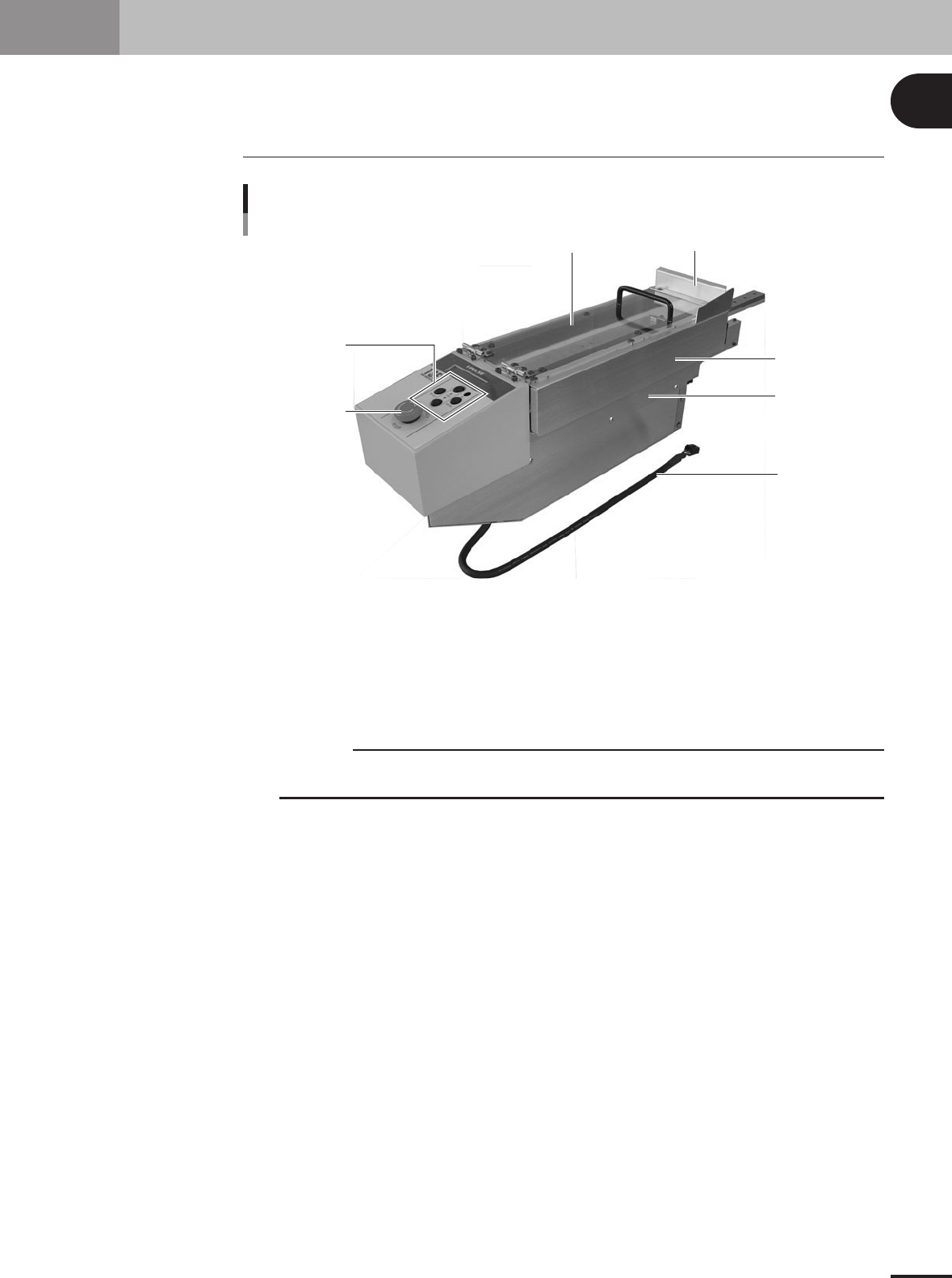
Upper safety cover Feeder cover
Operation switch
panel
Emergency stop
button
Side safety cover 1
Side safety cover 2
Signal cable
TSF1 main body 1
73100-5V-00
Operation switch panel
Use the button switches on this panel to return the shuttle to its origin position, move it to the tray
replacement position or perform JOG operation.
Upper safety cover
Open this cover to set up a tray on the TSF1.
c
CAUTION
Do not apply force to the upper safety cover or place any object on it. Doing so might deform or
damage the cover.
Feeder cover
This is attached to the end of the upper safety cover, to prevent you from putting your hands or other
objects inside the mounter.
Side safety cover 1
When two TSF1 units are used, you must remove this side safety cover of the TSF1 that is installed
in position 1.
Side safety cover 2
When two TSF1 units are used, you must also remove this side safety cover of the TSF1 that is
installed in position 1.
Signal cable
Connect this signal cable to the mounter (M CUBE PLUS). Always turn off the mounter power
switch before plugging this signal cable into the connector on the mounter side or unplugging it.
Emergency stop button
When pressed, this button immediately turns off the servo control to stop the TSF1 and mounter. To
cancel emergency stop, release this button and then press the [READY] button on the mounter.