M3plus_OperationManual_e.pdf - 第250页
2 - 5 2 Ho w to handle and operate the TSF1 2.3 Detaching the TSF1 1 Turn off the mounter power switch. n NOTE After production is finished, the shuttle automatically moves to the tray replacement position. If the shuttl…
2 -4
2
How to handle and operate the TSF1
4
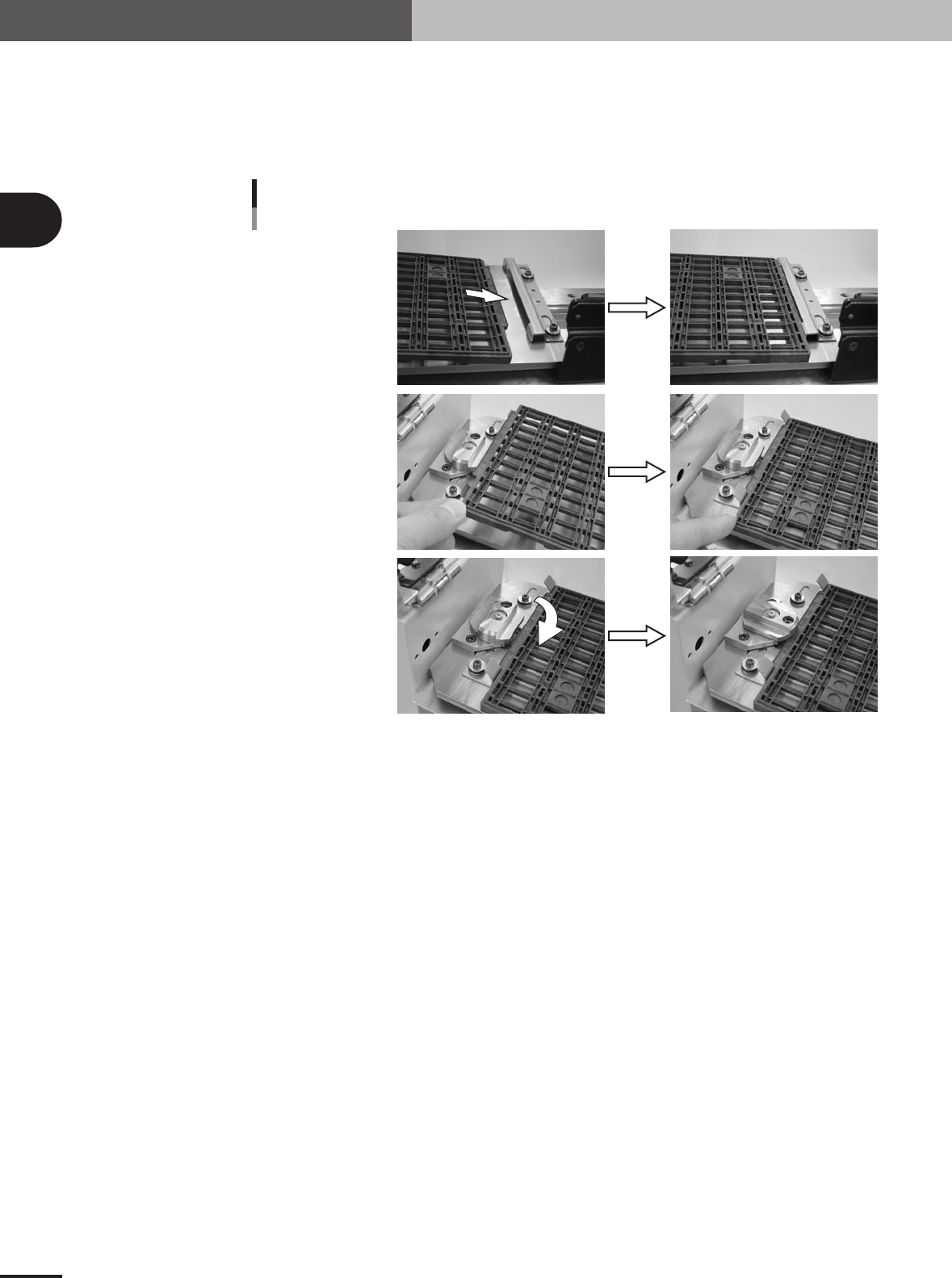
Set the tray on the shuttle.
1.Gently insert the mounter-side protruding edge of the tray into the tray guide F.
2.Gently place the opposite protruding edge of the tray between the bent up metal
pieces of the tray guide R.
3.Turn the hold knob to clamp the tray.
Insert into tray guide F.
Securing the tray
Set the tray in tray guide R.
Tu rn the hold knob.
73203-5V-00
5
Close the TSF1 upper safety cover.
Make sure the tray is securely clamped on the shuttle and then close the TSF1 upper
safety cover.
6
Release the emergency stop button on the TSF1.

2 -5
2
How to handle and operate the TSF1
2.3 Detaching the TSF1
1
Turn off the mounter power switch.
n
NOTE
After production is finished, the shuttle automatically moves to the tray replacement position. If the shuttle is not
at the tray replacement position when you start the shutdown process with the servo turned on, the shuttle will
automatically move to the tray replacement position during the process of turning the power off. However, if you
start the shutdown process with the servo turned off, the shuttle will fail to move to the tray replacement position.
If that happens, wait until the mounter power completely turns off, and then move the shuttle by hand to the tray
replacement position.
2
Remove the component tray.
1.Open the TSF1 upper safety cover.
2. Remove the tray in the reverse of the above procedure explained in section 2.2,
"Setting up the component tray".
3. Close the TSF1 upper safety cover.
3
Disconnect the signal cable.
Unplug the TSF1 signal cable connector from the feeder plate connector, and then
plug in the shorting connector (LC2-M51FK-XXX).
4
Detach the TSF1 from the feeder plate.
While pulling up the clamp lever to unclamp the TSF1, gently detach the entire unit of
the TSF1 from the feeder plate.
n
NOTE
When not using the TSF1 after detaching it, reattach the feeder plate safety hoods of the mounter and change the
machine setting to specifications that do not use the TSF1. (For information on how to change the specifications,
see Chapter 3, "Setup".)
2 -6
2
How to handle and operate the TSF1
2.4 Manual operations
n
NOTE
You can manually operate the TSF1 to return the shuttle to the origin position or to move it to the tray
replacement position. Use these operations in the following cases.
[Example 1]
When replacing the tray before the specified number of components has been mounted:
In normal operation, when all components on the tray run out, the TSF1 detects this and the shuttle
automatically moves to the tray replacement position where you can replace the empty tray with a
new tray. For example, if only half of the full number of components remain on the tray and those
components are all used up before the specified number of components is mounted, a pickup error
will occur. If this happens, you must manually move the shuttle to the tray replacement position to
replace the empty tray with a new tray.
[Example 2]
When moving the shuttle during maintenance or inspection:
When you want to move the shuttle to spread grease after applying it to the shuttle axis or to check
for abnormal noise or vibration during inspection, use the JOG operation.
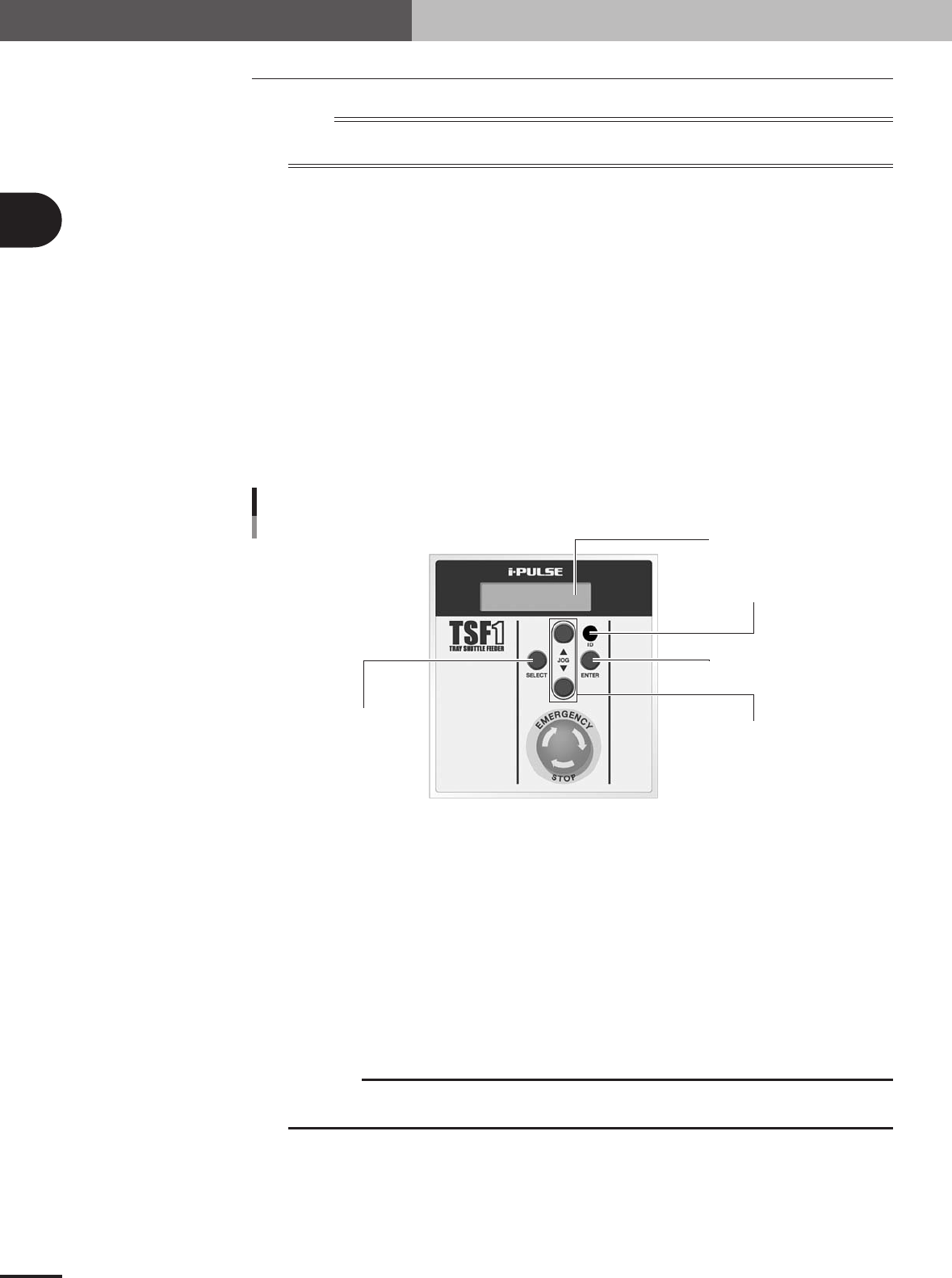
Operation panel switch description
ENTER button
ID setting dial
JOG button
SELECT button
LCD (Liquid crystal display)
Operation switch panel
73104-5V-00
SELECT button
Use this button to select the manual operation. Select "SET" to move the shuttle to the tray
replacement position or "ORG" to return the shuttle to the origin.
ENTER button
Press this button to perform the manual operation selected with the SELECT button. (The selected
operation is entered the first time you press this button, and is run the second time you press it.)
JOG button
1. Moves the shuttle in JOG mode.
Pressing the [▲] button moves the shuttle toward the work position (mounter side).
Pressing the [▼] button moves the shuttle toward the tray replacement position (TSF1 operation
switch panel side).
c
CAUTION
The JOG buttons and ENTER button are disabled during emergency stop or automatic
operation or when the head (Z-axis) of the mounter is at a point lower than the specified height.
2. Adjusts the LCD backlight brightness.
When the mounter power switch is turned on, the LCD (liquid crystal display) shows the TSF1
software version information for about 2 seconds. During this period, pressing the JOG button
once enters the adjustment mode for LCD backlight brightness. The brightness can be adjusted in
32 steps. Press the [▲] button to make the display darker, or press the [▼] button to make it
brighter.