M3plus_OperationManual_e.pdf - 第261页
3 - 8 3 Setup 3 Set the communication parameters. 1. In the left pane, select "Option Setting" from under "Machine Information". 2. Check that the "RS232C CMU" field is set to "WithCMUr…
3 -7
3
Setup
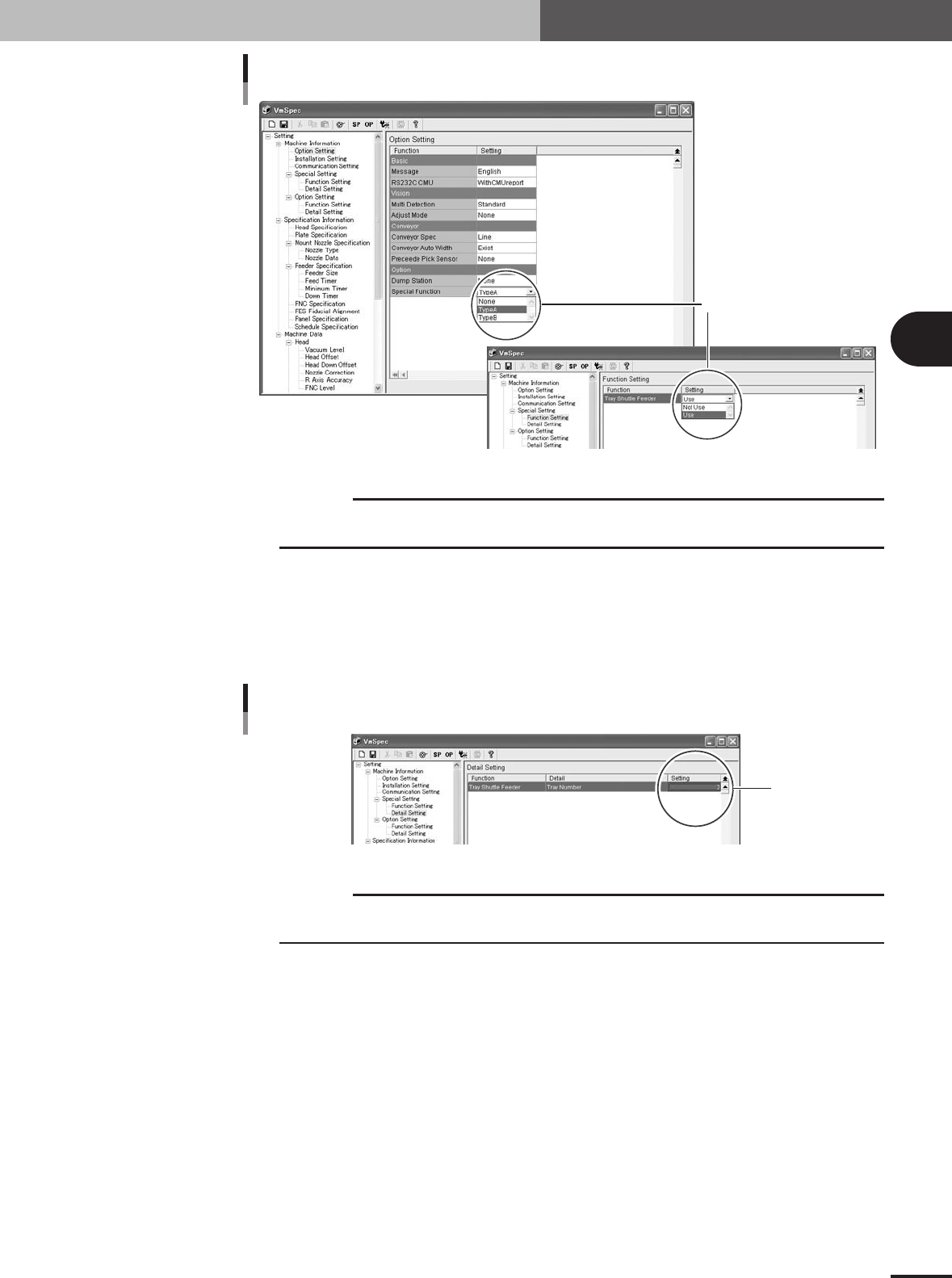
Machine setting 1
Set here.
77310-5V-00
c
CAUTION
If the "Option" - "Special Function" parameter is set to "None" (TSF1 is not used), the "Tray
Shuttle Feeder" parameter setting will be disabled.
2
Set the number of TSF1 units to be used.
1.In the left pane, select "Detail Setting" from under "Machine Information" - "Spe-
cial Setting".
2.In the "Setting" field of the "Tray Shuttle Feeder" parameter, set "1" when using
one TSF1 unit or set "2" when using two TSF1 units.
Machine setting 2
Set here.
77311-5V-00
c
CAUTION
If the "Option" - "Special Function" parameter is set to "None" (TSF1 is not used), the "Tray
Shuttle Feeder" parameter setting will be disabled.
3 -8
3
Setup
3
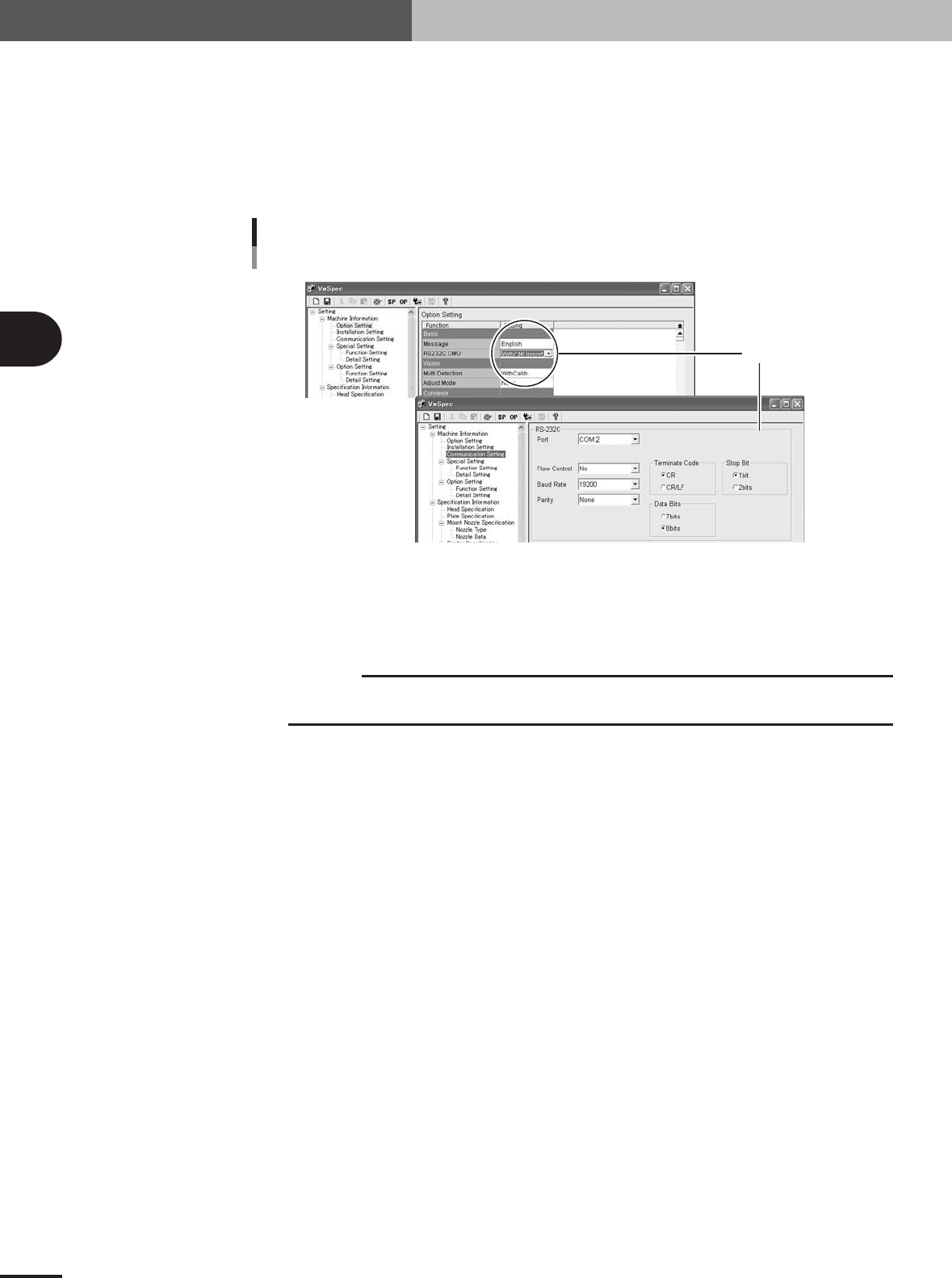
Set the communication parameters.
1.In the left pane, select "Option Setting" from under "Machine Information".
2.Check that the "RS232C CMU" field is set to "WithCMUreport" whether the TSF1 is
used or not.
3.Select "Communication Setting" from under "Machine Information".
The current communication settings are displayed in the right pane.
4.Make the settings in the RS-232C group box as shown below.
Machine setting 3
Set here.
77312-5V-00
4
Save the settings when you have made changes.
Click the [Save] button (floppy disk icon button) on the toolbar to save the settings.
5
Close the "VmSpec" window.
c
CAUTION
When the machine settings have been changed, shut down the mounter and then turn it back
on to enable the changes.
4
Inspection and maintenance work
4 -1
4. Inspection and maintenance work
4.1 Precautions
Always observe the following precautions when inspecting the TSF1.
• The inspection must be carried out by competent personnel who has received YAMAHA training,
or under the direction of a YAMAHA approved dealer.
• Always turn off the power before beginning inspections. At times when power must be supplied to
make an inspection, NEVER get within the machine movement range.
•Use only lubricants specified by YAMAHA or the YAMAHA dealer.
4.2 Inspection points before operation
Inspect the following points before using the TSF1.
c
CAUTION
Always turn off the power before beginning inspections. At times when power must be supplied
to make an inspection, NEVER get within the machine movement range.
Check for components or debris that have fallen into the TSF1
Check particularly the sliding assemblies (ball screw and linear guide) and peripheral parts.
w
WARNING
IF YOU BLOW AIR TO REMOVE DEBRIS AND FOREIGN MATTER (SUCH AS CHIPS THAT HAVE
FALLEN INTO THE TSF1), THEY MIGHT GET INTO A NARROWER SPACE. AVOID USING AIR
BLOW, BUT USE TWEEZERS OR SIMILAR TOOLS TO REMOVE DEBRIS OR FOREIGN MATTER.
CONTINUED OPERATION WITH DEBRIS OR CHIPS STILL ADHERING TO THE INTERIOR MIGHT
CAUSE THE TSF1 TO MALFUNCTION.
Signal cable and connector
Check that there are no bends or breaks in the signal cable and also that the connector shell and pins
are not deformed.
c
CAUTION
Using the signal cable that is bent excessively or the deformed connector might cause commu-
nication errors.
Lubrication
Check that grease is spread over the ball screw and linear guide surfaces.
c
CAUTION
Periodic greasing of the moving parts is essential to ensure safety and long-term use.
Shuttle movement
Check whether abnormal noise or vibration is produced from the ball screw or linear guide during
return-to-origin operation.
n
NOTE
For details on the inspection locations and procedures, refer to the next section 4.3, "Inspection and maintenance".