M3plus_OperationManual_e.pdf - 第83页
3 - 18 3 Creating the PCB data 3. Creating the PCB information 9 Mark 2 Enter the mark No. for Mark 2 (mark No. registered as fiducial mark in the mark information). When this mark is identical with Mark 1, enter "0…
3 -17
3
Creating the PCB data
3. Creating the PCB information
3.4 Fiducial parameters
The fiducial function corrects local distortion or warps on a PCB that may occur from
errors in machining the PCB outline and locate pin holes, PCB clamping mechanism
fluctuations, using recognition results of the fiducial marks provided on the PCB.
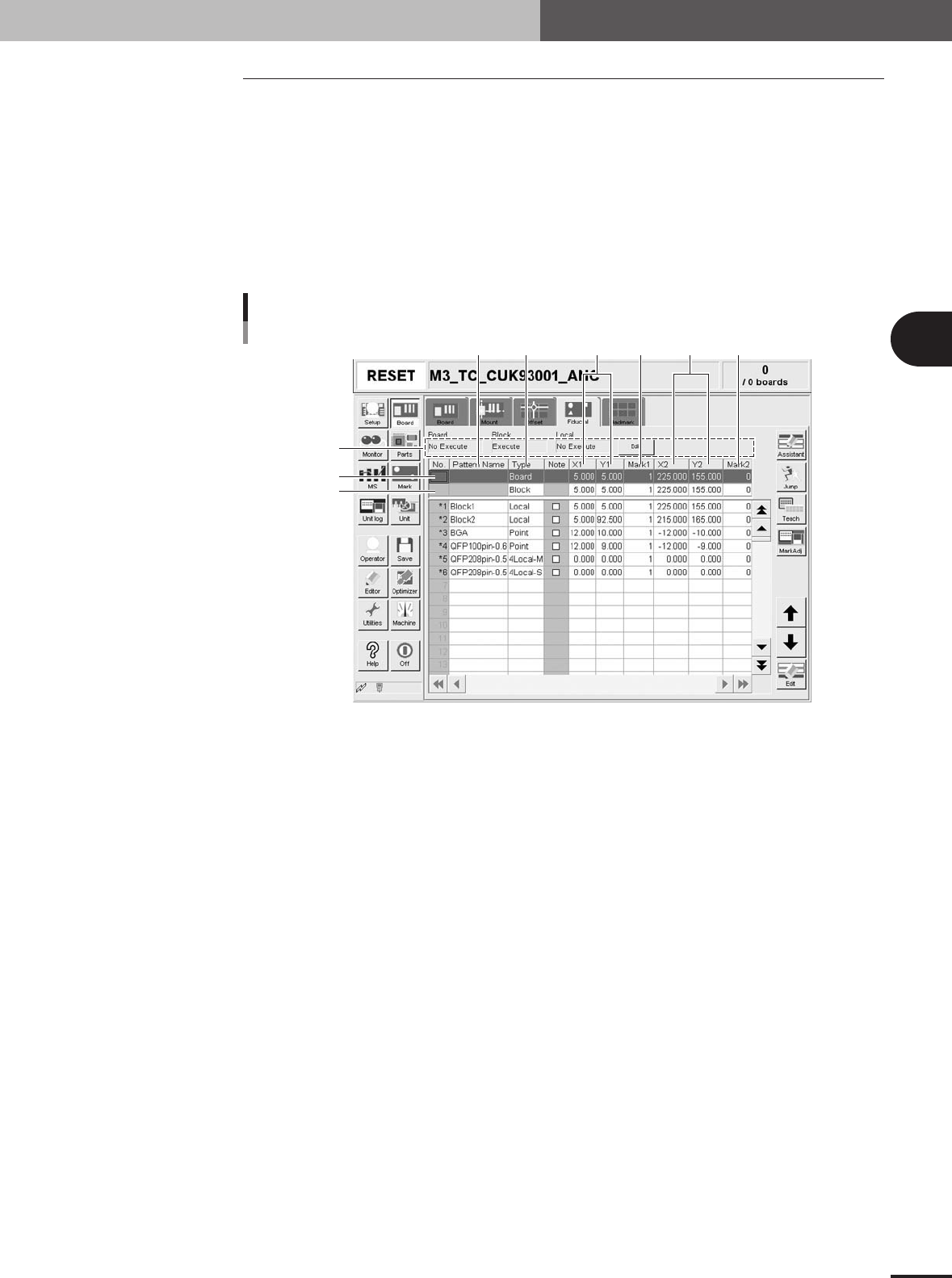
Selecting the [Fiducial] tab opens the screen for setting fiducial mark parameters and
their coordinates. Set these parameters as explained below when using the fiducial
function. (See "3.4.1" to "3.4.3" in this section for more details.) Two or four fiducial
marks are used as a set, but it is okay if each mark is different in shape. Fiducial mark
data must be registered in the mark information beforehand. (See "5. Creating the mark
information" in this chapter.)
Fiducial parameter
4
1
56 879
2
3
Fiducial parameter
27409-5E-20
1 Board, Block, Local
Fiducial functions are broadly classified into three types: "Board" fiducial function specified for a
PCB, "Block" fiducial function specified for each block of a multi-block PCB, and "Local" fiducial
function related to mounting data. The fiducial function you wan to use should be set to "Execute".
To change the setting, press the [Edit] button on the right end.
2 Board
On the top line of the parameter list, set the board fiducial mark data.
3 Block
On the second line of the parameter list, set the block fiducial mark data.
4 Pattern Name
Enter the fiducial mark name here. (Names cannot be entered in the top and second rows.)
5 Type
On the third or subsequent lines, specify the type of fiducial function you want to use, by selecting
from among ""Point", "Local", "4Local-M" and "4Local-S".
6 X1, Y1
Enter the XY coordinates of Mark 1 relative to the PCB origin in millimeter. You can perform
teaching with the [Teach] button.
7 Mark 1
Enter the mark No. for Mark 1 (mark No. registered as fiducial mark in the mark information).
8 X2, Y2
Enter the XY coordinates of Mark 2 relative to the PCB origin in millimeter. You can perform
teaching with the [Teach] button.

3 -18
3
Creating the PCB data
3. Creating the PCB information
9 Mark 2
Enter the mark No. for Mark 2 (mark No. registered as fiducial mark in the mark information). When
this mark is identical with Mark 1, enter "0".
n
NOTE
Although you can enter the XY coordinates of each mark by teaching, we recommend using the accurate design
data because the fiducial mark settings directly affect the mounting accuracy.
3 -19
3
Creating the PCB data
3. Creating the PCB information
3.4.1 Board fiducial function
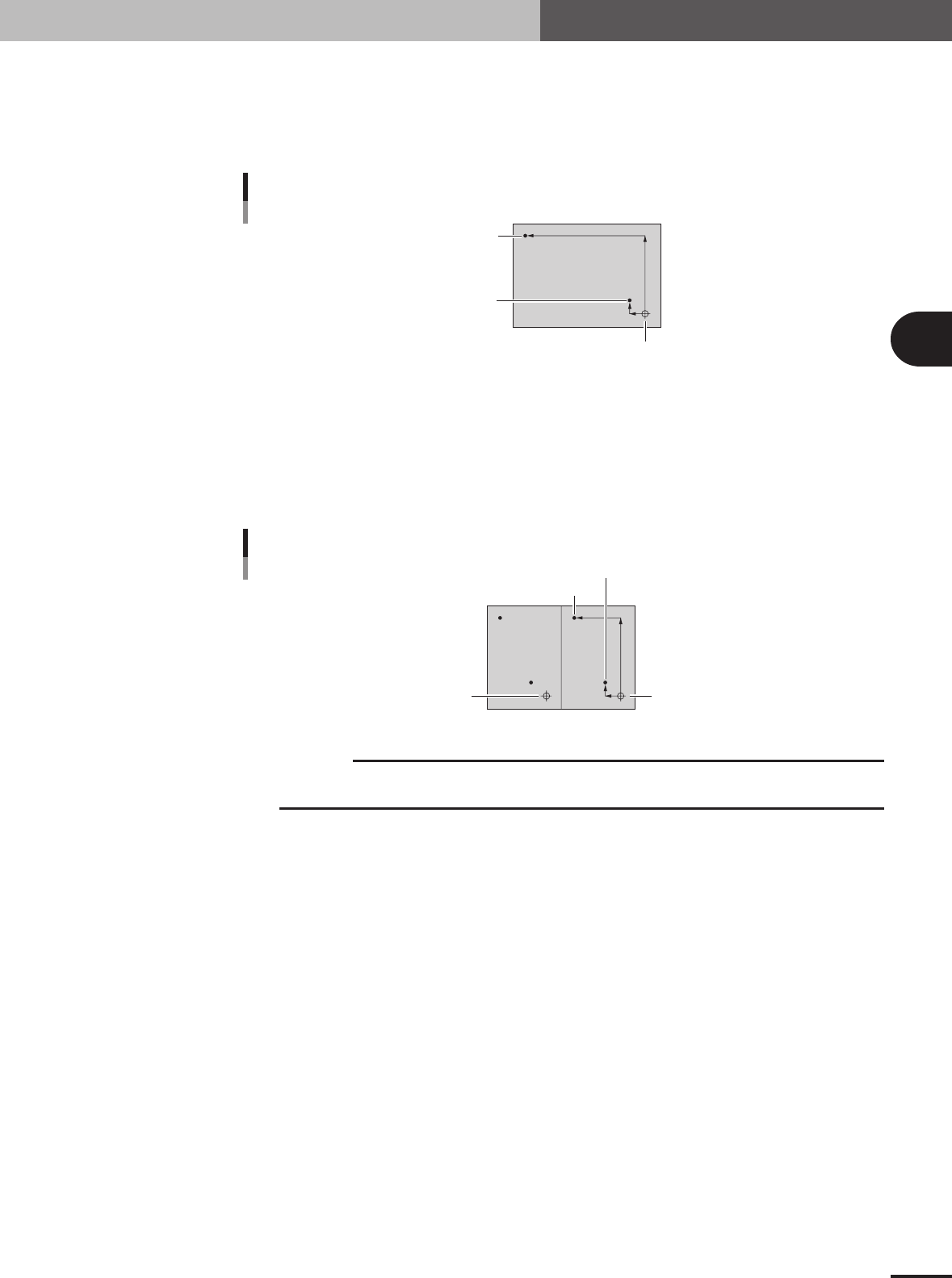
The board fiducial function corrects the positioning error of the entire PCB by using a
pair of fiducial marks. This function is particularly effective in correcting the positioning
error caused by PCB clamping mechanism fluctuations. As shown in the figure below, a
pair of fiducial marks must be diagonally located on the entire PCB.
Board fiducial marks
Mark 1 (X1, Y1)
Mark 2 (X2, Y2)
PCB origin
23409-5E-20
3.4.2 Block fiducial function
The block fiducial function corrects the positioning error of each block on a multi-block
PCB, by using a pair of fiducial marks provided in the block. This function is also effec-
tive in correcting the positioning error caused by PCB clamping mechanism fluctuations.
As shown in the figure below, a pair of fiducial marks must be diagonally located in each
block.
Block fiducial marks
Mark 1 (X1, Y1)
Mark 2 (X2, Y2)
Reference block origin
Block repeat No.2
23410-5E-20
c
CAUTION
The block fiducial can only be effective for multi-block PCB data with "block offset" specified
on the Offset tab screen.