00192156-04.pdf - 第27页
Maintenance Inst ructions F Maintenance 03/2003 US Edition 6 Maintenanc e work every week 27 Empty the component drawer or flap of the 8 mm S feeder 6 : Unplug the 8 m m S convey or and l ift it off the changeov er table…
Maintenance Maintenance Instructions F
6 Maintenance work every week 03/2003 US Edition
26
6

Maintenance Instructions F Maintenance
03/2003 US Edition 6 Maintenance work every week
27
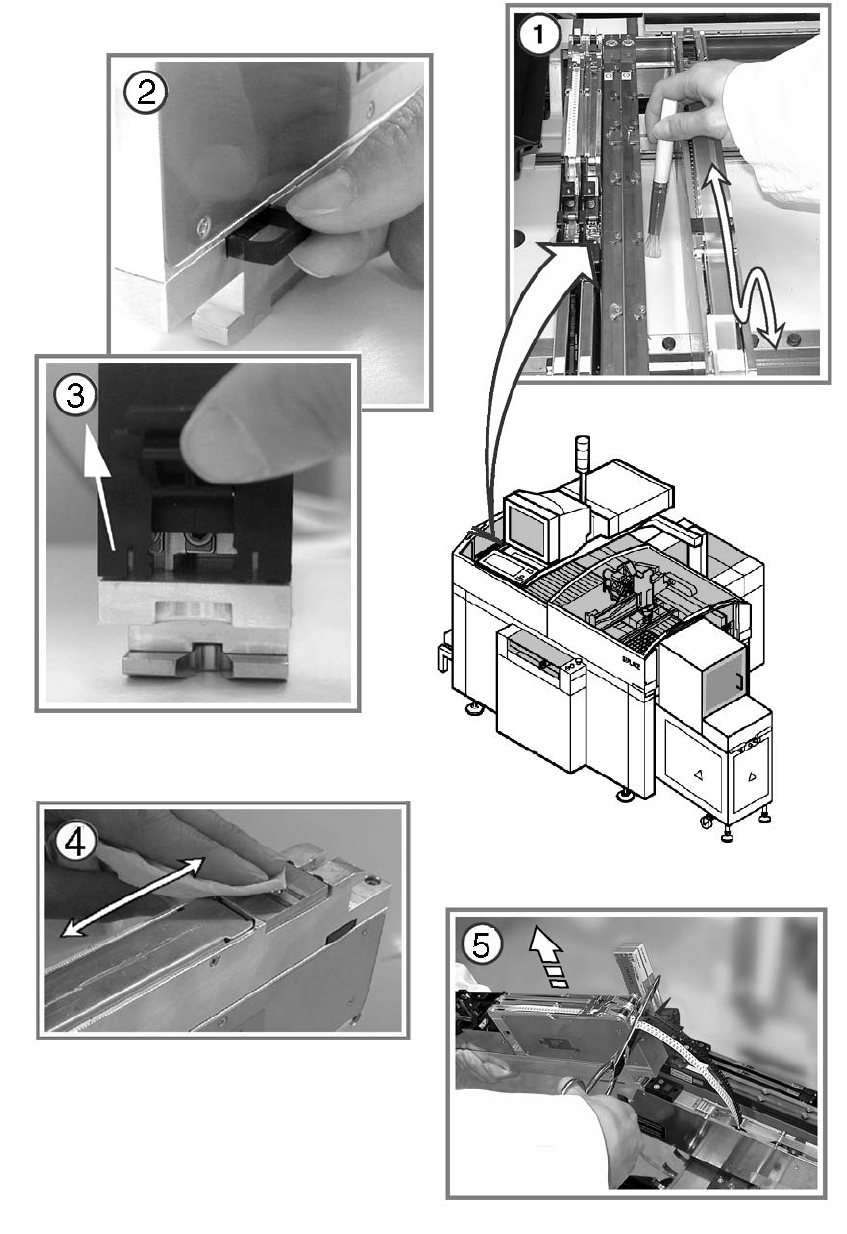
Empty the component drawer or flap of the 8 mm S feeder 6
: Unplug the 8 mm S conveyor and lift it off the changeover table.
6
a Use a brush or the vacuum cleaner to remove loose components from the changeover table.
6
s Empty the component drawer of the 2x8 mm S conveyor (if present).
6
d Open the flap of the 3x8 mm S conveyor (if present) and remove the components.
6
f Wipe the base of the feeder to remove any dirt.
6
g Cut off the empty tape flush with the feeder.
6
: Return the feeders to their original (correct) locations.
6
Make sure that the feeder is placed firmly on the changeover table and is inserted in the correct
position. 6
6
6
6
: Repeat these tasks at both feeder areas.
: Close the protective hood.
: Select “Block manually” (status open) on the station computer and click on OK (for dual con-
veyor track 1 / track 2).
6
6
6
6
6
Maintenance Maintenance Instructions F
6 Maintenance work every week 03/2003 US Edition
28
6