00192156-04.pdf - 第28页
Maintenance Maintenance Instr uctions F 6 Maintenance work every week 03/2003 US E dition 28 6

Maintenance Instructions F Maintenance
03/2003 US Edition 6 Maintenance work every week
27
Empty the component drawer or flap of the 8 mm S feeder 6
: Unplug the 8 mm S conveyor and lift it off the changeover table.
6
a Use a brush or the vacuum cleaner to remove loose components from the changeover table.
6
s Empty the component drawer of the 2x8 mm S conveyor (if present).
6
d Open the flap of the 3x8 mm S conveyor (if present) and remove the components.
6
f Wipe the base of the feeder to remove any dirt.
6
g Cut off the empty tape flush with the feeder.
6
: Return the feeders to their original (correct) locations.
6
Make sure that the feeder is placed firmly on the changeover table and is inserted in the correct
position. 6
6
6
6
: Repeat these tasks at both feeder areas.
: Close the protective hood.
: Select “Block manually” (status open) on the station computer and click on OK (for dual con-
veyor track 1 / track 2).
6
6
6
6
6
Maintenance Maintenance Instructions F
6 Maintenance work every week 03/2003 US Edition
28
6

Maintenance Instructions F Maintenance
03/2003 US Edition 6 Maintenance work every week
29
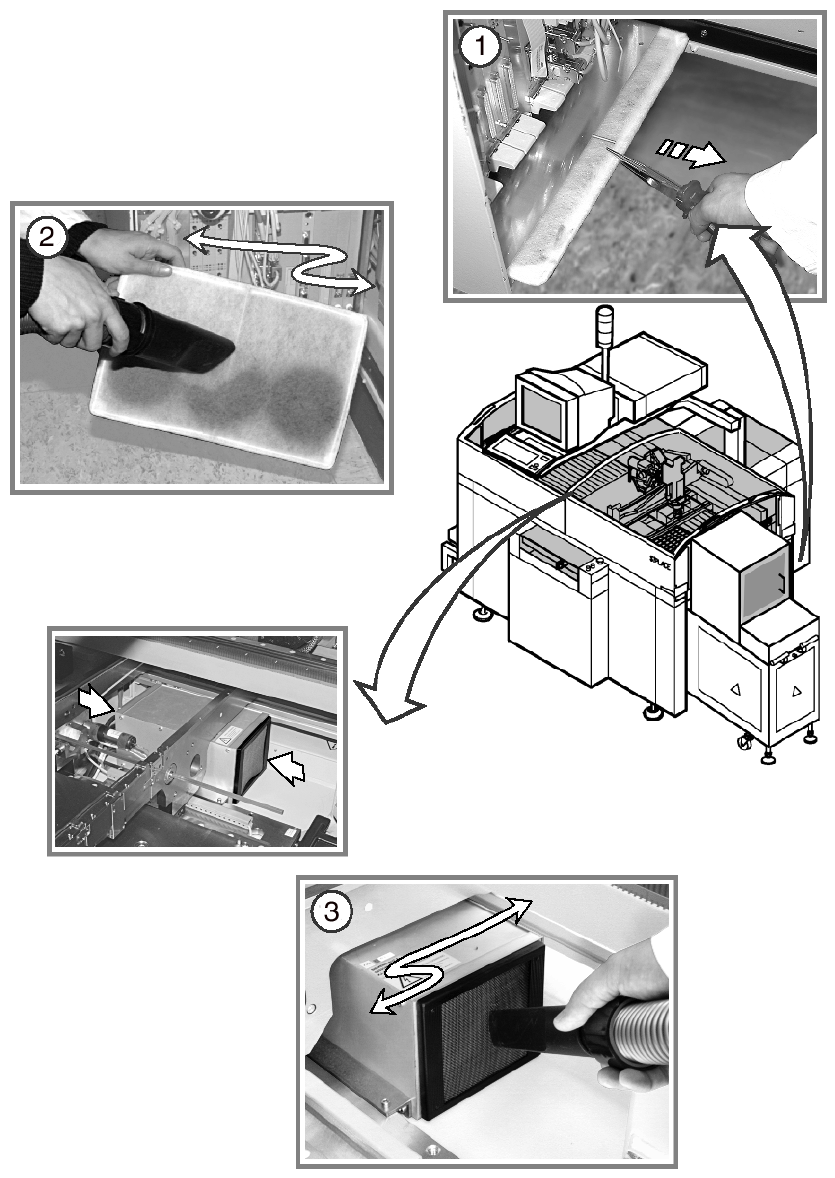
Vacuum the filter mats 6
a Remove the filter mats from the control and servo units using suitable pliers.
6
s Vacuum the filter mats. Replace them with new mats if they remain dark and discolored after
vacuuming. Then return the filter mat(s) to their correct positions.
The electronic modules will not be cooled adequately if the filter mats are dirty. 6
6
6
6
d Vacuum the filter mats for the control unit of the PCB conveyor.
6
: Repeat these tasks at every placement machine.
6
6
6
6
6
6
6
6
6
6
6
6
6
6
6
6
6