00192156-04.pdf - 第38页
Maintenance Maintenance Instr uctions F 7 Monthly m aintenance work 03/2003 US E dition 38 7

Maintenance Instructions F Maintenance
03/2003 US Edition 7 Monthly maintenance work
37
a Use a lens cleaning cloth to clean the glass disk of the turning station scanning unit.
7
s Remove the 12 valve plungers.
d Clean the valve casings using a cottonwool bud moistened with ethyl alcohol.
Never use pipe-cleaners or bottle brushes to clean the valve casing.
This could tear out the sleeve retaining springs or leave lint or hairs in the segment which, in turn,
could cause faults. 7
7
: Insert the cleaned and very lightly greased valve plungers into the valve casing.
See section ("Maintain the valve plungers").
7
: Move them backwards and forwards several times.
: If the valve plungers move very easily, replace them with new plungers.
If they do move very easily, they are not guaranteed to work correctly. 7
7
: Insert the cleaned sleeves into the segments.
See section ("Maintain the sleeves").
Use only gentle pressure to latch the sleeves into position so as not to damage the sleeve retain-
ing springs. 7
7
7
: Check that the sleeve can be moved easily in the segment.
If the sleeve does not move easily: 7
: Remove the sleeve once more.
f Clean the segment using a cottonwool bud moistened with ethyl alcohol.
7
Never use pipe-cleaners or bottle brushes to clean the segment.
This could tear out the sleeve retaining springs or leave lint or hairs in the segment which, in turn,
could cause faults. 7
7
: Use the "Single Functions" menu to pick up the nozzles of the Collect&Place head.
Maintenance Maintenance Instructions F
7 Monthly maintenance work 03/2003 US Edition
38
7
Maintenance Instructions F Maintenance
03/2003 US Edition 7 Monthly maintenance work
39
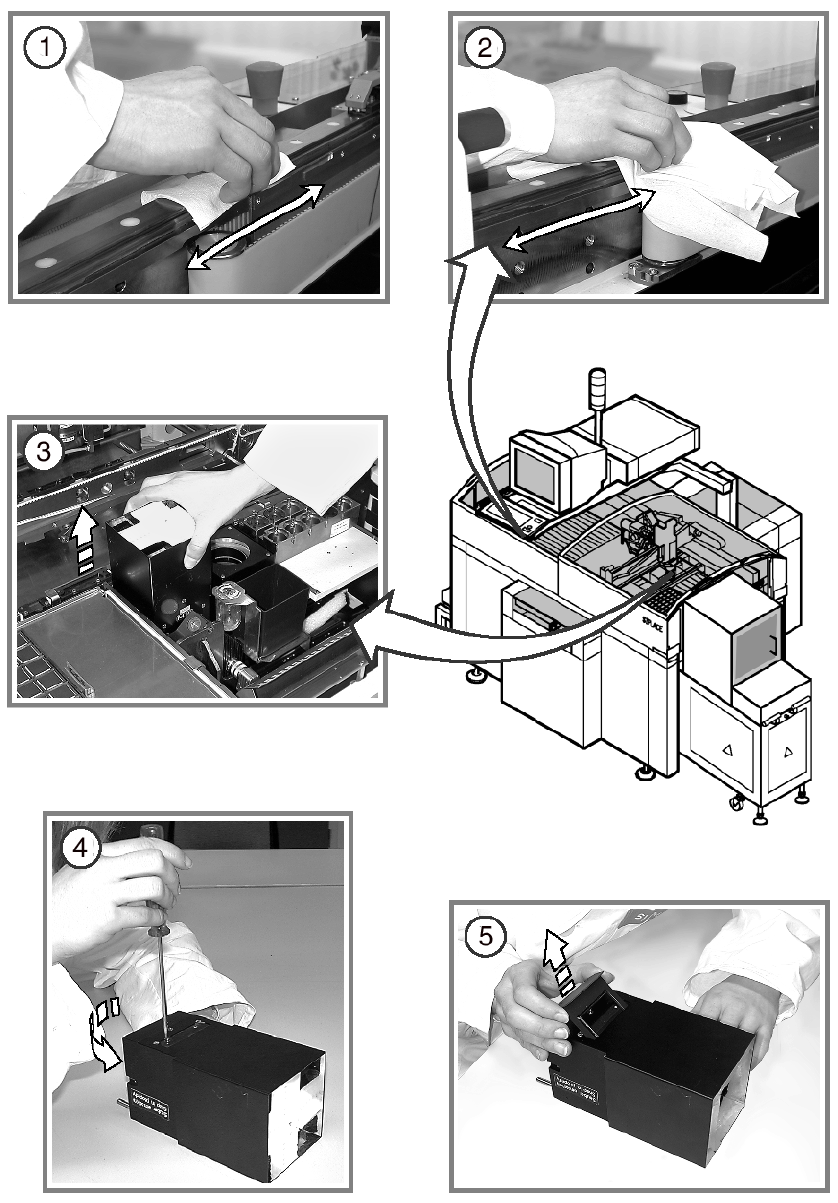
Clean the linear guides for the X and Y axes 7
a Use the SIPLACE cleaning cloth to clean the linear guides for the X and Y axes thoroughly
along their entire length.
s Use a lint-free cloth to remove any remaining dirt from the linear guides.
: Preserve the linear guides using a new SIPLACE cleaning tissue.
7
7
: Switch the placement system off at the main switch.
7
7
Clean the IC camera 7
d Carefully pull the top part of the IC camera up and off.
This will enable you to remove loose components from the IC camera.
f Loosen and remove the two slotted screws from the mapping plate.
g Remove the glass disk.
7
7
7
7
7
7
7
7
7
7
7