00192156-04.pdf - 第86页
Maintenance Maintenance Instr uctions F 10 Annual maintenance work 03/2003 US E dition 86 10
Maintenance Instructions F Maintenance
03/2003 US Edition 10 Annual maintenance work
85
Maintain the WPC 10
10
10
Disconnect the WPC from the power supply as follows: 10
a Detach the round main power plug.
s Detach the rectangular data connector.
d Wind up the WPC.
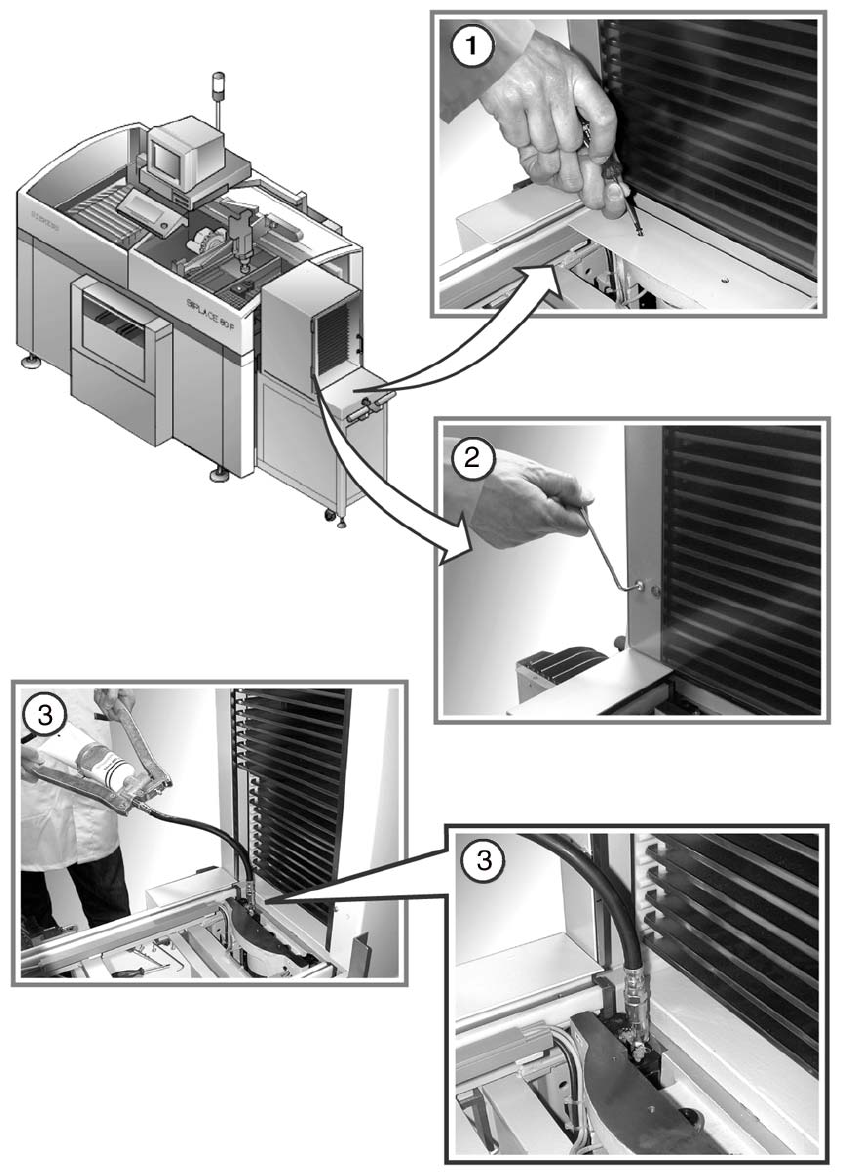
f Loosen the 4 hexagon socket head screws for the left cover of the WPC and remove it.
10
g Fit the grease gun hose on the grease nipple of the ball screw.
Carefully press grease into the nipple until contaminated grease emerges from it.
: Remove excess grease with a lint-free cloth.
10
10
10
10
10
10
10
10
10
10
10
10
Maintenance Maintenance Instructions F
10 Annual maintenance work 03/2003 US Edition
86
10
Maintenance Instructions F Maintenance
03/2003 US Edition 10 Annual maintenance work
87
a Loosen the 2 screws on the cover plate over the conveyor area and remove the cover.
s Loosen the 4 screws on acrylic glass cover and remove the cover.
10
10
d Fill both grease nipples with grease from the grease gun.
10
10
: Reverse the above sequence to fit the WPC.
: Dock the WPC into the machine once more.
10
: Repeat these tasks at every WPC on the line.
10
: Close the protective covers for the placement machines.
10
10
10
10
10
10
10
10
10
10
10
10
10
10
10
10