00196624-04_Service Manual WPC5_6_EN_01-2019.pdf - 第98页
Service Manua l WPC5 / WPC6 Page 3- 98 3.7.11 13 Safety S witc h Spare Part • Safety switch, closed (safet y switch with cable) [03062919- xx] Removal / Install ation ➢ Mark the installation position of the safety swit…

Service Manual WPC5 / WPC6
Page 3-97
Settings
➢ Check the function and correct position of the limit switch. The limit switch must switch when
the lifting axis moves over the switch (3) (end position).
➢ To do this, open the following function in the main view:
⇨ Sensors and Functions ⇨ Location ⇨ Check functions for WPC ⇨ Advanced functions
.
➢ Select the
Feed axis
button in the Axis input area.
➢ Select the
Limit switch
+ button in the input area (see also "4.1.4 Calibrating the Limit Switch"
[➙ 4-119]).
⇨
The lifting axis will be moved so that an actuator on the lifting axis moves over the limit
switch.
The limit (end position) will be calculated.
⇨
Go to the main view and open the menu function
⇨ Sensors and Functions ⇨ Location ⇨ Check functions for WPC ⇨ Advanced functions ⇨ WPC E/A
Ports
.
Make sure that the
Lifting axis bottom limit switch
view option is enabled.
⇨
A dialog box will open and the calculated value will be shown. The permissible limits
(minimum/maximum position) will also be shown. The end position must be within these
limits.
➢ Check the permissible limits against the value actually measured.
➢ If necessary, correct the mechanical position of the limit switch and repeat the
measurement procedure.
➢ If the value is within the permissible limits, save the data by clicking on
Accept
.
➢
Seal the two mounting bracket fastening screws with locking varnish.
Service Manual WPC5 / WPC6
Page 3-98
3.7.11 13 Safety Switch
Spare Part
• Safety switch, closed (safety switch with cable) [03062919-xx]
Removal / Installation
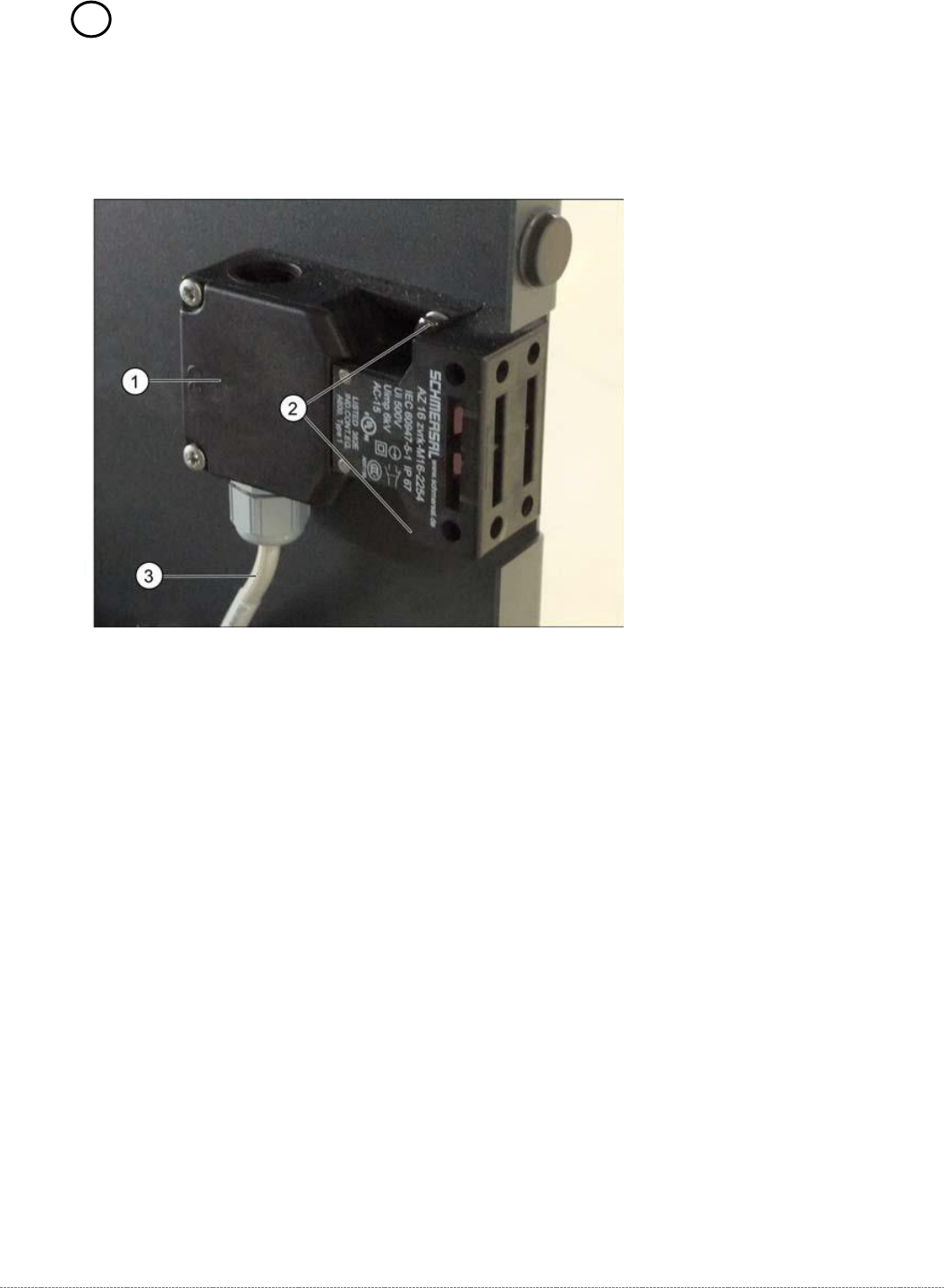
➢ Mark the installation position of the safety switch (1) at the two fastening screws (2) with
slots.
➢ Loosen the two fastening screws (2) and remove the safety switch (1).
➢ Unthread the connection cable (3) as far as the control unit back plane..
The connection cable has two separate connections:
• Unplug the connection cable at terminal strip x12a on the control unit back plane.
• Unplug the connection cable from the safety loop.
➢ Fit the new safety switch at the marked installation position.
➢ Restore the electrical connection and fix the connection cable into place.
Settings
➢ Make sure that the door contact engages properly. If necessary, correct the installation
position at the slots.
➢ Check that the safety switch switches reliably at the docked WPC.
Service Manual WPC5 / WPC6
Page 3-99
3.7.12 Sensor 12 Reference Proximity Switch Load axis
Spare Part
• Reference point proximity switch load axis [03056947-xx]
Removal / Installation
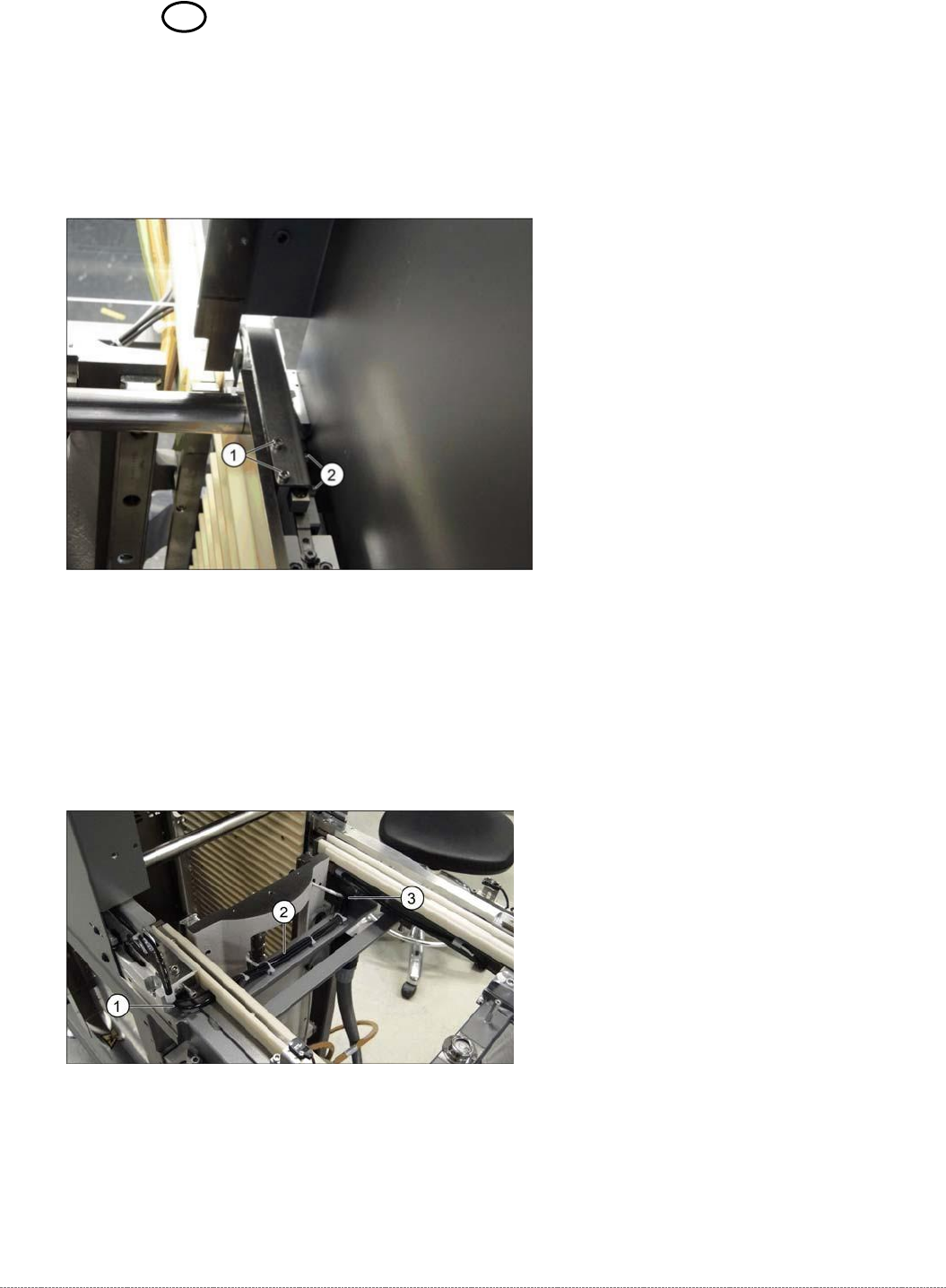
➢ Loosen the two screws (1) fastening the sensor fixture bracket and unthread the cable.
➢ Unthread the connection cable as far as the control unit back plane and unplug it from the
terminal strip.
➢ Loosen the two screws (2) fastening the sensor to the fixture bracket and then remove the
sensor.
➢ Screw the new sensor to the fixture bracket (2).
➢ Fix the bracket into the tower with the two screws which you removed (1).
➢ Run the cable out of the tower, under the feed axis and along to the other side (1 to 3) and
up to the back plane of the control unit. Fix the cable into place with cable ties.
➢ Restore the electrical connection and fix the connection cable into place.