182049 Viking Installation Manual.pdf - 第54页
semi automatic POWER UP SEQUENCE MACHINE POW ER UP SEQUEN CE 6.2 Installatio n Manual Chapt er Issue 1 O ct 02 MACHINE POWER UP SE QUENCE Hard Disk Chec k 1. Connect the mains supply to the machine. 2. T urn the Mai ns I…
semi automatic
POWER UP SEQUENCE
GENERAL
Chapter Issue 1 Oct 02 Installation Manual 6.1
CHAPTER 6 POWER UP SEQUENCE
GENERAL
Before the machine is powered up, a final check is required to ensure proper
installation. When fully satisfied that all instructions and preparations have been
carried out as detailed in the Machine Preparation chapter, proceed with the
power up checks detailed in this chapter.
Electrical Services Check the following electrical services are available:
The machine transformer must be tapped to the nearest selectable voltage
within the following limits:
• 100V, 110V and 120V ±5%
• 200V, 210V, 220V, 230V and 240V ±2.5%
CAUTION
VOLTAGE CONFIGURATION.
The factory set voltage configuration may
differ from the customers own supply.
- Ensure correct transformer configuration is used
- Ensure that the machine serial plate is annotated correctly
- Ensure filtration unit (if fitted) is voltage compatible
NOTE
For information on the filtration unit, Machine Relocation section of the Machine
Preparation chapter of this manual refers. Refer to Technical Reference
Manual, Power Supply and Distribution chapter for more detailed information.
Detail Voltage
Measured Customer/Factory electrical supply
Detail Accept Reject
Check dispatch documentation and serial number plate on rear
of machine matches supply
semi automatic
POWER UP SEQUENCE
MACHINE POWER UP SEQUENCE
6.2 Installation Manual Chapter Issue 1 Oct 02
MACHINE POWER UP SEQUENCE
Hard Disk Check
1. Connect the mains supply to the machine.
2. Turn the Mains Isolation Switch ON.
3.
NOTE
If the machine hard disk is corrupt, carry out the NT recovery procedure
detailed in the Housekeeping chapter of the User Manual.
Checking Hard Disk
Partition C
4. Carry out the following:
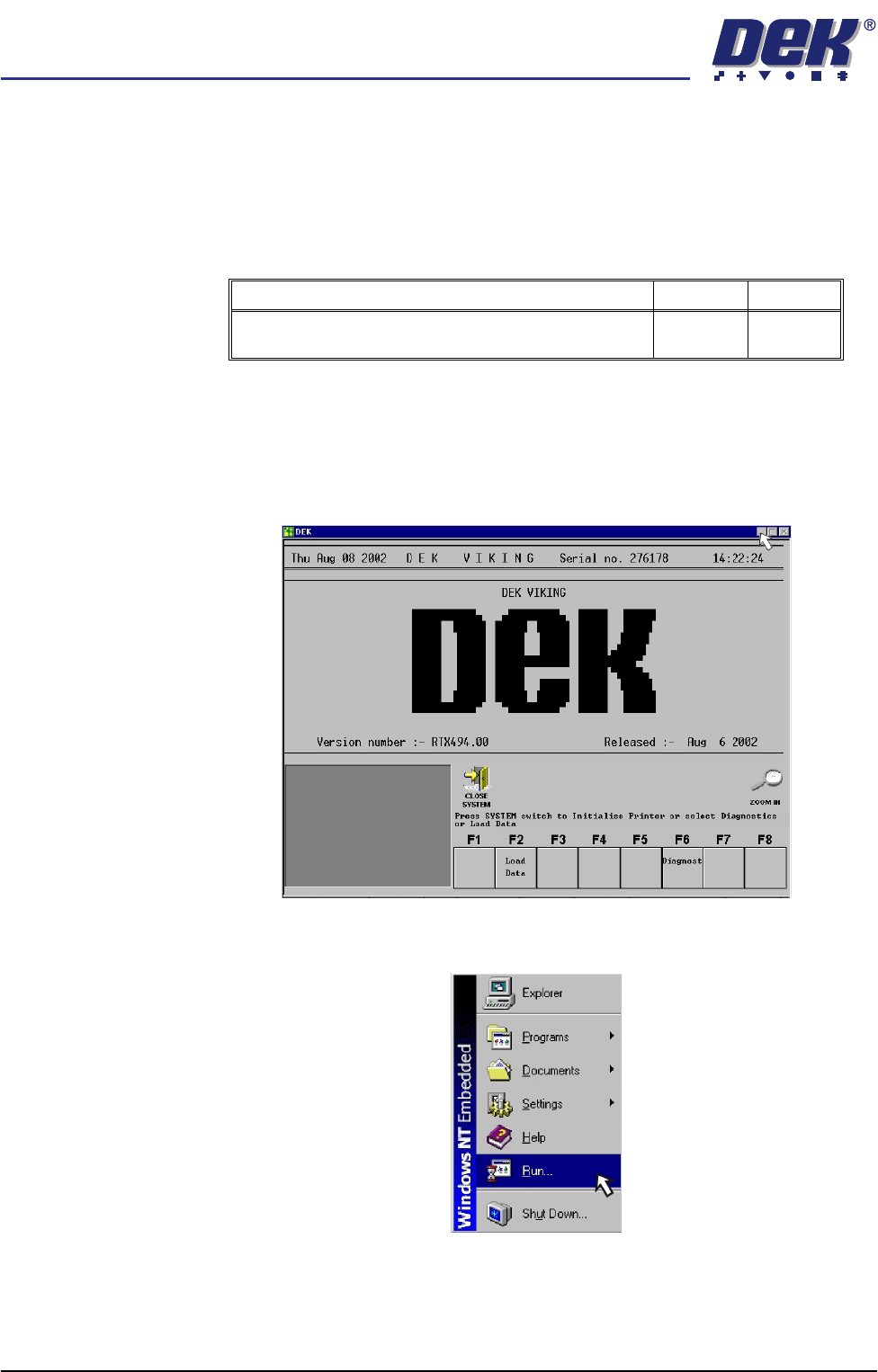
a. On completion of ‘auto login’, minimise the DEK program.
b. Using the mouse, click on the Start button on the taskbar. The Start Menu
is displayed.
c. Click on the Run icon.
Detail Accept Reject
Check the machine hard disk for any defects caused in
transit using Chkdsk.
semi automatic
POWER UP SEQUENCE
MACHINE POWER UP SEQUENCE
Chapter Issue 1 Oct 02 Installation Manual 6.3
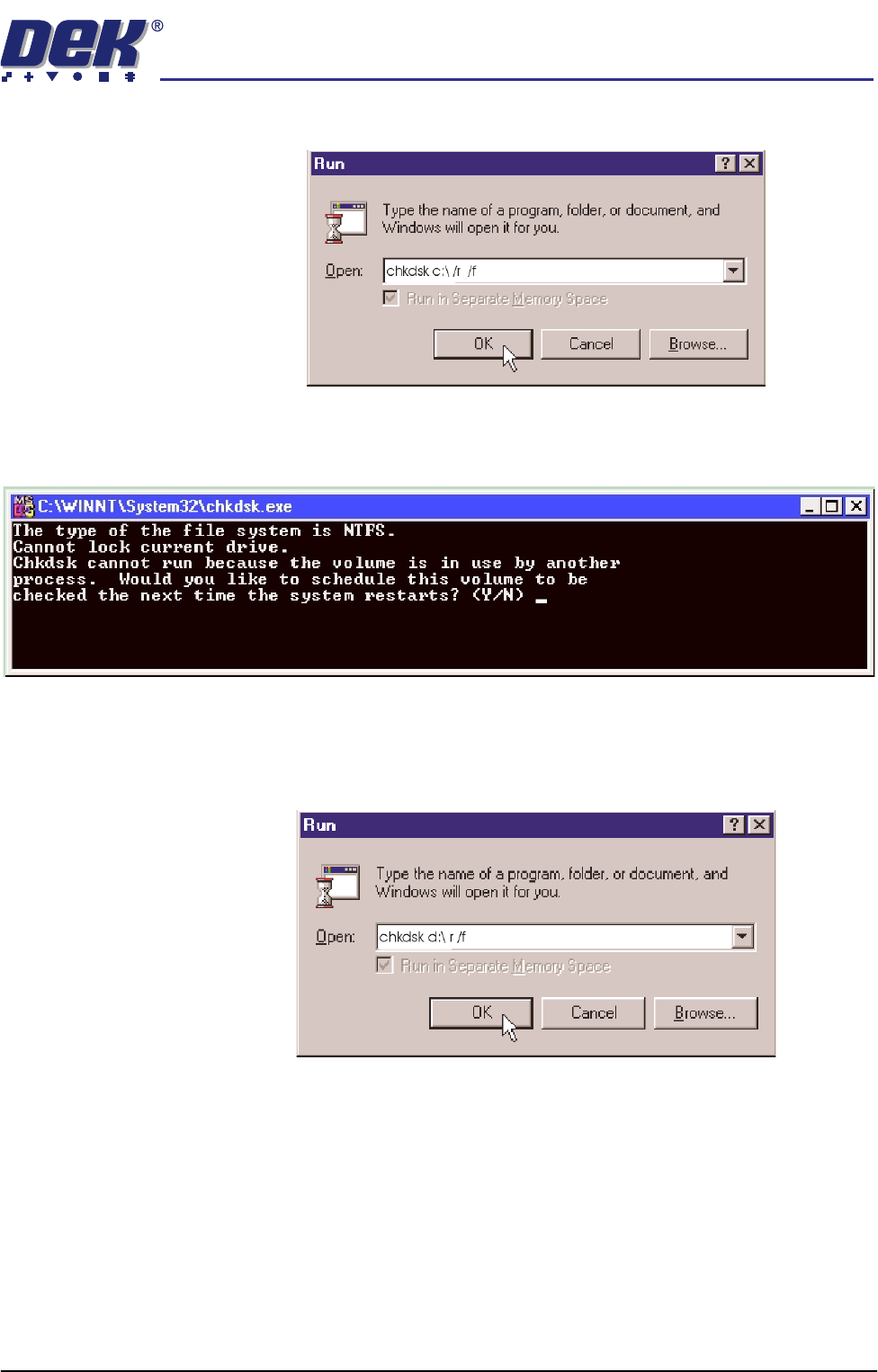
d. Click in the open box, and type chkdsk c:\ /r /f
e. Select the OK button.
f. The Chkdsk program displays the following DOS prompt:
g. Select Y, Enter.
Checking Hard Disk
Partition D
h. When the DOS window closes, select Start on the taskbar, select Run...
i. Click in the Open box and type chkdsk d:\ /r /f
j. Select the OK button.