YSM10_Mainte_E.pdf - 第94页
3-27 3 Periodic maintenance items 4.2 Base 4.2.1 Cleaning the Control box filter T he air intake fan and the filter are in the control box that controls the machine. T he filter should be cleaned once a 6-month, although…
3-26
3
Periodic maintenance items
4.1.3 Cleaning the scan camera
The light diffuser plate and prism for the scan camera are attached to the opening at the left end of the camera.
These diffuser plate and prism may become dirty due to dust and dirt. Periodic cleaning is recommended.
c
CAUTION
Do not apply strong force to the camera parts during cleaning. Doing so may damage the glass components used in
the camera unit.
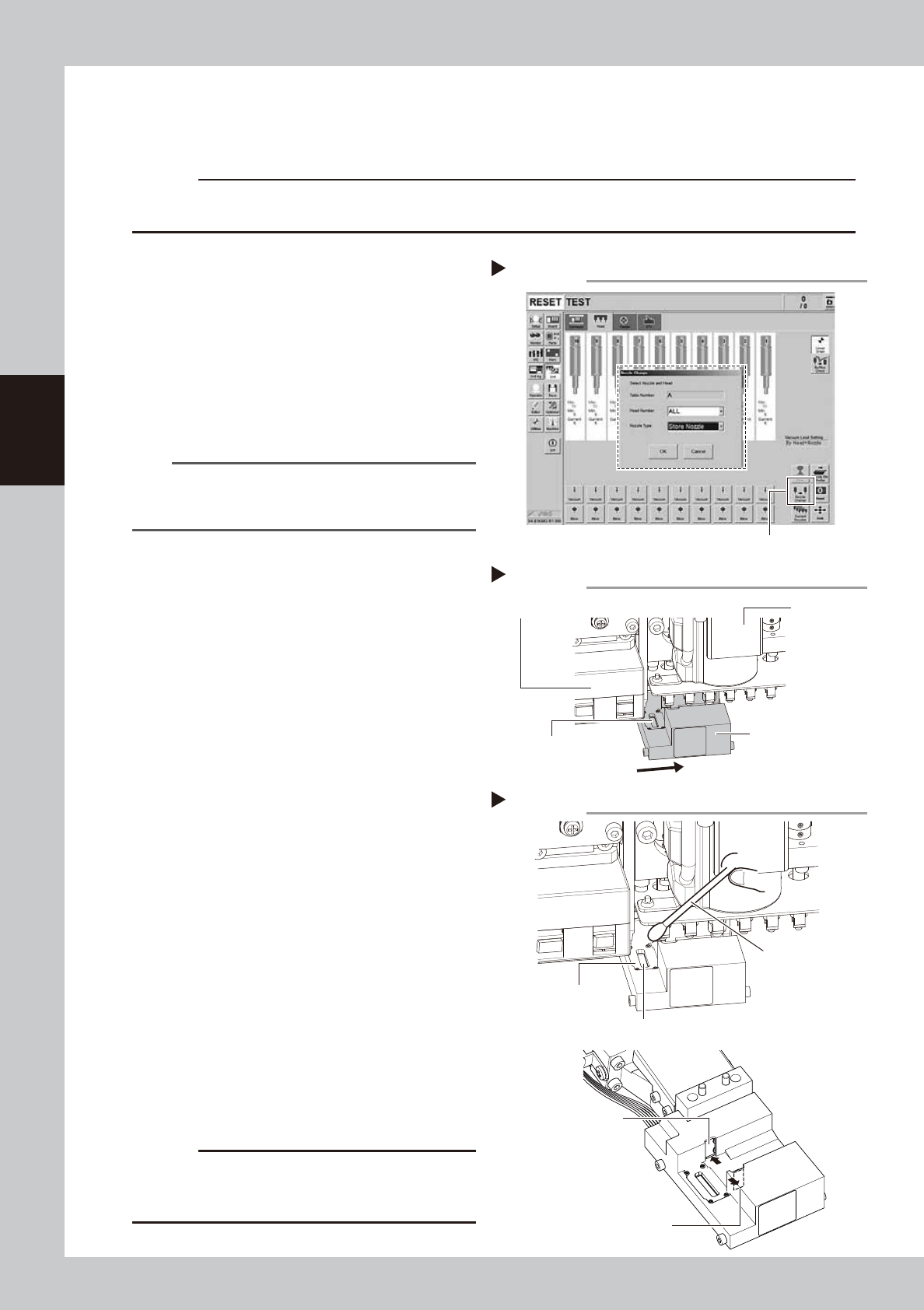
1
(With the nozzle station) Return all
nozzles to the nozzle station.
1. Press the [Nozzle Change] button on the
[Unit] - [Head] tab screen.
2. Select "ALL" from the "Head Number" and
select "Store Nozzle" from the "Nozzle
Type" on the "Nozzle Change" screen.
3. Press the [OK] button to return all nozzles
to the nozzle station.
54305-KMG-00
n
NOTE
If the machine is not equipped with the nozzle station,
press the emergency stop button to open the machine
sefety cover and detach the nozzles manually.
2
Move the head unit.
e
1. Press the emergency stop button to open
the machine safety cover.
2. Move the head unit forward.
3
Move the scan camera.
1. Check that all the heads (nozzle holder
sections) are raised to the upper end. If
not, move them up manually.
2. Move the scan camera manually to the
position where the prism can be seen
(example position: intermediate position
between the R-axis motor and fiducial
camera). At this time, do not apply any
excessive force.
53337-KMG-00
4
Wipe the diffuser plate and prism.
1. Use a cotton swab to remove dust and
dirt on the upper surface of the main
light diffuser plate and on the prism
surface. Since the prism surface is
narrow, twist the end of the cotton swab
into a pointed tip and use it to wipe the
prism surface lightly.
2.
Wipe the side-view light diffuser plate and
prism using a cotton swab. Use a hand
mirror when wiping the prism surface
since it cannot be seen from the front
.
53338-KMG-00
c
CAUTION
Do not use solvent. It may cause the surface finish of
the prism to peel or flake and the diffuser plate to
discolor.
Step1
[Nozzle Change] button
Returning all nozzles to nozzle station
Moving the scan camera
Step 3
Prism
Fiducial camera
R-axis motor
Scan camera
Step 4
Cleaning the light diffuser plate and prism
Cotton swab
Main light diffuser plate
Side-view light
diffuser plate
Side-view prism
Main prism
3-27
3
Periodic maintenance items
4.2 Base
4.2.1 Cleaning the Control box filter
The air intake fan and the filter are in the control box that controls the machine. The filter should be cleaned
once a 6-month, although this may vary depending on the machine condition.
1
Power off the machine.
2
Turn off the air supply.
Turn the air supply/exhaust switch on the
lower left of the machine to the exhaust side
and turn off the main air.
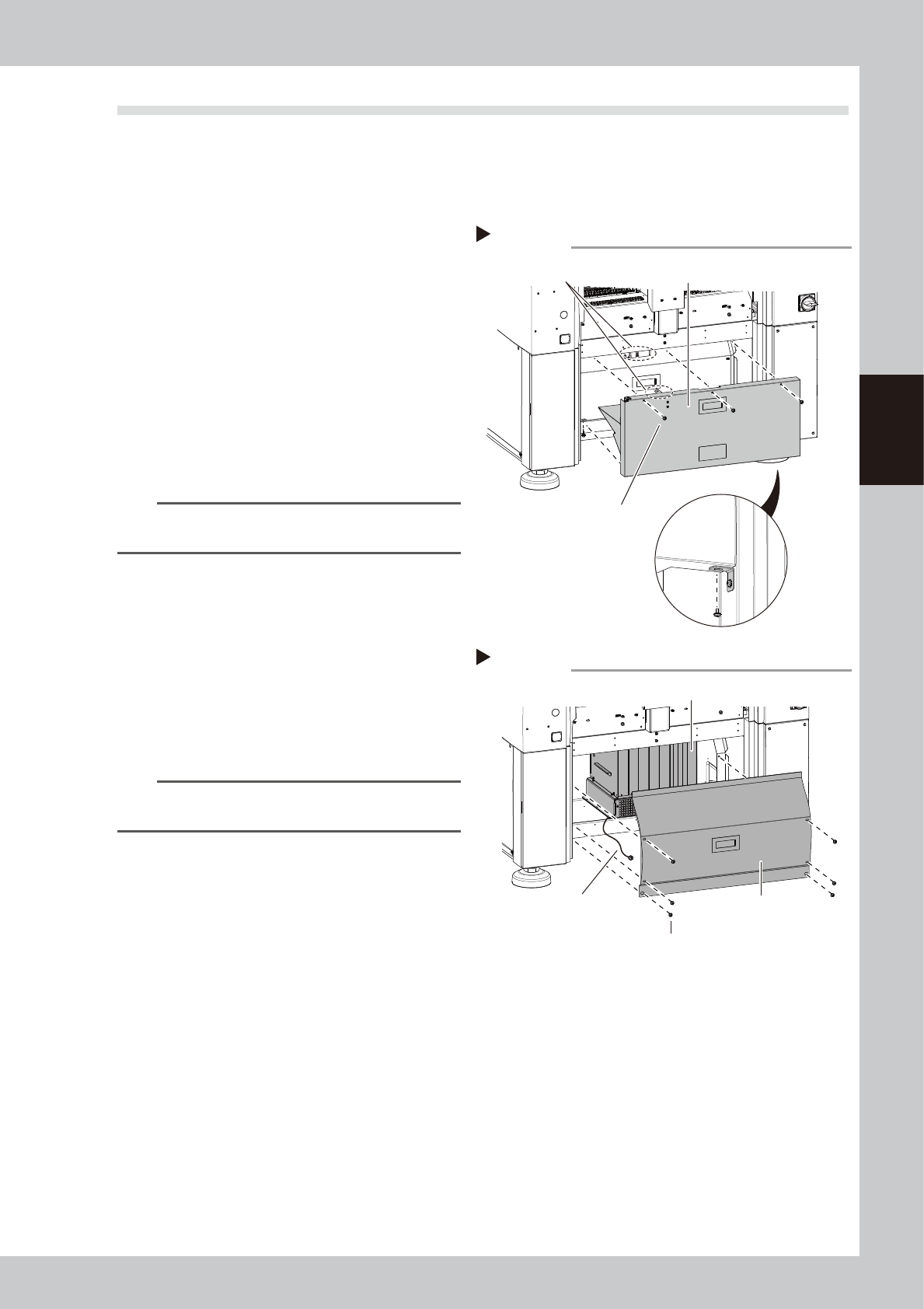
3
Detach the tape cutter safety cover.
1. Remove the mounting screws of the tape
cutter safety cover with a phillips
screwdriver.
2. Pull the tape cutter cover forward to
detach it.
53356-KMG-00
n
NOTE
The interlock key is attached on the tape cutter safety
cover.
4
Detach the inner cover
1. Remove the mounting screws of the inner
cover with a phillips screwdriver.
2. Detach the cover.
3. A ground wire is connected to the rear
side of the cover. Remove the screw
mounting the ground wire with a phillips
screwdriver.
53357-KMG-00
n
NOTE
Toothed washer is attached to the ground wire mounting
screw. Make sure not to lose it when removing screws.
5
Clean around the control box.
If dust is found around the control box, clean
the area with a vacuum cleaner, etc. before
detaching the filter.
Step 3
Detaching the tape cutter safety cover
Tape cutter safety cover
Cover mounting screw
Bottom of cover
Interlock key
Step 4
Detaching the cover
Cover
Cover mounting screw
Control box
Ground wire
3-28
3
Periodic maintenance items
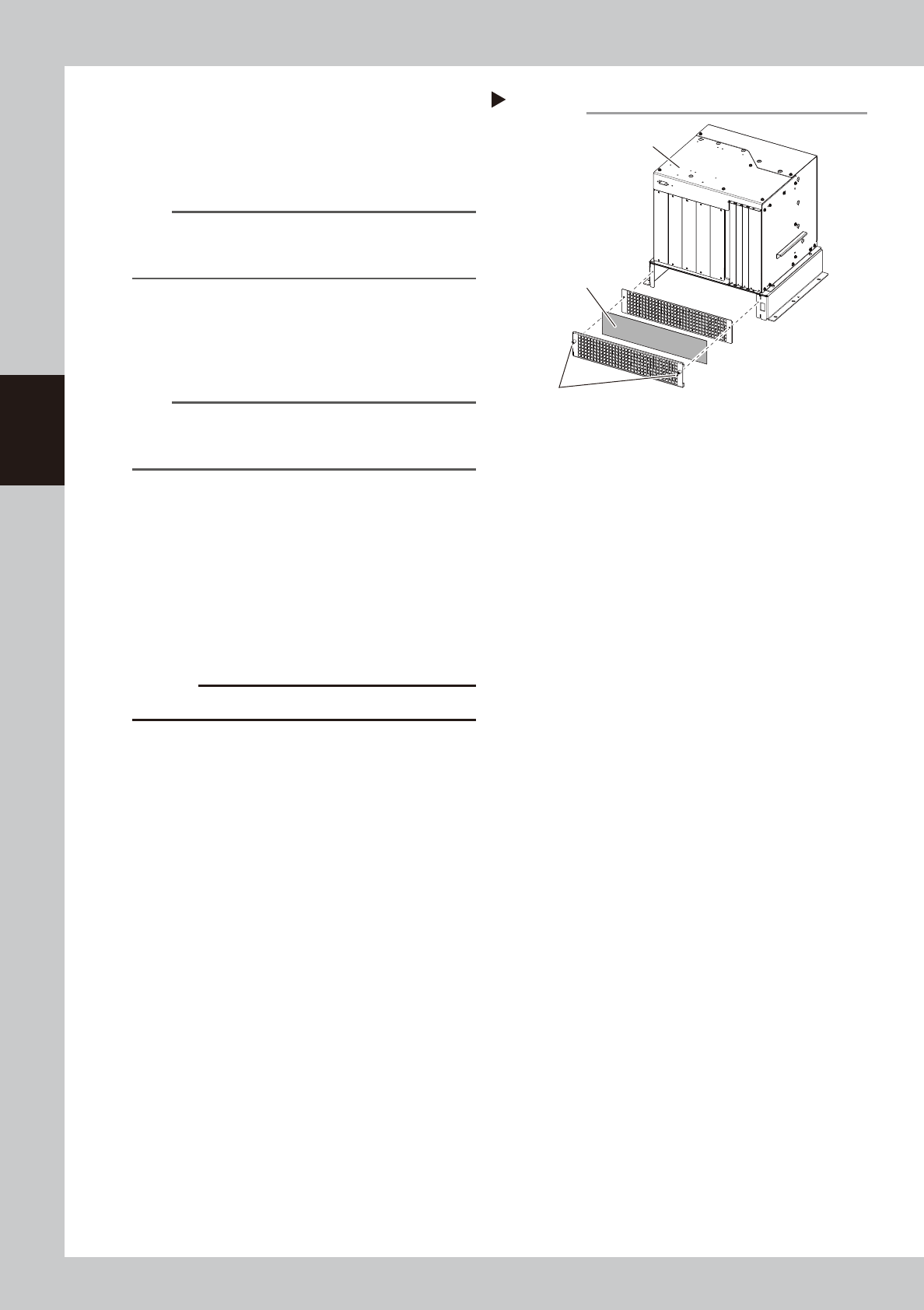
6
Detach the control box filter.
The filter mounting screws can be loosen
manually. Loosen the filter mounting screws
and detach the filter from the control box.
53358-KMG-00
n
NOTE
Multiple cables are connected to the control box. If it is
difficult to access to the filter, disconnect the cables
from the control box as necessary.
7
Clean the filter.
The filter locates between 2 covers. Detach
the filter and clean the dust sticking to the
filter with a vacuum cleaner or a vacuum
tool.
NOTE
If contaminants cannot be removed completely or if
the filter itself deteriorates, it is necessary to replace the
filter with a new one
8
Return the filter to the original
position.
Reattach the filter to the control box by
reversing its removal procedure.
9
Return the covers to the original
positions.
1. Reattach the inner cover.
2. Reattach the tape cutter safety cover.
c
CAUTION
Make sure not to catch cables when attaching covers.
Step 6-7
Detaching control box filter
Control box
Filter
Filter mounting screws