00191021-02.pdf - 第108页
3 Calibration Functions User ’s Manual Test Program S ITEST 3.1 Preparation for the P erformance of the Calibration Functions Software Version 403.xx Edition 12/97 3 - 4

User’s Manual Test Program SITEST 3 Calibration Functions
Software Version 403.xx Edition 12/97 3.1 Preparation for the Performance of the Calibration Functions
3 - 3
3.1 Preparation for the Performance of the Calibration
Functions
●
In the main view click on the Overall reference run button to have all gantry and head axes perform a
reference run.
●
Make sure that a type 720 nozzle is attached to all (center) sleeves of the revolver heads, and a type
416 nozzle is attached to the IC head of SIPLACE 80F
4
.
NOTE
When you perform the calibration of the machine, the gantry that is not currently required will auto-
matically be moved to the park position.
●
Place the calibration tool into the "calibration piece pocket" (see Fig. 3.12.1).
NOTE
The calibration tool must be absolutely free of contamination and is to be placed into the "calibration tool
pocket" with the imprint of the fiducial structure facing down.
●
In the main view select the desired gantry by clicking on the corresponding icon.
NOTE
If the calibration activities are performed using the Calibrate machine... function, a selection of the gantry
is not required.

3 Calibration Functions User’s Manual Test Program SITEST
3.1 Preparation for the Performance of the Calibration Functions Software Version 403.xx Edition 12/97
3 - 4
User’s Manual Test Program SITEST 3 Calibration Functions
Software Version 403.xx Edition 12/97 3.2 Complete Calibration of the Machine
3 - 5
3.2 Complete Calibration of the Machine
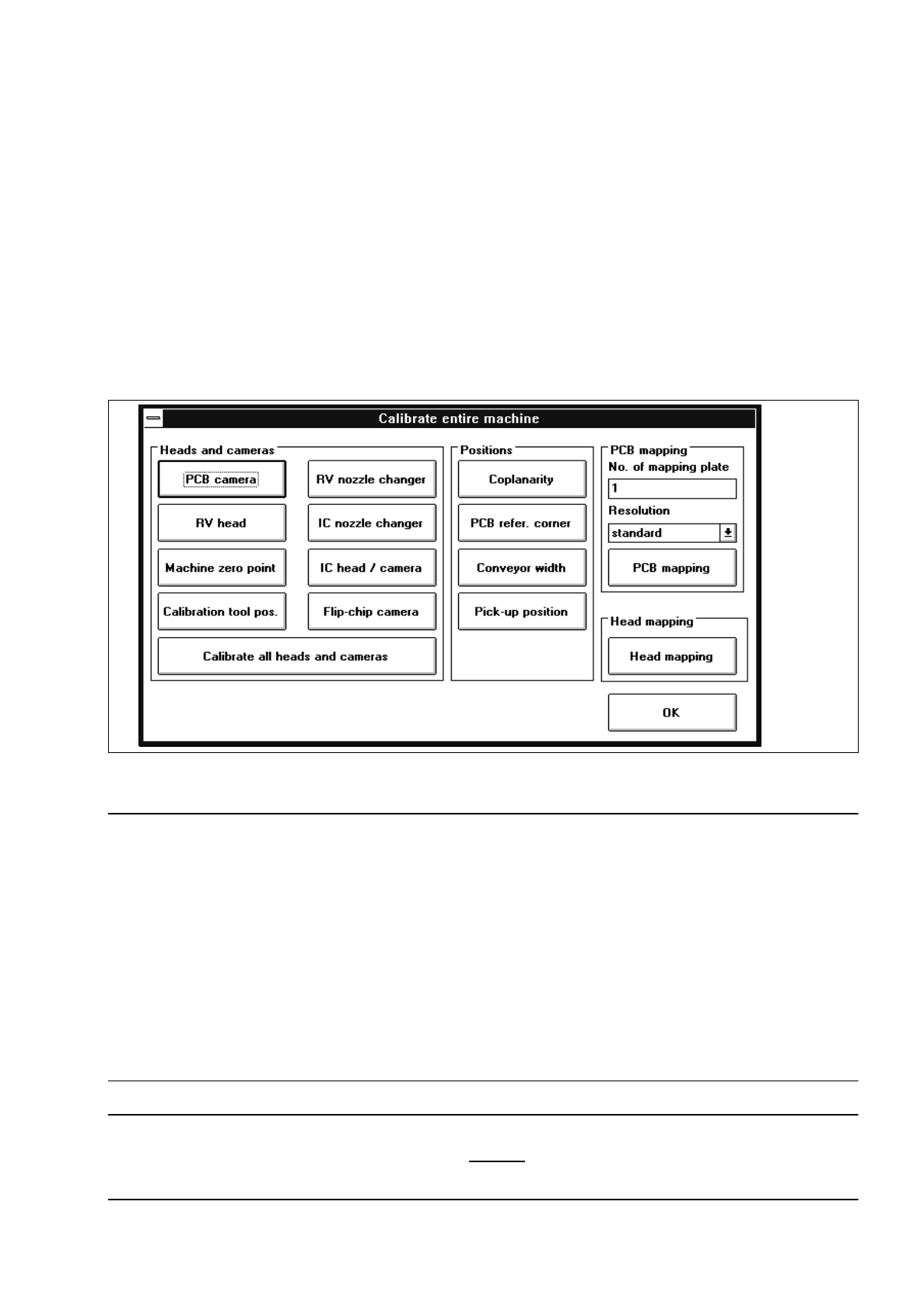
All calibrations described in the following sections can be performed with the aid of the functions contained in
the "Calibrate entire machine" setting box.
In addition, it is also possible to carry out the calibration of the conveyor width (see also chapt. 2, section
2.5.1) and the complete mapping procedure (see also chapt. 4).
●
Carry out the preparatory steps proceeding as described in section 3.1.
●
In the main view click on the Calibrate machine... button.
The setting box below opens.
Fig. 3.2.1 "Calibrate entire machine" Setting Box (Example: "SIPLACE 80F
4
" Machine Type)
NOTE
The sequence in which the calibration of the complete machine has to be performed is governed by the
arrangement of the buttons and whether they can be activated. The operator is automatically guided through
the calibration procedure in that only the function can be activated that is the next permitted function in the
calibration sequence.
If a reference run is required prior to the execution of a particular function, that function cannot be activated
until the appropriate reference run has been performed.
Owing to the fact that prior to the execution of some functions special actions must be taken, the required
work steps are displayed at the appropriate point in dialog boxes. Following the completion of the required
work steps, these dialog boxes have to be closed by clicking on "OK" or "Close" (setting box for Teaching).
NOTE
For measuring the PCB reference corner position, a 100 mm
-wide PCB is to be used as the latter can subse-
quently be also used for the calibration of the conveyor width.