00191021-02.pdf - 第161页
User’s Manual Test Program S ITEST 4 Mapping Software Version 403.xx Edition 07/97 4.3 RV Mapping 4 - 9 4.3 RV Mapping NOTE Prior to the perfor mance of RV map ping m ake sur e that P CB map ping has already been c arrie…

4 Mapping User’s Manual Test Program SITEST
4.2 PCB Mapping Software Version 403.xx Edition 07/97
4 - 8
●
If a dual conveyor is installed, activate the radio button for the conveyor track for which mapping has
not yet been performed.
●
Click on the
Start
button again.
Gantry 2 performs the mapping run on the selected conveyor track.
After the mapping run has been completed without any errors, the data thus determined is automatically
saved.
●
Remove the mapping plate(s) for PCB mapping.
●
Click on the icon to return to the main view.
NOTE
PCB mapping can also be performed using the
Calibrate machine...
-->
PCB mapping
function (see
chapt. 3, section 3.2). On SIPLACE 80S-20 machine types, this function is used to perform automatically
the mapping procedure, first for gantry 1 and then for gantry 2.
If a dual conveyor is installed on the machine, mapping is performed first on the right and then on the left
conveyor track.
User’s Manual Test Program SITEST 4 Mapping
Software Version 403.xx Edition 07/97 4.3 RV Mapping
4 - 9
4.3 RV Mapping
NOTE
Prior to the performance of RV mapping make sure that PCB mapping has already been carried out.
●
Carry out the preparatory steps as described in section 4.1.
Additional prerequisites are:
–
Segment offset
II
(RV-PCB camera offset) must already have been determined for both gantries.
–
The calibration tool must be in the calibration tool pocket.
–
The calibration tool position must already have been determined.
–
On segment 1 of each revolver head a type 720 nozzle must be attached.
●
In the main view click on the icon (for revolver head 1 of SIPLACE 80S-20) or on the icon
(for the revolver head of SIPLACE 80F
4
)
to switch the screen display to the "RV head" display
(see Fig. 0.3.4).
●
Click on the icon to switch to the "RV mapping" display.
4 Mapping User’s Manual Test Program SITEST
4.3 RV Mapping Software Version 403.xx Edition 07/97
4 - 10
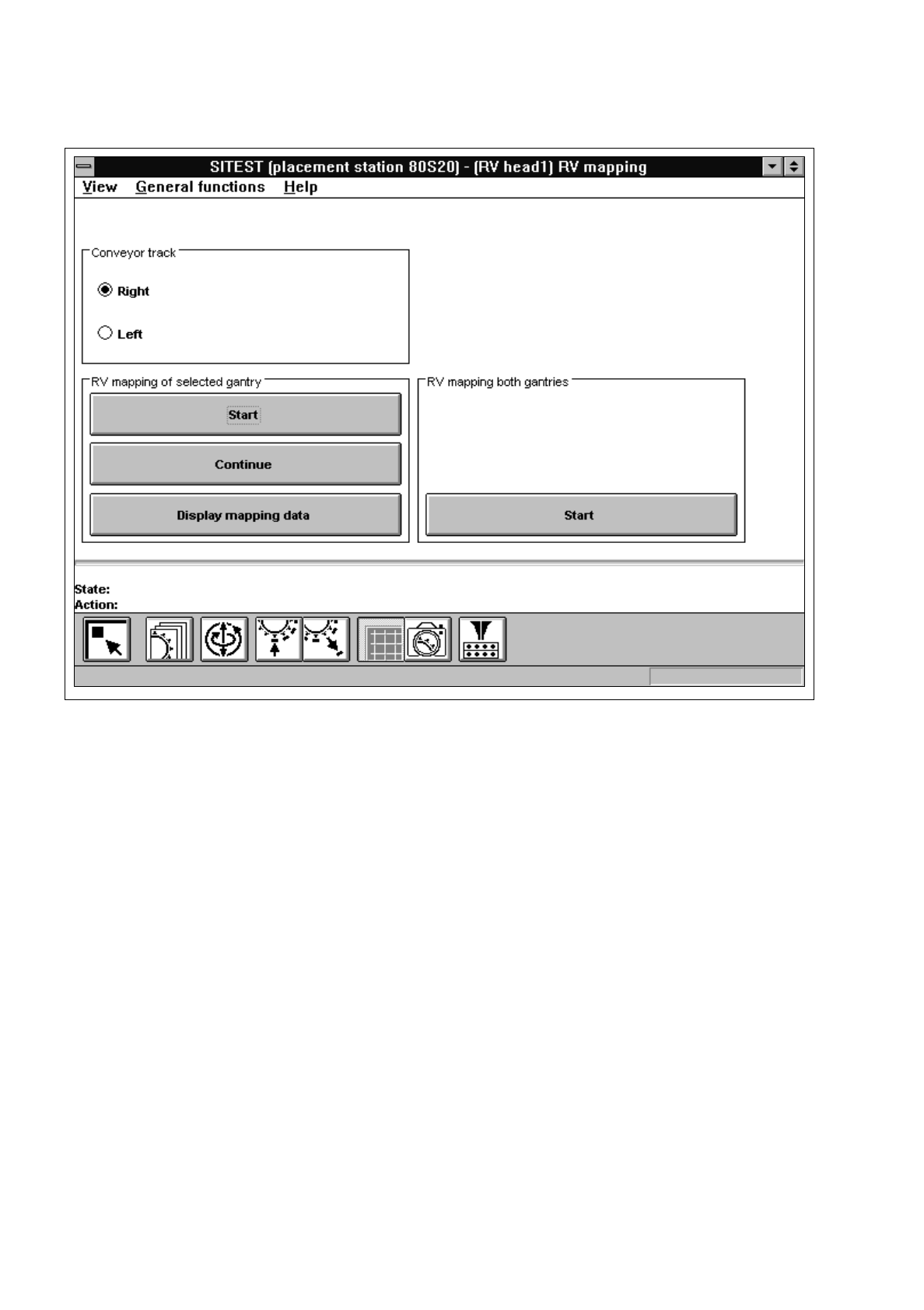
Fig. 4.3.1 "RV mapping" Display
The following functions are available in the "RV mapping" display:
–
Right to select the right conveyor track
–
Left to select the left conveyor track of a dual conveyor
–
Start to start the mapping run
(field "RV mapping of selected gantry")
–
Continue to continue mapping
–
Display mapping data to display the mapping data determined
–
Start to perform the mapping run for both gantries of the SIPLACE
(field "RV mapping both gantries")
80S-20 (switching from one gantry to the other is carried out auto-
matically. The mapping run is first carried out for gantry 1, then for
gantry 2).