00191021-02.pdf - 第61页
User’s Manual Test Program S ITEST 1 General Functions Software Version 403.xx Edition 12/97 1.10 Displaying Errors 1 - 25 1.10 Displaying Errors ● In the ma in vi ew clic k on the ico n to sw itch to the "Error&quo…

1 General Functions User’s Manual Test Program SITEST
1.9 In-/Output Functions Software Version 403.xx Edition 12/97
1 - 24
NOTE
Please note that a waiting time needs to be entered prior to the execution of the continuous run.
●
Click on the
Continuous run
button.
A dialog box for entering the waiting time opens.
●
Enter the desired waiting time and then start the continuous run by clicking on the
Start
button.
●
Terminate the continuous run by clicking on the
Cancel
button in the "Continuous run" dialog box.
User’s Manual Test Program SITEST 1 General Functions
Software Version 403.xx Edition 12/97 1.10 Displaying Errors
1 - 25
1.10 Displaying Errors
●
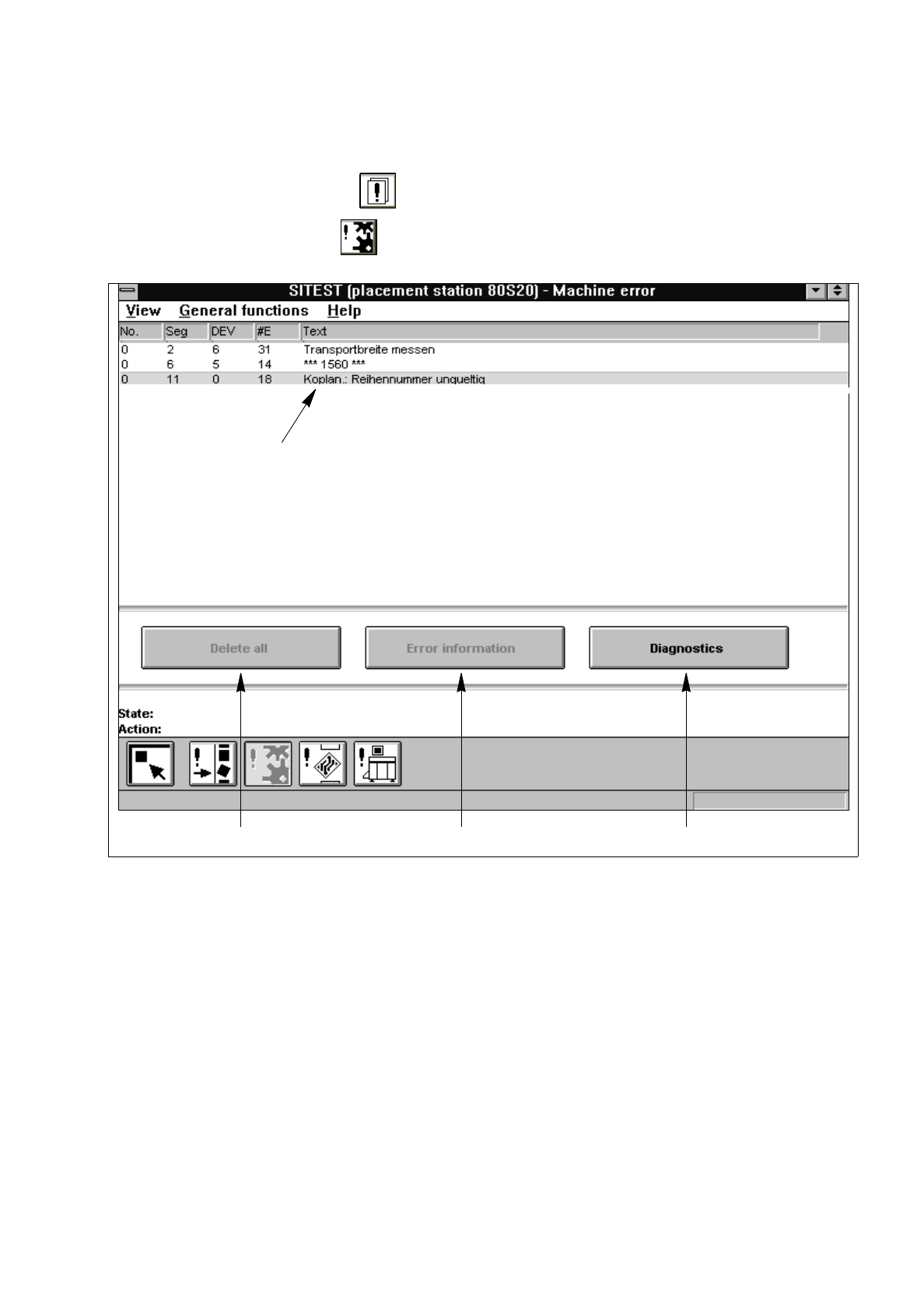
In the main view click on the icon to switch to the "Error" display (see Fig. 0.3.3).
●
Click, for example, on the icon to obtain a listing of the machine errors that have occurred.
Fig. 1.10.1 "Machine errors" Display
Legend pertaining to
Fig. 1.10.1
➀
Deletes all error messages from the current error display
➁
Starts the help system containing information on the cause and correction of the error currently selected
➂
Starts the system for diagnosing the error currently selected
➃
Selected error
●
Select an error by clicking on the appropriate line.
●
Click, for example, on the
Error information
button.
The user interface of the SIPLACE Information and Help System opens.
A help window displays the error description and correction instructions relating to the selected error.
●
More details on how to use the Information and Help System are contained in chap. 19 of the
SIPLACE 80S-20/F
4
User’s Manual.
➀
➁➂
➃

1 General Functions User’s Manual Test Program SITEST
1.10 Displaying Errors Software Version 403.xx Edition 12/97
1 - 26